The Problems of Embedded Python in Excel, or How to Excel in Pwning Pandas
Black Hat Asia 2025 · Day 2 · Briefings
Overview
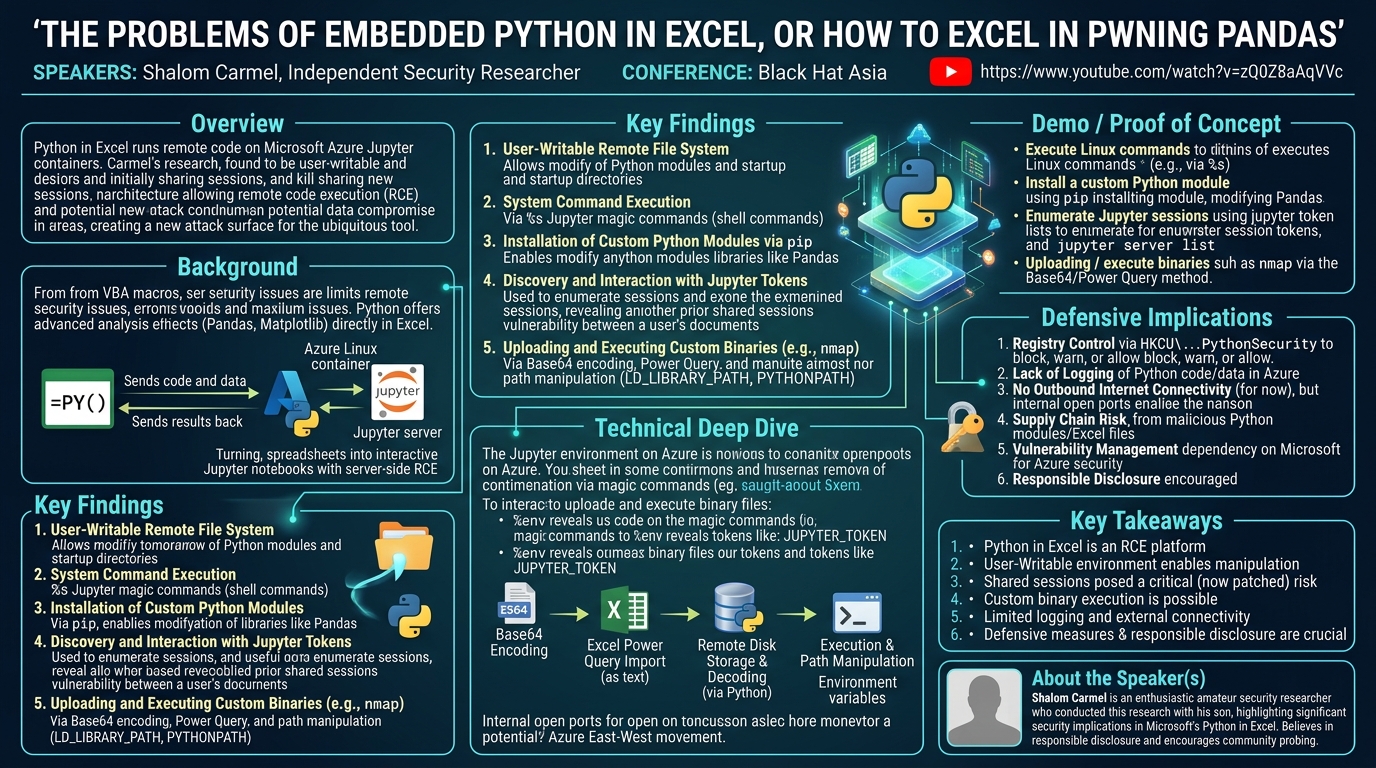
Shalom Carmel’s presentation, "The Problems of Embedded Python in Excel, or How to Excel in Pwning Pandas," delves into the unexpected security implications of Microsoft’s recent integration of Python into Excel for Office 365 users. Introduced approximately a year and a half prior to the talk, this feature allows users to embed Python code directly within Excel spreadsheets, with execution handled remotely on Microsoft's Azure infrastructure. While designed to empower data analysts with advanced capabilities beyond VBA, Carmel's research, conducted with his son, uncovered several critical vulnerabilities and design choices that could be exploited for remote code execution (RCE) and potentially impact the confidentiality and integrity of user data.
Key moments
- 0:40 Core vulnerability: Python code runs in shared sessions.
- 2:30 Talk agenda: Remote code execution & custom binaries.
- 4:30 Motivation: Python in Excel overcomes VBA limitations.
- 5:15 How Python code is written and executed in Excel.
- 7:20 Architecture: Data and code sent to Azure Jupyter.
- 9:00 Key insight: Excel Python functions as embedded Jupyter.
The Problems of Embedded Python in Excel, or How to Excel in Pwning Pandas
Speakers: Shalom Carmel, Independent Security Researcher
Conference: Black Hat Asia
YouTube: https://www.youtube.com/watch?v=zQ0Z8aAqVVc
Overview
Shalom Carmel’s presentation, "The Problems of Embedded Python in Excel, or How to Excel in Pwning Pandas," delves into the unexpected security implications of Microsoft’s recent integration of Python into Excel for Office 365 users. Introduced approximately a year and a half prior to the talk, this feature allows users to embed Python code directly within Excel spreadsheets, with execution handled remotely on Microsoft's Azure infrastructure. While designed to empower data analysts with advanced capabilities beyond VBA, Carmel's research, conducted with his son, uncovered several critical vulnerabilities and design choices that could be exploited for remote code execution (RCE) and potentially impact the confidentiality and integrity of user data.
The core of Carmel's findings revolves around the discovery that the Python execution environment, hosted within dedicated Jupyter containers on Azure Linux, is largely user-writable. This fundamental design choice, combined with the potential for shared Jupyter sessions (a vulnerability Microsoft claims to have patched coincidentally in February 2024, prior to Carmel's disclosure), opens avenues for attackers to manipulate the runtime, install custom modules, execute arbitrary system commands, and potentially interact with other users' sessions. The talk highlights that despite Microsoft's assurances of isolation, the underlying architecture of a remote code execution platform inherently introduces new security challenges that warrant careful consideration by both users and defenders.
This research is particularly significant because Excel is a ubiquitous tool, deeply embedded in enterprise environments globally. The introduction of Python, intended to be a secure replacement for the often-maligned VBA macros, inadvertently creates a new attack surface. Carmel's work serves as a crucial wake-up call, demonstrating that even features from trusted vendors require rigorous security scrutiny, especially when they involve remote execution environments. His findings underscore the need for organizations to understand these new risks and implement appropriate defensive measures, even as Microsoft continues to refine the feature's security posture.
Background
▶ Watch: Core vulnerability: Python code runs in shared sessions. (0:40)
The integration of Python into Microsoft Excel for Office 365 on Windows represents a significant shift in the spreadsheet's capabilities. Historically, VBA (Visual Basic for Applications) has been the primary scripting language for automating tasks and extending Excel's functionality. However, VBA has notable limitations, particularly in advanced data analysis, visualization, and integration with modern data science libraries. Moreover, VBA macros have long been a significant security concern, frequently exploited by attackers for malware delivery and execution, leading many organizations to disable them by default.
Microsoft's introduction of Python aims to address these shortcomings, offering data analysts a powerful, industry-standard language with access to rich libraries like Pandas for complex data manipulation and Matplotlib for sophisticated visualizations. This innovation allows users to perform advanced analytics directly within Excel, bypassing the need to export data to external Python environments. The design, however, places the Python execution not on the user's local machine, but on Microsoft Azure.
The architecture works as follows: when a user enters a =PY() formula in an Excel cell, the Python code, along with any referenced Excel data (cells, ranges, named ranges, or tables), is transmitted over the network to Microsoft's cloud infrastructure. This data and code are then processed within a dedicated container running on Azure Linux, which hosts a Jupyter server. The results—which can be anything from single values to complex Pandas DataFrames—are then sent back to the user's Excel spreadsheet. Microsoft initially touted this as a secure, isolated environment, emphasizing that Python code cannot interact with VBA or access the local file system. Essentially, each Excel spreadsheet becomes a large, interactive Jupyter notebook, with cells acting as execution units and supporting Jupyter magic commands. This server-side execution model, while offering powerful computational resources, inherently transforms Excel into a remote code execution platform, a detail with profound security implications.
Key Findings
▶ Watch: Motivation: Python in Excel overcomes VBA limitations. (4:30)
Shalom Carmel's research revealed several critical findings that challenge the initial perception of Python in Excel as an entirely secure and isolated environment.
- User-Writable Remote File System: A primary discovery was that almost the entire file system within the Azure-hosted Python container is user-writable. This includes crucial directories such as those containing Python modules and the Jupyter startup directory. This means that an attacker can modify the runtime environment, inject malicious code into existing libraries (like Pandas), or even set up persistent backdoors that could affect subsequent sessions.
- System Command Execution via Jupyter Magic Commands: The Jupyter environment supports magic commands, specifically the
%scommand, which allows direct execution of Linux shell commands within the Python interpreter. While basic networking tools likeping,dig,nmap, andnetcatare intentionally absent, essential utilities likecurl,pip,rpm,tar,unzip, andzipare present. This capability enables an attacker to perform reconnaissance, manage files, and install custom software. - Installation of Custom Python Modules: Leveraging the user-writable file system and the
pipcommand, Carmel demonstrated the ability to install custom Python modules. This was achieved by creating a minimal installable package and usingpipto install it into the remote environment. He further proved this by successfully adding a custom variable (fubar) to the standardpandasmodule, illustrating the potential for malicious modification or data exfiltration via compromised libraries. - Discovery and Interaction with Jupyter Tokens and Sessions: The environment variables expose a Jupyter token, which is crucial for interacting with the Jupyter server. Carmel showed that this token could be used to enumerate other active Jupyter sessions on the same container. This led to the discovery of a critical vulnerability: prior to February 2024, different Excel documents from the same user could share the same Jupyter session. This meant that if a user accessed sensitive data in one spreadsheet and then opened another, an attacker controlling the second spreadsheet (or a malicious module installed in the shared session) could potentially access or exfiltrate data from the first. Although Microsoft claims to have patched this in February, the existence of multiple sessions visible via
jupyter server liststill raises questions about true isolation. - Uploading and Executing Custom Binaries: Carmel devised a method to upload and execute arbitrary binary files (e.g.,
nmap) into the Azure container. This involves encoding the binary as a Base64 string, importing it into Excel via Power Query (to bypass Excel's interpretation of characters like+as formulas), saving the Base64 text to a remote disk file, decoding it back into a binary, and then executing it. Crucially, the process also involves manipulating environment variables likeLD_LIBRARY_PATH(for shared library dependencies) andPYTHONPATH(for Python modules) to ensure the uploaded binaries and their dependencies are correctly located and executed.
These findings collectively paint a picture of a powerful, yet potentially vulnerable, remote execution environment that requires careful management and security considerations.
Technical Deep Dive
▶ Watch: How Python code is written and executed in Excel. (5:15)
The technical underpinnings of Python in Excel are rooted in its operation as a sophisticated Jupyter environment hosted on Azure Linux. When a user inputs a formula like =PY("import pandas as pd; df = pd.DataFrame({'col1': [1,2], 'col2': [3,4]}); print(df)"), the code and any referenced Excel data are serialized and sent to Microsoft's cloud. The execution occurs within a containerized environment, specifically designed to run Python using standard libraries.
A key vector for interaction and potential exploitation is the direct support for Jupyter magic commands. These special commands, prefixed with % or %%, allow users to control the Jupyter kernel and its environment. Carmel demonstrated the use of %s to execute shell commands directly. For instance, %s ls -la / would list the root directory of the remote Linux file system. While the environment is stripped of common offensive tools like nmap or netcat, essential utilities like curl, pip, rpm, tar, unzip, and zip are available, providing a surprising degree of control.
Further reconnaissance can be performed using magic commands like %env, which reveals environment variables, or by listing installed Python libraries. The output of %env is particularly revealing, as it often contains tantalizing hints about the underlying infrastructure and, critically, the Jupyter token. This token is not just an identifier; it's an authentication credential that can be used to communicate directly with the local Jupyter server. Carmel showed that the token is often found in JP_SERVER_71.json or as the JUPYTER_TOKEN environment variable. With this token, an attacker could potentially enumerate other active sessions on the same server, inspect their status, and even execute code within them.
The most significant technical finding regarding persistence and environment manipulation is the user-writable nature of the remote file system. Carmel identified several critical directories where users have write permissions:
/usr/local/lib/python3.x/dist-packages/(or similar): This is where Python modules are typically installed. Having write access here means an attacker can modify existing, legitimate Python libraries (e.g., Pandas) or install new, malicious ones.- The Jupyter startup directory: Modifications here could lead to code execution whenever a new Jupyter session starts, potentially affecting other users if sessions are shared.
- Jupyter connection files: These files, often found in directories like
/home/jupyter/.local/share/jupyter/runtime/, contain session information and, as noted, the Jupyter token. Their writability could allow for session hijacking or manipulation.
To exploit this, Carmel demonstrated the installation of a custom Python module using pip. He crafted a minimal setup.py file and bundled it into a simple package. By using %s pip install . within the user-writable environment, he successfully installed his custom module. This proof-of-concept involved modifying the standard pandas module to include a custom variable, illustrating how an attacker could inject code to intercept or exfiltrate data processed by Pandas.
The ability to upload and execute arbitrary binaries is another advanced technique. This process involves several steps:
- Base64 Encoding: The desired binary (e.g.,
nmapfrom a WSL environment) is first encoded into a Base64 string. - Excel Power Query Import: Directly pasting Base64 strings into Excel cells can fail if the string contains characters like
+, which Excel interprets as a formula. To circumvent this, the Base64 encoded string is imported into a named range within Excel using Power Query. This ensures the string is treated as raw text. - Remote Disk Storage and Decoding: Python code within Excel reads the Base64 string from the named range, saves it as a text file on the remote container's file system, and then decodes it back into its original binary format.
- Execution and Path Manipulation: For the uploaded binary to execute and find its dependencies, the environment variables
PATH,LD_LIBRARY_PATH(for dynamic linker to find shared libraries), andPYTHONPATH(for Python modules) must be adjusted. This ensures the system knows where to locate the newly uploaded executables and any custom libraries. Carmel mentioned a script on GitHub that bundles binaries and their dependencies into a single zip file, which can then be uploaded and extracted, simplifying this process.
While the Azure instances are strictly firewalled from accessing the external internet (no outbound connections for DNS, ICMP, TCP), Carmel noted that running nmap on the local container reveals other open ports beyond the Jupyter default (8888). These ports likely relate to Microsoft's internal control plane for managing the containers, representing a potential avenue for further research into East-West movement within the Azure infrastructure.
Demo / Proof of Concept
▶ Watch: Architecture: Data and code sent to Azure Jupyter. (7:20)
While the transcript doesn't detail a full live demonstration in real-time, Shalom Carmel clearly outlines and refers to several proof-of-concept capabilities he developed and tested. These demonstrations highlight the practical implications of his findings:
- Executing Linux Shell Commands: Carmel demonstrated the ability to execute arbitrary Linux commands directly from an Excel cell using the
%sJupyter magic command. He explicitly stated, "I will show you this in the demo," referring to simple commands that confirm the environment's nature and the presence of utilities likecurlorpip. This capability is foundational, proving that the user has shell access within the remote container. - Installing Custom Python Modules: A significant proof-of-concept involved installing a custom Python module using
pipwithin the remote Azure environment. Carmel explained how he wrote a minimal Python module, packaged it, and then used a bash script (executed via%s) to install it. He then confirmed its successful installation and went a step further, demonstrating how he could modify the standard Pandas module by adding a new variable (e.g.,fubar) to it. This illustrates how an attacker could inject malicious code into commonly used data science libraries to exfiltrate or tamper with data as it is processed. He stated, "I was able to do use this trick to completely to not completely but to modify to add all kinds of stuff to the standard pandas module." - Enumerating Jupyter Sessions: Carmel showed how to use the exposed Jupyter token and commands like
jupyter server listto discover other active Jupyter sessions running on the same container. He presented actual output from his tests, showing multiple sessions with different activity times, underscoring the potential for shared resource exploitation. This directly supported his discussion of the pre-February 2024 vulnerability where sessions from the same user across different documents could be shared. - Uploading and Recreating Binary Files: Although not fully demonstrated live due to time constraints, Carmel meticulously detailed the methodology for uploading and executing arbitrary binary files, such as
nmap. He explained the multi-step process:
- Base64 encoding the binary.
- Importing the Base64 string into Excel via Power Query to avoid parsing issues.
- Using Python code to save the Base64 string to a file on the remote disk.
- Decoding the file back into its original binary format.
- Setting environment variables like
LD_LIBRARY_PATHandPYTHONPATHto ensure the system can locate and execute the uploaded binary and its dependencies.
He mentioned a handy script on GitHub that streamlines the packaging of binaries with their dependencies for this purpose, demonstrating a complete, actionable proof-of-concept for introducing and running custom tools within the Microsoft-controlled environment.
These demonstrations, whether shown live or detailed as actionable methodologies, collectively validate Carmel's claims about the extensive control users can gain over the Python in Excel runtime, far beyond what Microsoft likely intended for a "secure" data analysis environment.
Defensive Implications
▶ Watch: Key insight: Excel Python functions as embedded Jupyter. (9:00)
The findings presented by Shalom Carmel carry significant implications for organizations utilizing Microsoft Excel with Python, particularly those handling sensitive data. Defenders need to understand that Python in Excel, by design, is a remote code execution platform, and as such, introduces a new attack surface.
- Registry Control for Python Execution: Microsoft provides a mechanism to control Python execution via the Windows Registry. Defenders can manage the behavior of Python in Excel through the key
HKCU\Software\Microsoft\Office\16.0\Excel\Security\PythonSecurity. Options include blocking Python execution entirely, warning users before execution, or allowing it by default. For environments with strict security requirements, outright blocking or implementing a warning policy is advisable until the organization fully assesses the risks and establishes compensating controls. - Lack of Logging: A critical defensive challenge is the absence of detailed execution logging. Microsoft confirmed that they do not log the content of Python code or data processed within the Azure containers, citing privacy concerns. This means that if an attacker successfully executes malicious Python code or exfiltrates data, there will be no forensic trail within Microsoft's logs to indicate what happened. Defenders must rely on endpoint detection and response (EDR) solutions on user workstations (though the Python execution is remote) and network monitoring for unusual outbound connections (which are currently blocked from the Azure container). The lack of logging necessitates a proactive approach to prevent exploitation rather than relying on detection after the fact.
- No Outbound Internet Connectivity (for now): While the Azure Python instances are currently blocked from accessing the external internet (no DNS, ICMP, or TCP connections), this is a crucial security control. Defenders should monitor for any changes to this policy or for methods to bypass this restriction, as direct internet access would significantly amplify the risk of data exfiltration and command-and-control communication. Carmel's discovery of open ports related to Microsoft's internal control plane suggests potential East-West movement within the Azure infrastructure, which could be a future research area for attackers.
- Supply Chain Risk for Python Modules: The ability to install custom Python modules or modify existing ones (like Pandas) introduces a software supply chain risk. If an attacker can trick a user into opening a malicious Excel file, they could inject code that compromises the integrity of data processing or exfiltrates information. Organizations should educate users about the dangers of opening untrusted Excel files, similar to the long-standing advice regarding VBA macros.
- Vulnerability Management of Microsoft's Cloud Infrastructure: While most of the exploits leverage the intended functionality of the Jupyter environment, the possibility of container breakout or connecting to other users' sessions (even if patched) remains a concern. Defenders must rely on Microsoft to secure its underlying Azure infrastructure and promptly patch any vulnerabilities that could allow for escalation beyond the intended container boundaries.
- Responsible Disclosure and Community Engagement: Carmel emphasized the importance of responsible disclosure and encouraged researchers to continue probing the security of Python in Excel. Organizations should stay informed about new research and vulnerabilities, as this is an evolving area. Microsoft's stance, "feel free to break it, just let us know," indicates an openness to community findings, which can ultimately lead to a more secure product.
In summary, organizations must recognize Python in Excel as a powerful but potentially risky feature. Implementing strong user education, leveraging available registry controls, and staying abreast of security research are paramount to mitigating the risks associated with this new capability.
Key Takeaways
- Python in Excel is a Remote Code Execution Platform: The feature fundamentally transforms Excel into an RCE platform, with Python code and data processed on Microsoft's Azure cloud within Jupyter containers. This introduces a new attack surface distinct from traditional Excel macro vulnerabilities.
- User-Writable Environment Enables Manipulation: The remote Python file system is largely user-writable, allowing attackers to install custom Python modules, modify existing libraries (e.g., Pandas), and execute arbitrary Linux shell commands (
%smagic command), offering significant control over the execution environment. - Shared Sessions Posed a Critical Risk: Prior to a February 2024 patch, different Excel documents from the same user could share the same Jupyter session, creating a vulnerability where malicious code in one document could potentially access or manipulate data from another. While patched, the presence of multiple visible sessions warrants continued scrutiny.
- Custom Binary Upload and Execution is Possible: Researchers can upload and execute arbitrary binaries (e.g.,
nmap) by encoding them in Base64, importing via Power Query, and then decoding and executing them within the Azure container, requiring manipulation ofLD_LIBRARY_PATHandPYTHONPATH. - Limited Logging and External Connectivity: Microsoft's Python in Excel environment currently lacks detailed logging of executed code/data due to privacy concerns, making forensic analysis difficult. While outbound internet connectivity is blocked, the presence of internal open ports suggests potential for East-West movement within Azure.
- Defensive Measures and Responsible Disclosure are Crucial: Organizations can control Python execution via registry settings. The research highlights that new technologies, even from trusted vendors, introduce new security challenges, emphasizing the need for continuous security research, responsible disclosure, and user education regarding the risks of untrusted Excel files.
About the Speaker(s)
Shalom Carmel is an enthusiastic amateur security researcher who conducted the presented research alongside his son. While not a professional in the security field, his curiosity and dedication led to the discovery of significant security implications within Microsoft's Python in Excel feature. His work demonstrates that valuable security insights can come from individuals driven by a passion for understanding and breaking technology. He believes in responsible disclosure and encourages others to explore and report vulnerabilities.
Reviews
Dr. Zero (Offensive Security Researcher) — MUST SEE
Shalom Carmel’s research on Python in Excel is a critical deep-dive into the security implications of Microsoft's new cloud-backed execution environment. He meticulously uncovered several significant vulnerabilities, including a user-writable remote file system, arbitrary Linux shell command execution via Jupyter magic commands, and a multi-stage technique for uploading and executing custom binaries. His findings demonstrated how this ubiquitous productivity tool has inadvertently become a potent remote code execution platform, exposing enterprises to novel attack vectors and underscoring the severe lack of forensic logging, demanding immediate attention from defenders.
Heather Calloway (CISO) — MUST SEE
This research from Shalom Carmel is a critical examination of Microsoft's Python in Excel feature, revealing it to be a new remote code execution platform with significant enterprise risk. The findings expose a user-writable execution environment, the ability to execute system commands and custom binaries, and a concerning lack of logging, fundamentally altering the threat model for a ubiquitous business tool. This is not merely a technical vulnerability; it is a governance challenge that demands immediate executive attention and a re-evaluation of data security policies, making it essential viewing for every CISO and board member.