Invisible Ink: Privacy Risks of CSS in Browsers and Emails
Black Hat Asia 2025 · Day 2 · Briefings
Overview
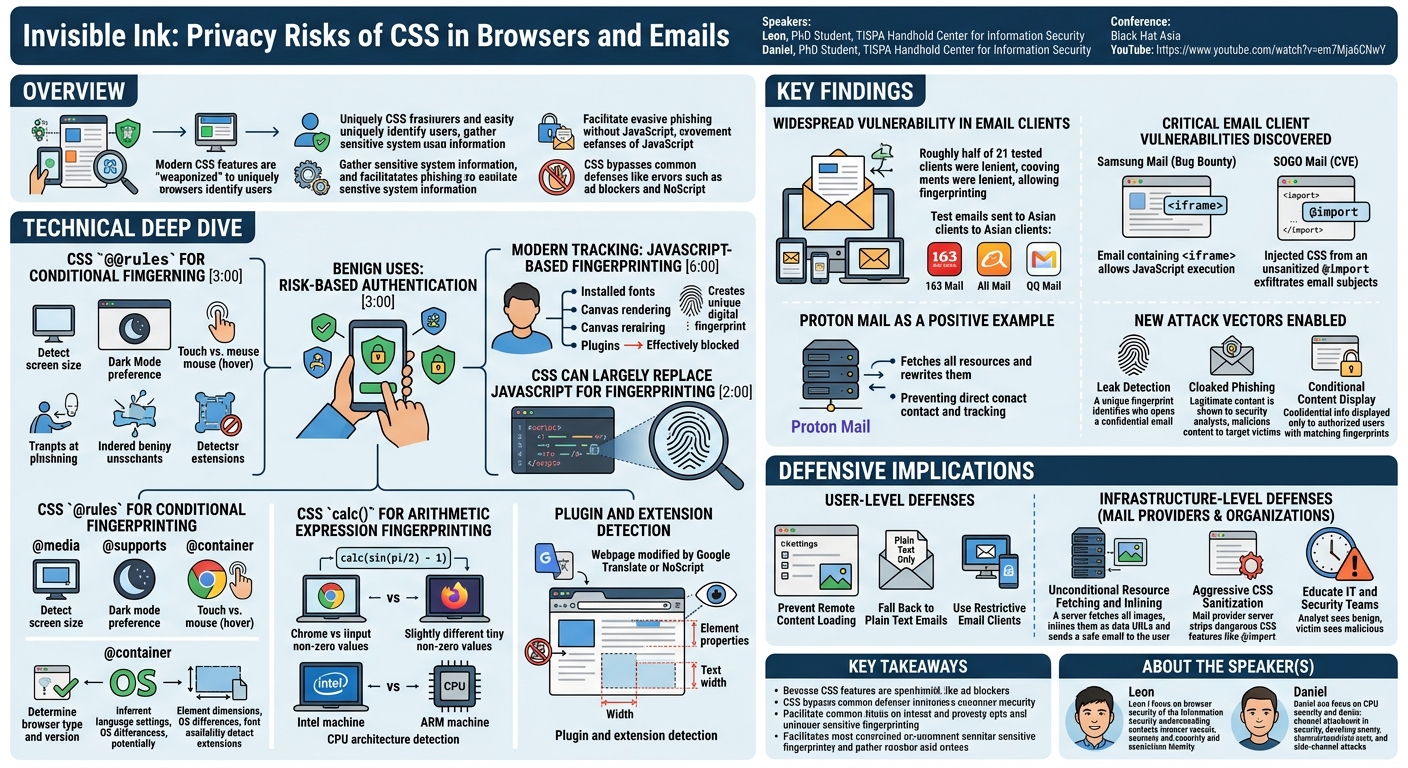
In "Invisible Ink: Privacy Risks of CSS in Browsers and Emails," Leon and Daniel from the TISPA Handhold Center for Information Security unveil a sophisticated and often overlooked vector for user tracking and targeted attacks: CSS-based browser and email client fingerprinting. The talk meticulously demonstrates how modern Cascading Style Sheets (CSS), traditionally used for website styling, can be weaponized to uniquely identify users, gather sensitive system information, and even facilitate highly evasive phishing campaigns, all without relying on JavaScript. This research is particularly significant because it bypasses common privacy defenses like ad blockers and NoScript, which primarily target JavaScript-based tracking.
Key moments
- 0:00 Introduction: CSS privacy risks in browsers and emails
- 1:00 Practical application: Detecting email leaks with CSS
- 2:00 Defining browser fingerprinting and its purpose
- 3:00 Benign uses: Risk-based authentication
- 4:00 Malicious uses: Targeted ads and malware evasion
- 6:00 Modern tracking: JavaScript-based browser fingerprinting
Invisible Ink: Privacy Risks of CSS in Browsers and Emails
Speakers: Leon, PhD Student, TISPA Handhold Center for Information Security; Daniel, PhD Student, TISPA Handhold Center for Information Security
Conference: Black Hat Asia
YouTube: https://www.youtube.com/watch?v=em7Mja6CNwY
Overview
In "Invisible Ink: Privacy Risks of CSS in Browsers and Emails," Leon and Daniel from the TISPA Handhold Center for Information Security unveil a sophisticated and often overlooked vector for user tracking and targeted attacks: CSS-based browser and email client fingerprinting. The talk meticulously demonstrates how modern Cascading Style Sheets (CSS), traditionally used for website styling, can be weaponized to uniquely identify users, gather sensitive system information, and even facilitate highly evasive phishing campaigns, all without relying on JavaScript. This research is particularly significant because it bypasses common privacy defenses like ad blockers and NoScript, which primarily target JavaScript-based tracking.
The speakers highlight that while JavaScript-based fingerprinting is a well-understood threat, its reliance on scripting languages makes it vulnerable to blocking. Their work reveals that CSS, with its increasingly powerful features, can achieve comparable levels of granularity and uniqueness in fingerprinting. This capability extends beyond web browsers into email clients, a domain where JavaScript is typically disabled for security reasons, opening up new avenues for persistent tracking, leak detection, and cloaked spear-phishing attacks that are exceptionally difficult to detect by security professionals.
The implications of "Invisible Ink" are profound for both users and security practitioners. It challenges existing assumptions about client-side security, particularly in the context of email. The presentation not only details the technical mechanisms behind CSS fingerprinting but also explores practical applications, defensive strategies, and even uncovers critical vulnerabilities in popular email clients. This research underscores the need for a re-evaluation of how CSS features are handled across web and email platforms to safeguard user privacy.
Background
▶ Watch: Introduction: CSS privacy risks in browsers and emails (0:00)
The motivation for user identification on the web, commonly known as fingerprinting, stems from various needs, both benign and malicious. On the positive side, fingerprinting can enhance security through risk-based authentication, where unusual browser fingerprints trigger additional verification steps, such as multi-factor authentication, to protect user accounts from compromise. However, the more prevalent use, and the primary concern for privacy advocates, is targeted advertising and covert tracking. Advertisers leverage unique user fingerprints to link browsing behavior across sessions and devices, building detailed profiles for personalized content delivery. Malicious actors, on the other hand, can use fingerprinting to obfuscate their intent, serving malware only to specific victim profiles while presenting benign content to security researchers or law enforcement, thus evading detection.
Early forms of fingerprinting relied on easily accessible metadata like IP address, user agent string, and language preferences. However, these methods suffer from low entropy, meaning they often fail to uniquely identify individual users, especially in shared network environments (e.g., multiple users on the same Wi-Fi). Furthermore, such information is relatively easy to spoof, rendering it unreliable for persistent tracking.
The evolution of tracking led to JavaScript-based browser fingerprinting, which significantly increased the entropy and uniqueness of user identification. JavaScript, executed on the client side, allows trackers to query a vast array of system and browser properties. Common techniques include enumerating installed fonts (e.g., detecting Microsoft Office by specific fonts like "Jill Sands"), analyzing subtle differences in canvas rendering across operating systems (e.g., variations in emoji rendering or text thickness between macOS and Linux), and inspecting browser plugin lists. These combined data points can create a highly unique "fingerprint" for almost every user.
Despite its effectiveness, JavaScript-based fingerprinting has a critical limitation: it relies on JavaScript execution. Privacy-conscious users and tools often disable JavaScript entirely (e.g., NoScript plugin, Tor Browser with higher security settings) or restrict its capabilities. Crucially, HTML emails, rendered by email clients, almost universally block JavaScript execution due to historical security concerns. This gap presented a challenge for trackers, leading the researchers to investigate if the same principles could be applied using CSS (Cascading Style Sheets). CSS, the language used to style HTML documents, offers a rich set of features that have evolved significantly over the years, including built-in functions like calc() for arithmetic expressions and @rules for conditional styling (e.g., @media queries based on screen dimensions), which form the foundation of their CSS-based fingerprinting techniques.
Key Findings
▶ Watch: Defining browser fingerprinting and its purpose (2:00)
The research presented in "Invisible Ink" reveals several critical findings concerning the capabilities of CSS for privacy-invasive fingerprinting and its implications for both web and email security:
- CSS Can Largely Replace JavaScript for Fingerprinting: The core finding is that modern CSS features alone can achieve highly advanced and unique browser fingerprinting, effectively bypassing traditional JavaScript blocking mechanisms. This includes querying system information (browser, OS, versions), hardware details (screen dimensions, CPU architecture), user preferences (language, installed fonts), and even detecting browser extensions/plugins.
- Widespread Vulnerability in Email Clients: Despite JavaScript being blocked, a significant number of email clients are vulnerable to CSS-based fingerprinting. The researchers conducted an extensive analysis, sending 2,100 test emails to 21 different email clients (webmail, desktop, mobile), including Asian clients like 163 Mail, Ali Mail, and QQ Mail. They found that roughly half of all tested clients were "lenient," allowing arbitrary CSS fingerprinting techniques, including powerful
@containerqueries. Almost all clients allowed at least some form of fingerprinting, such as querying screen size via@mediarules. The lack of a universal standard for HTML email rendering means each client supports a vastly different feature set, creating a complex attack surface.
- Discovery of Critical Email Client Vulnerabilities:
- Samsung Mail JavaScript Execution (Bug Bounty): The researchers discovered that Samsung Mail allowed the inclusion of an
<iframe>element within an email, which could then execute arbitrary JavaScript code. While sandboxed within the iframe, this still enabled all traditional JavaScript-based fingerprinting techniques. This vulnerability was disclosed to Samsung Mail, resulting in a bug bounty. - SOGO Mail Client-Wide CSS Injection (CVE): In SOGO Mail, a critical vulnerability was found where the
@importstatement in CSS was not properly sanitized. This allowed an attacker to inject CSS that affected the entire mail client interface, not just the email content. By chaining this with conditional styling based on the first letter of visible email subjects, the attackers could exfiltrate the full subjects of all emails visible to the user. This severe bug was reported and awarded a CVE, and has since been fixed.
- Proton Mail as a Positive Example: In contrast to the vulnerabilities found, Proton Mail was highlighted as a secure example. Their mail servers unconditionally fetch all potential remote resources (e.g., different image sizes for
@mediaqueries) and then rewrite their URLs todata:URLs before sending the email to the user. This proactive measure ensures that the user's client never directly contacts the attacker's server, effectively preventing any resource-loading-based tracking or fingerprinting.
- New Attack Vectors Enabled by CSS Fingerprinting: The research demonstrates practical applications for CSS fingerprinting beyond mere tracking:
- Leak Detection: By embedding a unique CSS fingerprinting payload, an email sender can detect if a confidential email sent to a specific recipient (e.g., Alice) is subsequently opened by an unauthorized party (e.g., Charlie), as their fingerprint would differ.
- Cloaked Phishing: Attackers can craft emails that appear as legitimate content to security analysts or IT departments (due to their specific fingerprint) but display malicious phishing content only to the intended victim profile.
- Conditional Content Display: Confidential information can be displayed only to users with a matching fingerprint, while others see benign or empty content, without requiring any exfiltration to an external server.
Technical Deep Dive
▶ Watch: Benign uses: Risk-based authentication (3:00)
The core of CSS-based fingerprinting lies in leveraging advanced CSS features, originally intended for responsive design and styling, in unintended ways to extract unique client-side information. The speakers meticulously break down several key CSS mechanisms that enable this.
CSS @rules for Conditional Fingerprinting
@media Queries: This well-known CSS feature allows styles to be applied conditionally based on device characteristics. While primarily used for responsive web design, it can be abused for fingerprinting:
- Screen Dimensions:
@mediaqueries can accurately determine the user's screen width and height. By using a series of increasingly specific@mediarules (e.g.,min-width: 720px,min-width: 721px, etc.), an attacker can pinpoint the exact screen dimensions. When combined with conditional resource loading (e.g., fetchinglarge.pngfor wide screens,small.pngfor narrow screens), the server can infer the screen size based on which resource is requested. - User Preferences:
@mediaqueries can also detect user preferences, such as dark mode (prefers-color-scheme: dark) or light mode. - Touch Device Detection: The
hovermedia feature (@media (hover: hover)) can determine if a device supports hovering (i.e., is not a touch-only device), providing an indication of the device type.
These capabilities provide a rich set of device information and user preferences.
@supports Rule: This rule allows developers to conditionally apply styles based on whether a specific CSS feature or property value is supported by the browser. This is invaluable for detecting browser type and version:
- Browser Identification: Certain CSS properties are vendor-prefixed or unique to specific browser engines. For example, a property like
-moz-propertywould only be supported in Firefox-based browsers. Detecting its support can identify the browser engine. - Version Detection: As browsers evolve, they incrementally add support for new CSS features. By testing for the availability of specific, newly introduced CSS features, an attacker can accurately determine the browser's version.
@container Rule: A relatively new addition to CSS, @container queries allow elements to style themselves based on the size of their parent container, rather than the viewport. This provides a powerful primitive for measuring the rendered width of specific elements, which is crucial for several fingerprinting techniques:
- Language Settings: Different languages often have varying word lengths. For example, the English phrase "File Picker" is shorter than its German equivalent. By placing such text within an element and using
@containerqueries to measure its rendered width, an attacker can infer the user's language settings. This is highly unique for most languages. - Browser and Operating System Differences: Default browser elements (e.g., form controls, buttons) can render with subtle proportional differences across operating systems (e.g., macOS vs. Windows) or even different browser engines to match the native look and feel.
@containercan detect these width variations. - Font Availability: The presence or absence of a specific font on a user's system significantly impacts the rendered width of text. By specifying a non-standard font (e.g., "Impact" vs. "Monza") and measuring the text's width using
@container, an attacker can determine if that font is installed. This indirectly reveals installed applications (e.g., Microsoft Office installs unique fonts). - Future Implications: The
@containerrule is evolving to include arbitrary style queries, which could allow checking for an element's color or other computed styles. This could enable even more granular fingerprinting, potentially even detecting browser extensions that modify element styles.
CSS calc() for Arithmetic Expression Fingerprinting
The calc() function, designed for performing arithmetic operations within CSS values, can be exploited due to subtle differences in how browser engines handle floating-point arithmetic, trigonometric functions, and rounding:
- Browser Differentiation: An expression like
calc(sin(pi/2) - 1)should mathematically evaluate to zero. However, due to variations in the approximation ofpi,sin(), and floating-point rounding, different browsers (e.g., Chrome vs. Firefox) can return slightly different non-zero values. This allows attackers to differentiate between browser engines. - Hardware Differentiation: Even with the same browser, the underlying hardware architecture can influence floating-point calculations. The speakers demonstrated that the same
calc()expression could yield different results on an Intel machine versus an ARM-based MacBook, allowing for CPU architecture detection.
Plugin and Extension Detection
Browser extensions and built-in plugins (like Google Translate) often modify the content or structure of a webpage to provide their functionality. These modifications can be detected using CSS:
- Content Modification: When Google Translate translates a page, it replaces text within HTML elements. The translated text often has a different character count and, crucially, a different rendered width. For example, "cyber security" in English (13 characters) might become a much shorter phrase in Chinese (4 characters). By measuring the width of a known text string, CSS can detect if translation occurred and even infer the target language.
- Structural Modification: Extensions like NoScript might replace a blocked video element with a placeholder image or modify its display properties. These structural changes, such as an element's
displayproperty or its computedwidth/height, can be detected and used for fingerprinting.
In summary, CSS provides a rich, often underestimated, toolkit for extracting a wide range of system, hardware, user, and application-specific information, comparable to, and in some cases surpassing, the capabilities of JavaScript-based fingerprinting, all while evading common defenses.
Demo / Proof of Concept
▶ Watch: Malicious uses: Targeted ads and malware evasion (4:00)
While a live demonstration wasn't explicitly described in the transcript, the speakers illustrated several compelling proof-of-concept applications for their CSS-based fingerprinting techniques, showcasing how these methods could be leveraged for both privacy-invasive and (potentially) security-enhancing purposes.
- Leak Detection: This was presented as a primary practical application. An attacker (Bob) sends a confidential email to a specific target (Alice). Embedded within the email is a CSS fingerprinting payload designed to detect Alice's unique browser and system characteristics. If Alice opens the email, her client's fingerprint is exfiltrated to Bob's server. If the email is subsequently forwarded or leaked to an unauthorized party (Charlie) who then opens it, Charlie's different fingerprint will be exfiltrated. Bob's server can then detect this mismatch, notifying Alice (or Bob) that the email has been leaked and opened by an unexpected recipient. This demonstrates the capability to track the propagation of sensitive information.
- Hidden Phishing Emails (Cloaked Spear Phishing): This represents a highly sophisticated and dangerous attack vector. An attacker can craft a single email that presents different content based on the recipient's CSS fingerprint. For example, if the recipient's fingerprint matches that of a typical "target" (e.g., a Microsoft PowerPoint user, identified by specific installed fonts or OS settings), the email displays a convincing phishing lure. However, if the fingerprint matches that of a security analyst or an IT department member (e.g., a Linux user, different fonts, specific browser extensions), the email displays completely benign, legitimate content. This allows attackers to bypass traditional spam filters and security reviews, as the malicious payload is only revealed to the intended victim, making detection extremely challenging.
- Conditional Confidential Information Hiding: This application does not require exfiltration to an external server, making it even harder to detect. An email can be designed such that its sensitive content is only displayed if the recipient's CSS fingerprint matches a predefined profile. If the fingerprint does not match, the email might display generic, irrelevant text or simply appear empty. This allows for highly targeted delivery of confidential messages, ensuring that only authorized individuals (whose systems generate the expected fingerprint) can view the actual content. This could be used by legitimate parties for secure communication, but also by malicious actors to ensure their hidden messages are only seen by conspirators.
These examples vividly illustrate the power and versatility of CSS fingerprinting, moving beyond passive tracking to enable active, conditional content delivery and detection mechanisms in both web and email contexts.
Defensive Implications
▶ Watch: Modern tracking: JavaScript-based browser fingerprinting (6:00)
The findings presented in "Invisible Ink" necessitate a multi-layered defensive strategy, addressing both user-level precautions and infrastructure-level mitigations by email providers and organizations.
User-Level Defenses
- Prevent Remote Content Loading: The most straightforward defense against fingerprinting that relies on resource exfiltration is to block all remote content loading in email clients. Many modern email clients offer this option, preventing the client from fetching images, stylesheets, or other resources from external servers. If the fingerprinting technique relies on the server detecting which conditional resource was loaded (e.g.,
large.pngvs.small.png), this mitigation is highly effective.
- Fall Back to Plain Text Emails: The ultimate defense is to configure email clients to display all incoming emails as plain text. This completely strips away all HTML and CSS styling, eliminating the attack surface for CSS fingerprinting. While highly effective for privacy, this approach significantly reduces the rich formatting and functionality expected in modern emails, making it impractical for many users.
- Use Restrictive Email Clients: Users should be aware that different email clients offer varying levels of protection. The research showed that some clients are more "lenient" (allowing advanced CSS features like
@containerqueries), while others are more "restrictive" (sanitizing or blocking more CSS features). Choosing a client known for its strong privacy and security posture, which restricts HTML/CSS capabilities, can significantly reduce exposure. Some clients also allow users to configure the level of HTML/CSS rendering.
- Be Aware of Client Choice: The talk emphasizes that the choice of email client directly impacts a user's privacy. Users should research their email client's security features and be mindful that even seemingly innocuous styling can be weaponized.
Infrastructure-Level Defenses (Mail Providers & Organizations)
- Unconditional Resource Fetching and Inlining (Proton Mail Model): Mail providers can adopt a proactive defense strategy similar to Proton Mail. This involves the mail server unconditionally fetching all possible remote resources that an email could theoretically load (e.g., all image variants defined in
@mediaqueries). These resources are then inlined into the email, typically asdata:URLs, and the original external URLs are rewritten. This ensures that the user's client never directly contacts the attacker's server, preventing any exfiltration based on conditional resource loading.
- Aggressive CSS Sanitization: Email providers need to implement more robust and comprehensive CSS sanitization. This goes beyond simply blocking JavaScript to actively stripping or rewriting dangerous CSS features that can be abused for fingerprinting. This includes, but is not limited to, disallowing
@importstatements (as exploited in SOGO Mail), restricting complexcalc()expressions, and carefully evaluating the security implications of advanced@media,@supports, and@containerqueries. The challenge here is balancing security with the desire to support rich HTML email functionality.
- Educate IT and Security Teams on Cloaked Attacks: For IT departments and security operations centers (SOCs) tasked with detecting spam and phishing, the research highlights a critical blind spot. Traditional methods of analyzing suspicious emails might fail if the email's content changes based on the analyst's fingerprint. Security teams must be aware that clever attackers can serve benign content to their monitoring systems while delivering malicious payloads to specific targets. This implies the need for diverse testing environments for email analysis, simulating various user fingerprints, to uncover cloaked threats.
The findings underscore that email security, traditionally focused on JavaScript and attachment-based threats, must now extend to a deeper understanding of CSS vulnerabilities. The lack of a single standard for HTML email rendering means that a fragmented and complex landscape of vulnerabilities will persist, requiring ongoing vigilance and adaptation from both users and service providers.
Key Takeaways
- CSS Alone Enables Advanced Fingerprinting: Modern CSS features, independent of JavaScript, can be leveraged for highly granular browser and system fingerprinting, challenging conventional privacy defenses.
- Email Clients Are Vulnerable: Despite JavaScript being blocked, a significant number of email clients allow CSS-based fingerprinting, creating new attack surfaces for tracking and targeted campaigns.
- Complex Mitigation Landscape: The absence of a universal standard for HTML email rendering leads to vastly different CSS feature support across clients, making a single, comprehensive mitigation strategy difficult to implement.
- New Attack Vectors Emerge: CSS fingerprinting facilitates novel malicious applications, including sophisticated leak detection, highly evasive cloaked phishing campaigns, and conditional content display without requiring external resource loading.
- Proactive Server-Side Defenses are Crucial: Mail providers can significantly enhance user privacy by unconditionally fetching and inlining all remote resources, as demonstrated by Proton Mail, to prevent exfiltration-based tracking.
- User Awareness and Client Choice Matter: Users must be aware of the privacy implications of their chosen email client and consider enabling features like remote content blocking or opting for more restrictive HTML rendering to protect themselves.
About the Speaker(s)
Leon is a PhD student at the TISPA Handhold Center for Information Security. His personal research focus is primarily on browser security, which aligns directly with the topic of this presentation exploring the privacy risks of CSS in web browsers.
Daniel is also a PhD student at the TISPA Handhold Center for Information Security. While his typical research focus is more on the lower-level side of things, specifically CPU security and side-channel attacks, he collaborated with Leon on this project, demonstrating his versatility in tackling various aspects of information security.
Reviews
Dr. Zero (Offensive Security Researcher) — MUST SEE
Leon and Daniel's "Invisible Ink" is a critical piece of technical research that meticulously exposes how modern CSS, often overlooked by traditional security tools, can be weaponized for advanced user fingerprinting and targeted attacks, especially within email clients. Their work not only details novel attack vectors like cloaked phishing and leak detection without JavaScript but also uncovers critical vulnerabilities in popular email clients. This talk is a wake-up call for both users and security professionals, demanding a fundamental re-evaluation of client-side security and email handling.
Heather Calloway (CISO) — MUST SEE
This research uncovers a critical, often overlooked attack surface: CSS-based fingerprinting in web browsers and, more alarmingly, email clients. By demonstrating how modern CSS features can bypass traditional JavaScript defenses to enable sophisticated user tracking, cloaked phishing, and leak detection, the speakers have exposed a significant governance and operational blind spot. This presentation provides actionable insights for security leaders and email service providers, demanding a re-evaluation of current email security assumptions and defensive strategies.