10 Things to Know Before You Work on Your Next M365 BEC
Ida Musheyev-Polishchuk (Senior Consultant · Strauss-Friedberg, an Aon company), Natasha Vij (Consultant · Strauss-Friedberg, an Aon company)
BSides NYC 2024 · Day 1 · Tech - Blue
Overview
In an insightful talk at BSides NYC, Ida Musheyev-Polishchuk and Natasha Vij, both from Strauss-Friedberg's Digital Forensics and Incident Response (DFIR) team, shed light on the intricacies of investigating Business Email Compromise (BEC) incidents within Microsoft 365 (M365) environments. Titled "10 Things to Know Before You Work on Your Next M365 BEC," their presentation provided a practical guide for cybersecurity analysts and incident responders, focusing on crucial steps and "low-hanging fruit" that can lead to quick wins in complex investigations. The speakers emphasized that while BECs can sometimes appear less complicated than other cyber incidents like ransomware, they often involve multiple compromised users and sophisticated persistence mechanisms, necessitating a structured and detailed approach.
Key moments
- 0:00 Introduction to M365 BEC investigations
- 1:30 Defining Business Email Compromise (BEC) and attack vectors
- 2:40 Understanding the implications of BEC attacks
- 4:10 Essential M365 log sources for BEC analysis
- 4:25 Unified Audit Log: The most comprehensive log
- 4:55 Mailbox Audit Log: Tracking threat actor actions
- 6:15 Message Trace Log: Analyzing email flow and delivery
- 6:40 Key M365 resources and portals (slide for reference)
10 Things to Know Before You Work on Your Next M365 BEC
Speakers: Ida Musheyev-Polishchuk (Senior Consultant, Strauss-Friedberg, an Aon company); Natasha Vij (Consultant, Strauss-Friedberg, an Aon company)
Conference: BSides NYC
YouTube: https://www.youtube.com/watch?v=lo-QSTg0czI
Overview
In an insightful talk at BSides NYC, Ida Musheyev-Polishchuk and Natasha Vij, both from Strauss-Friedberg's Digital Forensics and Incident Response (DFIR) team, shed light on the intricacies of investigating Business Email Compromise (BEC) incidents within Microsoft 365 (M365) environments. Titled "10 Things to Know Before You Work on Your Next M365 BEC," their presentation provided a practical guide for cybersecurity analysts and incident responders, focusing on crucial steps and "low-hanging fruit" that can lead to quick wins in complex investigations. The speakers emphasized that while BECs can sometimes appear less complicated than other cyber incidents like ransomware, they often involve multiple compromised users and sophisticated persistence mechanisms, necessitating a structured and detailed approach.
The core of the talk revolved around equipping attendees with actionable intelligence to efficiently detect, analyze, and respond to BEC attacks targeting M365. The speakers highlighted the significant implications of BECs, including substantial financial loss through wire fraud, extensive data theft (SharePoint files, Outlook mail items, user contacts, PII/PHI), severe reputational damage, and even serving as an initial foothold for broader network compromise. By outlining key log sources, common threat actor techniques, and essential investigative practices, Musheyev-Polishchuk and Vij aimed to empower defenders with the knowledge required to navigate these challenging incidents effectively and support organizations in their recovery efforts.
Background
▶ Watch: Introduction to M365 BEC investigations (0:00)
Business Email Compromise (BEC) is a pervasive cyber threat where adversaries infiltrate an email environment, specifically M365 in the context of this discussion, to cause disruption or financial harm. The initial compromise can occur through various vectors. Phishing and social engineering attempts are rampant, where threat actors craft deceptive emails to trick users into revealing credentials or clicking malicious links. Equally prevalent are compromises stemming from organizations failing to implement robust Multi-Factor Authentication (MFA) methods, such as FIDO2 authentication or token-based/code-based authentication, leaving accounts vulnerable to credential stuffing or simple password compromises. While less common, brute-forcing attempts can also lead to initial access.
Effective BEC investigations rely heavily on access to comprehensive logging within the M365 ecosystem. The speakers detailed five critical log sources:
- Unified Audit Log (UAL): Described as the most comprehensive log, the UAL records a vast array of user, group, application, domain, and directory activities across M365 services like SharePoint and OneDrive. It captures successful and failed user logins, file access, and various administrative actions, making it indispensable for a holistic investigation.
- Mailbox Audit Log: This log specifically tracks actions performed by mailbox owners, delegates, and administrators. Events such as mail item deletion, modification, or sending are recorded here, which are crucial for understanding threat actor activity within a compromised mailbox.
- Azure AD Sign-in Log (now Microsoft Entra): This log provides detailed information on all sign-in attempts to the tenant, including those from internal applications and OAuth applications. It's vital for tracking identity and access management and understanding how users (and threat actors) authenticate.
- Azure Audit Log: This log captures changes applied within the tenant, encompassing user and group management, as well as updates to tenant resources. It helps identify unauthorized configuration changes made by an attacker.
- Message Trace Log: This log provides a detailed history of email messages, indicating whether an email was received, rejected, deferred, or delivered. It also shows actions taken between sending and delivery, assisting in identifying messages sent or accessed by a threat actor.
Despite the richness of these log sources, several limitations can impede investigations. Historically, the Unified Audit Log (UAL) was not always enabled by default for older M365 tenants, leaving significant blind spots. Furthermore, log licensing limitations pose a challenge: an E3 license typically provides 180 days of UAL retention, while an E5 license extends this to 365 days. Similarly, Azure AD sign-in logs have standard (7 days) and premium (P1/P2, 30 days) retention tiers. These differences can severely impact the scope of an investigation, especially when the delay in compromise identification means the malicious activity falls outside the available log retention period. A persistent frustration for investigators is the appearance of intermittent Microsoft IP addresses in logs, which complicates the differentiation between legitimate user activity and threat actor actions, making definitive attribution difficult.
Key Findings
▶ Watch: Understanding the implications of BEC attacks (2:40)
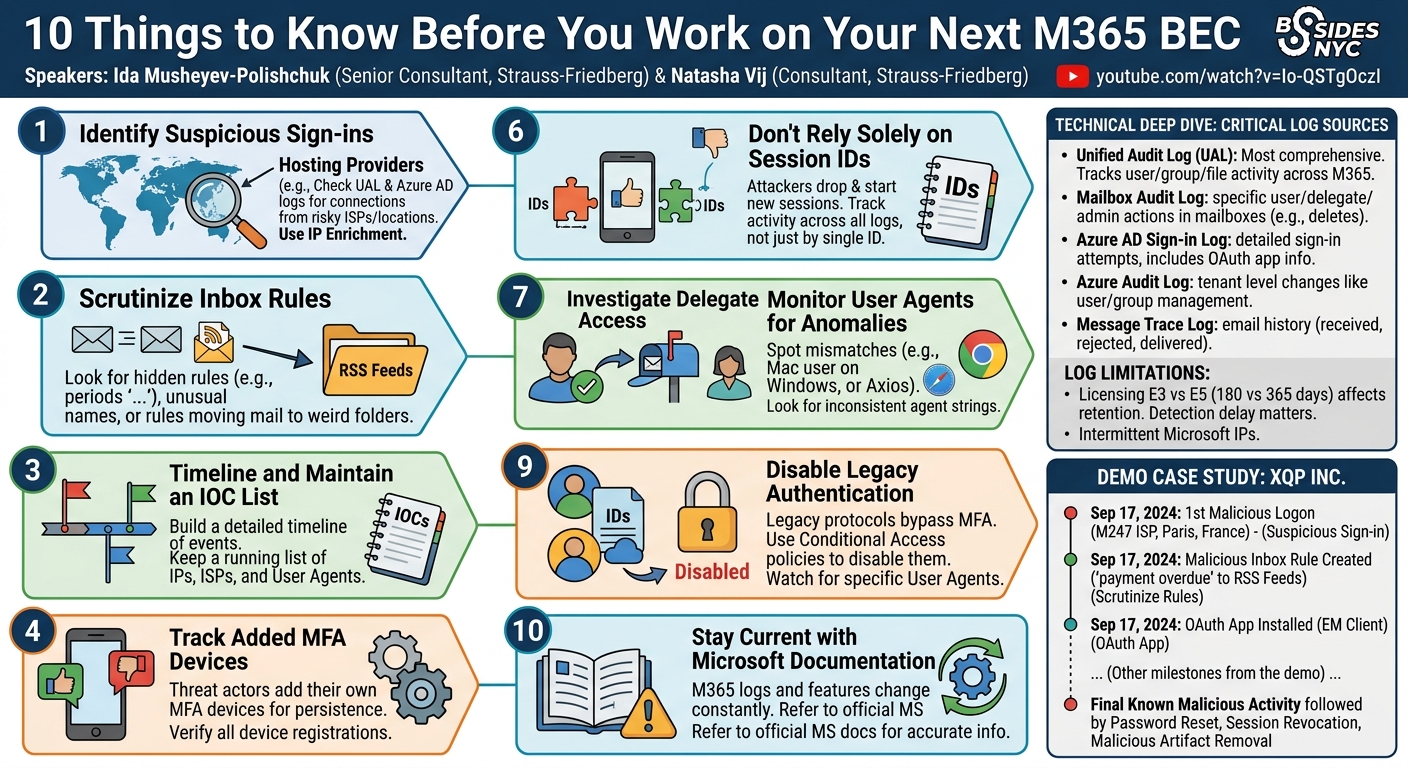
The talk outlined "10 Things to Know" that form the backbone of a successful M365 BEC investigation, guiding analysts through common threat actor behaviors and critical data points:
- Identify Quick Wins with Suspicious Sign-ins: The first step involves reviewing the Unified Audit Log and Azure AD Sign-in Log for anomalous login activity. Investigators should specifically look for connections originating from commonly known hosting providers (e.g., M247, DigitalOcean, OVH, Amazon AWS, Google Cloud, Microsoft Azure, Alibaba) or VPN/ISP services often leveraged by threat actors for anonymity. While not all such connections are malicious, IP enrichment (to identify country, city, and ISP) combined with client verification is essential to distinguish legitimate remote access from malicious intrusions.
- Scrutinize Inbox Rules: Threat actors frequently establish inbox rules to hide their tracks or forward sensitive emails. Suspicious patterns include randomly named rules (e.g., "1234", "FF", or combinations of periods like "...") and rules that move mail to unusual folders like RSS Feeds or Conversation History, which users rarely access. Rules created during or immediately after a known malicious logon, or those originating from identified threat actor IPs/ISPs, are strong indicators of compromise.
- Timeline and Maintain an IOC List: A meticulous timeline of events is paramount, especially in cases involving multiple compromised users. Critical dates include the first malicious activity, the last malicious activity, and the password reset date (which generally indicates the threat actor's removal, though not always definitively). Alongside the timeline, a continuously updated Indicators of Compromise (IOC) list—detailing suspicious IP addresses, ISPs, locations, malicious domains, and user agents—is vital for cross-referencing across various log sources.
- Track Added MFA Devices: Threat actors often add their own MFA devices to a compromised account to maintain persistence, circumventing subsequent password changes or session revocations. These devices allow them to approve MFA requests for continued access, such as for data exfiltration or mailbox syncing. It is critical to identify when an MFA device was added relative to the first malicious logon and ensure all non-legitimate MFA devices are removed during remediation.
- Beware of Malicious OAuth Applications: OAuth applications allow third-party services to access M365 resources on a user's behalf. While legitimate for many business tools, threat actors exploit them for persistent access to mailboxes, contacts, or SharePoint files. Attackers can install these apps during an active compromise or trick users into consenting via phishing. The presence of an unfamiliar or newly consented OAuth app, especially one with broad permissions, is a significant red flag. A password change alone will not revoke access granted to a malicious OAuth application.
- Don't Rely Solely on Session IDs: Session IDs are unique identifiers assigned by M365 for each user session. While useful for tracking activity within a single session, threat actors may utilize multiple session IDs. Investigators must track all identified malicious sessions across all relevant log sources (e.g., Unified Audit Log and Mailbox Audit Log). Additionally, some crucial events may not have an associated session ID, emphasizing the need for a holistic approach rather than filtering solely by session ID.
- Investigate Delegate Access: Delegate access permits one user to view another's mailbox, often used legitimately for executive assistants or vacation coverage. Threat actors, however, leverage existing delegate access or create new permissions to expand their reach within an organization. Look for "Add Mailbox Permission" or "Set Mailbox Permission" operations in the Unified Audit Log, especially those originating from suspicious IPs. Limiting the number of users with delegate access and regularly auditing these permissions are crucial defensive measures.
- Monitor User Agents for Anomalies: A user agent string provides details about the application, operating system, device, and version used for a login or activity. Inconsistent user agents—such as a user typically logging in from a Mac suddenly showing a Windows, Linux, or Axios user agent—are strong indicators of compromise. While threat actors can spoof user agents, this is not universally observed, making user agent analysis a valuable tool for differentiating legitimate from anomalous activity.
- Disable Legacy Authentication: Legacy authentication methods allow sign-ins with just a username and password, bypassing modern security controls like MFA. Although now disabled by default in M365, it can still be enabled in some environments due to older devices or specific third-party application requirements. Legacy authentication is a significant vulnerability, susceptible to brute-force and password spray attacks. Identifying and disabling it (e.g., via Conditional Access policies) is a critical security hardening step. Specific user agents can also indicate legacy authentication attempts.
- Stay Current with Microsoft Documentation: The M365 platform is constantly evolving, with log structures, available data, and features undergoing frequent changes. Relying on outdated information can lead to missed detections or incomplete investigations. Recent changes include the expansion of mail item access logging to E3 licenses and the deprecation of the Admin Audit Log and impending deprecation of the Mailbox Audit Log, with their data migrating to the Unified Audit Log. Continuous engagement with Microsoft's official documentation is essential for accurate and effective incident response.
Technical Deep Dive
▶ Watch: Unified Audit Log: The most comprehensive log (4:25)
A successful M365 BEC investigation mandates a deep understanding of M365 logging mechanisms and the specific indicators to hunt for. The Unified Audit Log (UAL) is the primary investigative tool, capturing a broad spectrum of activities. When examining suspicious sign-ins, analysts should extract fields like User ID, Creation Time, and IP Address. Crucially, IP enrichment services can transform raw IP addresses into geographical and ISP data (country, city, ISP), revealing connections from known malicious hosting providers like M247, DigitalOcean, or Alibaba Cloud. These providers are frequently abused by threat actors seeking to anonymize their true origin.
For detecting malicious inbox rules, investigators query the UAL for New-InboxRule or Set-InboxRule operations. The focus should be on the RuleName, Conditions (e.g., specific keywords like "payment overdue"), and Actions (e.g., MoveToFolder to "RSS Feeds" or "Conversation History", or ForwardTo). Correlation with the ClientIP and CreationTime of the rule against known malicious sign-ins is paramount. The Mailbox Audit Log can provide additional context on mail item interactions related to these rules.
MFA device tracking involves reviewing Azure AD Sign-in logs for UserRegisteredMfa or similar events. The Creation Time of such events, especially if immediately following a suspicious login from a non-corporate IP, strongly suggests threat actor-added persistence. Remediation requires not just a password reset but also a thorough sweep to remove all non-legitimate MFA registrations associated with the compromised account.
Malicious OAuth applications represent a sophisticated persistence mechanism. The Microsoft Defender portal (specifically the App Governance section) or the Azure AD admin portal allows administrators to review consented applications and their granted permissions. Within the UAL, events like AppConsenting can indicate when an application was granted permissions. Threat actors often seek permissions that allow Mail.ReadWrite, MailboxSettings.ReadWrite, or Contacts.ReadWrite, effectively granting them full control over the mailbox or related data without requiring direct login after the initial compromise. Tools like EM Client were specifically mentioned as being leveraged by attackers due to their broad access capabilities.
The use of Session IDs in investigations is a double-edged sword. While they link related activities, it's critical to understand their limitations. Threat actors might drop and re-establish sessions, generating new IDs. Furthermore, not all M365 events are tagged with a session ID. Therefore, filtering logs solely by session ID can lead to incomplete data. Instead, session IDs should be used as one of several IOCs, alongside IP addresses, user agents, and timestamps, to build a comprehensive picture.
Delegate access modifications are logged in the UAL with Add-MailboxPermission or Set-MailboxPermission operations. Key fields to examine include the Identity of the mailbox being delegated, the User granted permission, and the ClientIP from which the change was made. Detecting delegate access from a malicious IP to an unexpected user account is a strong indicator of lateral movement or expanded access by the threat actor.
User agent analysis provides granular detail about the client environment. The UserAgent field in sign-in logs and audit records can reveal inconsistencies (e.g., a Mac user agent followed by a Windows or Linux agent from the same user ID within a short timeframe). While user agent spoofing is possible, it's not universally employed by threat actors, making discrepancies a valuable heuristic.
Finally, Legacy Authentication attempts are identifiable through specific UserAgent strings often associated with older protocols like ActiveSync, IMAP, or POP. These are critical to identify because they bypass modern MFA controls. Disabling legacy authentication through Conditional Access policies is a fundamental security hardening measure.
The speakers also touched upon the importance of search terms from compromised mailboxes. While the IP address of the search operation isn't logged, the SearchQuery and CreationTime are. These search terms (e.g., "payment overdue," "invoice," "credentials") offer insight into the threat actor's reconnaissance objectives, such as identifying financial information or sensitive data. Delegate access can enable the viewing of search history for other mailboxes.
Demo / Proof of Concept
▶ Watch: Mailbox Audit Log: Tracking threat actor actions (4:55)
To illustrate their "10 Things to Know," the speakers presented a simulated BEC investigation for a fictional small organization named XQP Incorporated, based in Fort Worth, Texas. XQP exclusively uses Apple devices and identified anomalous activity originating from [email protected] starting September 17, 2024.
The simulation demonstrated the application of each investigative step:
- Suspicious Sign-in: The investigation began by examining the Unified Audit Log and Azure AD Sign-in Log. An anomalous login was identified from an IP address associated with M247, a known hosting provider. IP enrichment confirmed the location as Paris, France. The client verified that the
testuser had not traveled to France and did not use hosting providers for access, confirming this as the first malicious logon. - Malicious Inbox Rule: Shortly after the initial compromise, a new inbox rule was detected. The rule, created during the threat actor's active window and originating from the same M247 ISP, was named suspiciously and configured to move emails containing "payment overdue" to the RSS Feeds folder, indicating an attempt to hide phishing attempts or sensitive incoming mails from the legitimate user.
- Compromise Timeline & IOCs: The timeline immediately captured the malicious logon and the creation of the inbox rule on September 17, 2024. The IOC list was updated with the M247 ISP, the Paris, France location, and the associated IP address.
- Malicious OAuth Application: A review of the Microsoft Defender portal revealed that an OAuth application named EM Client was installed on September 17, 2024, within the threat actor's window. This indicated a persistence mechanism that could bypass password resets.
- Delegate Access: Two
Add Mailbox Permissionoperations were observed in the Unified Audit Log, granting delegate access to J. Smith and J. Doe for thetestaccount. This activity also originated from the M247 ISP, confirming it as malicious and expanding the scope to investigate these new delegate accounts. - User Agent Anomaly: Further analysis of the suspicious sign-in revealed a Windows user agent. This directly contradicted XQP's policy of exclusively using Apple devices, providing another strong indicator that the activity was malicious.
- Threat Actor Search Terms: The mailbox's search history showed a search for "payment overdue" within the threat actor's timeframe. This correlated directly with the malicious inbox rule and demonstrated the threat actor's reconnaissance efforts to find specific financial information.
The simulation concluded by highlighting the last known malicious activity related to the "payment overdue" mail items, followed by a password reset and the client's confirmation of additional remediation steps (revoking sessions, removing malicious OAuth apps like EM Client, disabling MFA devices), effectively removing the threat actor from the environment. This case study effectively tied together the theoretical "10 things" with practical application in an incident response scenario.
Defensive Implications
▶ Watch: Key M365 resources and portals (slide for reference) (6:40)
The insights gleaned from M365 BEC investigations provide a clear roadmap for organizations to bolster their defenses and enhance their incident response readiness.
Immediate Containment and Eradication:
During an active incident, password resets for all compromised users are paramount, coupled with immediate revocation of all active sessions. This severs the threat actor's current access. Crucially, all artifacts introduced by the threat actor must be identified and removed. This includes any malicious inbox rules, unauthorized MFA devices, and rogue OAuth applications. A clean environment is essential for resuming normal business operations.
Proactive Protection Measures:
- Stronger MFA Implementation: Organizations must move beyond basic MFA. Implementing FIDO2 authentication or robust token-based/code-based authentication methods significantly raises the bar for attackers. While MFA isn't a silver bullet against all bypass techniques, it's a fundamental layer of defense that makes compromise far more difficult.
- Admin-Approved Device Registration: Requiring administrator approval for device registration in M365 prevents threat actors from adding their own devices to maintain persistence or leverage their infrastructure within the environment.
- Regular Audits: Proactive and regular audits of inbox rules, OAuth applications, and delegate access permissions are critical. This ensures that M365 administrators have full visibility into their environment, identifying and removing unauthorized configurations before they can be exploited. Limiting the number of users with delegate access to only those with a legitimate business need reduces the attack surface.
- Security Awareness Training: Given that many BEC attacks originate from phishing emails, regular and effective security training for users is indispensable. Training should educate employees on how to identify phishing attempts, understand the risks of sensitive data exposure, and report suspicious activity.
- Disable Legacy Authentication: Organizations should aggressively disable legacy authentication protocols across their M365 tenant using Conditional Access policies. If specific business justifications necessitate legacy authentication, Microsoft provides more secure alternatives that should be explored. Eliminating this vulnerability removes a common entry point for brute-force and password spray attacks.
- Limit Mail Recipients: Where feasible for business operations, limiting the number of recipients a single user can send emails to can hinder threat actors' ability to rapidly launch widespread phishing campaigns from a compromised account, slowing down their lateral movement and impact.
- Principle of Least Privilege for Admin Access: Limiting the number of users with Global Admin access and implementing the principle of least privilege for all administrative roles is foundational. In the event of an account compromise, the impact is confined to the specific permissions of that user, preventing broader environmental control by the attacker.
By adopting these defensive strategies, organizations can significantly reduce their susceptibility to M365 BEC attacks and enhance their ability to respond effectively when incidents inevitably occur.
Key Takeaways
- Comprehensive Logging is Crucial: Leverage all M365 log sources (UAL, Azure AD Sign-in, Mailbox Audit, Azure Audit, Message Trace) but be aware of licensing limitations (E3 vs. E5) and potential log gaps.
- Prioritize Quick Wins: Immediately hunt for suspicious sign-ins from hosting providers or anomalous geographic locations, and scrutinize newly created or modified inbox rules for malicious intent.
- Timeline and IOCs are Non-Negotiable: Maintain a meticulous timeline of all events and a detailed Indicators of Compromise (IOC) list (IPs, ISPs, user agents) to track threat actor activity and scope the compromise.
- Persistence Mechanisms are Key: Actively hunt for threat actor-added MFA devices and malicious OAuth applications, as these provide persistent access even after password changes.
- Beyond Passwords: Password resets are a critical first step but are insufficient alone. Ensure all malicious artifacts like inbox rules, MFA devices, and OAuth apps are removed, and sessions are revoked.
- Proactive Hardening: Implement stronger MFA (FIDO2), disable legacy authentication, enforce admin-approved device registration, and regularly audit delegate access and application permissions to prevent future compromises.
About the Speaker(s)
Ida Musheyev-Polishchuk is a Senior Consultant with Strauss-Friedberg, an Aon company, where she is a member of their digital forensics and incident response (DFIR) team. Based out of the New York office, Ida has been with Strauss-Friedberg for over four years, specializing in responding to various cybersecurity incidents, including business email compromise cases. Beyond her professional role, Ida's passion lies in photography.
Natasha Vij is a Consultant, also part of the DFIR practice at Strauss-Friedberg, an Aon company. She recently relocated to the New Jersey/New York area after spending a decade in Washington D.C. Natasha frequently works on a diverse range of cybersecurity incidents, with a particular focus on M365 BEC investigations. Together, Ida and Natasha bring extensive practical experience from the front lines of incident response to their discussions.
Reviews
Dr. Zero (Offensive Security Researcher) — SOLID
Competent, practitioner-level IR guidance on M365 BEC investigations from two consultants who clearly do this work daily. Nothing here will surprise an experienced DFIR analyst, but the structured 10-point framework tied to a concrete simulation makes it useful for responders earlier in their careers or teams standing up M365 IR capability for the first time.
Heather Calloway (CISO) — SOLID
A competent, practitioner-level walkthrough of M365 BEC investigations that delivers real procedural value for analysts and IR teams. Well-structured and grounded in actual casework, but it stays firmly in the technical lane and never surfaces the organizational, governance, or business risk dimensions that would make it relevant beyond the SOC.