When the Shadow Crosses Over
Ilya Yatsenko (Graduate Student · UMD)
BSides NYC 2025 (0x05) · Day 1 · Tech - Red
Overview
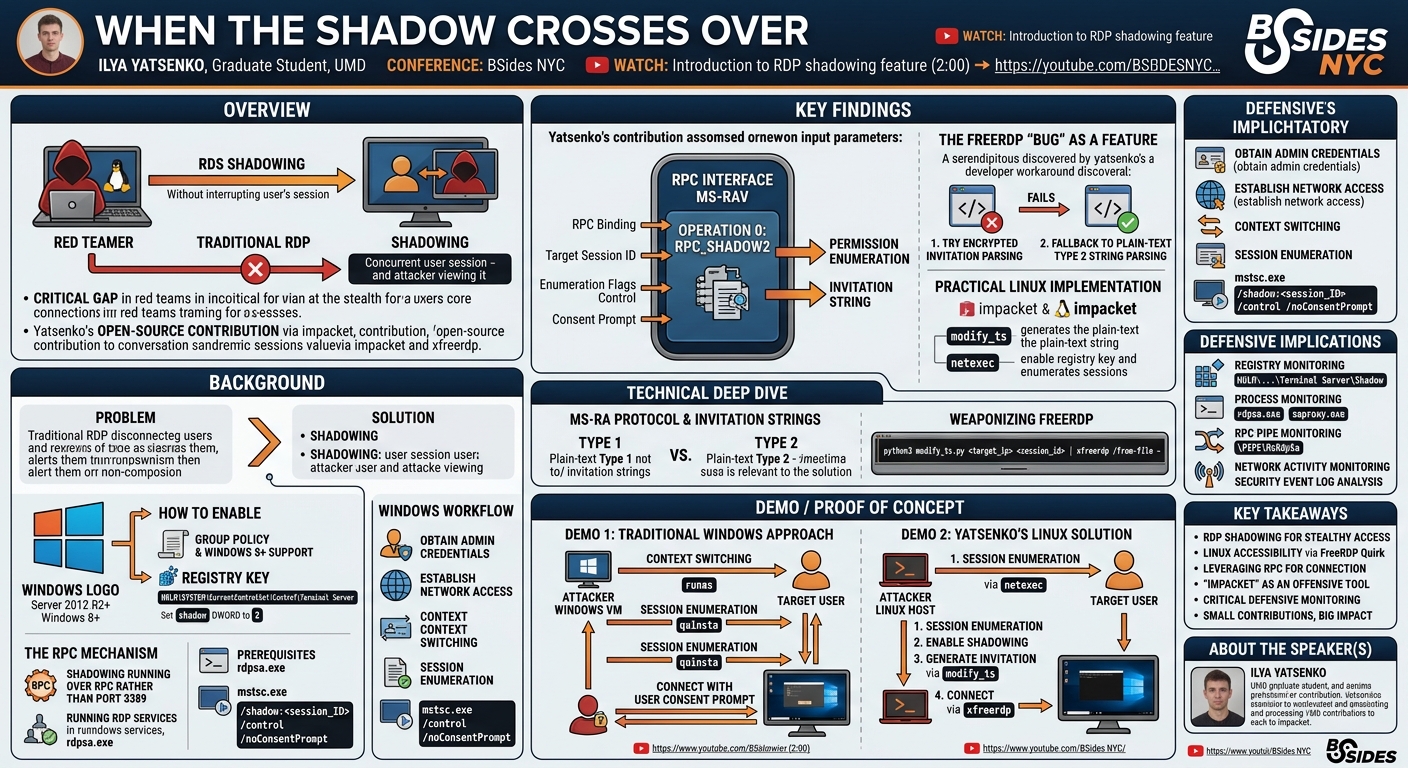
In his BSides NYC talk, "When the Shadow Crosses Over," Ilya Yatsenko, a graduate student at the University of Maryland, delved into the often-overlooked and powerful Remote Desktop Services (RDS) shadowing feature in Windows. The presentation addressed a long-standing challenge for offensive security professionals: how to monitor or interact with an active user session on a remote Windows system without interrupting the legitimate user. Yatsenko’s research culminated in a practical, open-source method to leverage this capability from a Linux host, a significant improvement over the traditional, cumbersome approach requiring a dedicated Windows virtual machine.
Key moments
- 2:00 Introduction to RDP shadowing feature
- 2:30 The problem with traditional RDP for monitoring
- 4:15 How to enable the RDP shadowing feature
- 5:00 Technical prerequisites and network communication for shadowing
- 6:00 Step-by-step workflow for RDP session shadowing
- 8:00 Live demo: Observing a remote RDP session
- 8:15 Live demo: Interacting with a shadowed session
- 8:45 Live demo: Shadowing without user consent prompt
When the Shadow Crosses Over
Speakers: Ilya Yatsenko, Graduate Student, UMD
Conference: BSides NYC
YouTube: https://www.youtube.com/watch?v=C73kmd1RRpQ
Overview
In his BSides NYC talk, "When the Shadow Crosses Over," Ilya Yatsenko, a graduate student at the University of Maryland, delved into the often-overlooked and powerful Remote Desktop Services (RDS) shadowing feature in Windows. The presentation addressed a long-standing challenge for offensive security professionals: how to monitor or interact with an active user session on a remote Windows system without interrupting the legitimate user. Yatsenko’s research culminated in a practical, open-source method to leverage this capability from a Linux host, a significant improvement over the traditional, cumbersome approach requiring a dedicated Windows virtual machine.
The talk highlights a critical operational gap in penetration testing and red teaming, where maintaining stealth and avoiding detection are paramount. Traditional Remote Desktop Protocol (RDP) connections forcibly disconnect an active user, creating an immediate alert. Shadowing, however, allows an administrator to view or even control a user's session seamlessly, often without their knowledge if configured maliciously. Yatsenko's contribution extends this powerful technique to Linux-based penetration testing toolkits, particularly impacket and xfreerdp, making it more accessible and integrated into common offensive workflows.
This presentation is particularly relevant for security practitioners, red teamers, and incident responders. For offensive teams, it provides a new, stealthier avenue for reconnaissance and lateral movement. For defenders, it underscores a potent technique that can be abused by adversaries and necessitates specific monitoring strategies to detect its malicious use. Yatsenko's journey from personal frustration to a community contribution exemplifies how targeted research can bridge practical gaps in the cybersecurity landscape.
Background
▶ Watch: Introduction to RDP shadowing feature (2:00)
The problem addressed by Ilya Yatsenko in his talk stems from a fundamental limitation in traditional remote access scenarios. When a penetration tester or red teamer gains credentials for a target system and attempts to connect via Remote Desktop Protocol (RDP), the default behavior is to disconnect any currently active user session. This interruption is not only disruptive to the target organization's operations but also immediately alerts the user, potentially compromising the attacker's stealth and operational objectives. Imagine needing to capture a screenshot of a specific application only accessible by a particular employee at certain times; kicking them out would be counterproductive and easily detectable.
Around 2019, Yatsenko encountered blog posts detailing the Remote Desktop Services (RDS) shadowing feature in Windows, which offered an elegant solution to this problem. RDS shadowing allows an administrative user to connect to an existing user's RDP session, viewing their screen and optionally taking control, all without interrupting the user's workflow. This capability is built into Windows Server 2012 R2 and later, as well as Windows 8 and later client operating systems. While powerful, the immediate challenge for Yatsenko, who prefers working from Linux or macOS-based penetration testing environments, was the lack of support for this feature in open-source RDP clients like xfreerdp or rdesktop. This forced a cumbersome workflow: spinning up a separate Windows virtual machine, switching context, and potentially proxying network traffic, adding significant overhead and reducing efficiency.
Enabling the shadowing feature requires specific configurations on the target Windows host. By default, it's not enabled. Administrators can enable it either through Group Policy Preferences or by creating a specific registry key. The most straightforward method involves setting the shadow DWORD value to 2 under HKLM\SYSTEM\CurrentControlSet\Control\Terminal Server for local configuration. This value permits shadowing without explicit user consent (though a prompt can still appear, as discussed later).
Crucially, RDS shadowing does not operate over the standard RDP port (3389). Instead, it leverages Remote Procedure Calls (RPC). An initial RPC call establishes the connection, after which the communication shifts to ephemeral ports within the higher range. This means that while direct network access to the target is necessary, the RDP port itself does not need to be open or accessible for shadowing to function. Prerequisites for successful shadowing also include having the RDP services running on the target and ensuring that necessary system binaries like rdpsa.exe and saproxy.exe are intact and operational.
The typical workflow for performing shadowing from a Windows machine involves several steps:
- Obtain elevated credentials: Administrative privileges are required to modify the registry key to enable shadowing and to perform the shadowing itself.
- Establish network access: Direct connectivity to the target machine is needed for RPC communication.
- Switch context: Since the default Microsoft RDP client (
mstsc.exe) doesn't directly prompt for credentials when used from PowerShell, an attacker typically needs to switch the current user context to that of an administrator on the target. This can be achieved using tools likerunas, Pass-the-Hash, or Pass-the-Ticket techniques. - Enumerate sessions: Identify the target user's active session ID using utilities like
quinsta(query sessions). - Initiate shadowing: Use the
mstsc.execlient with specific parameters, including/shadow:<session_ID>,/control(for interactive control), and/noConsentPrompt(to suppress the user notification).
This Windows-centric process, while effective, underscores the need for a more integrated and flexible solution for those operating outside a Windows environment, which ultimately drove Yatsenko's research.
Key Findings
▶ Watch: How to enable the RDP shadowing feature (4:15)
Ilya Yatsenko's core contribution lies in identifying and exploiting an unexpected behavior within the xfreerdp client, enabling remote desktop shadowing from a Linux host. This discovery effectively bypasses the previous requirement for a Windows virtual machine, streamlining offensive operations.
The fundamental findings revolve around:
- The RPC Mechanism of Shadowing: Yatsenko confirmed that RDS shadowing operates via a specific RPC interface, identified as
MS-RAV(Remote Assistance Viewer Protocol). This interface exposes a single, critical method:RPC_SHADOW2, with operation number0. This method takes parameters such as the RPC binding, the target session ID (obtained viaquinsta), and specific enumeration flags that correspond to control options (e.g., view-only vs. interactive) and the consent prompt behavior. The most significant aspect for stealth is the ability to set a flag that corresponds to the/noConsentPromptoption, allowing an attacker to initiate a shadow session without alerting the target user. The result of this RPC call is a permission enumeration and, crucially, an "invitation string."
- The Elusive "Invitation String" and Remote Assistance: The invitation string returned by
RPC_SHADOW2is key. Yatsenko traced its origins to the Remote Assistance (MS-RA) protocol, which was introduced in Windows XP and has since largely been deprecated in favor of "Quick Assist." MS-RA operates on an "expert-novice" model, where a novice generates an "invite" (encrypted with a password) and sends it to an expert. The expert then uses both the invite and password to connect. MS-RA supports functions like viewing/interacting, keyboard/mouse control, and chat. The invitation string itself can appear in two types: Type 1 and Type 2, with Type 2 being relevant for newer versions. Yatsenko initially attempted to generate and encrypt these strings manually, following the MS-RA protocol specification, but encountered failures.
- The FreeRDP "Bug" as a Feature: The breakthrough came from a serendipitous discovery within the
xfreerdpcodebase. Whilexfreerdpis not designed to support RDS shadowing explicitly, it does have some legacy support for Remote Assistance files. Yatsenko found a specific issue report from 2019 concerningxfreerdp's inability to parse encrypted Remote Assistance invitation files. The crucial detail was the workaround implemented by a developer: if the parsing of an encrypted invitation file failed,xfreerdpwould then attempt to parse the file's content as a plain-text Remote Assistance string Type 2. This unintended fallback mechanism proved to be the Achilles' heel (or rather, the open door) for Yatsenko's research.
- Practical Implementation with
impacket: Leveraging thisxfreerdpquirk, Yatsenko developed a tool, integrated asmodify_tswithin theimpacketframework, to make the necessary RPC call (RPC_SHADOW2). This tool generates the plain-text Type 2 invitation string. By piping this plain-text string directly toxfreerdp, the client would successfully interpret it and establish a shadow session. This effectively weaponized an existing, albeit obscure, feature inxfreerdp, transforming a parsing failure into an offensive capability. Theimpacketnetexecmodule was also extended to facilitate enabling the shadowing registry key and enumerating sessions, completing the end-to-end workflow from a Linux host.
In essence, Yatsenko's key finding is that the RPC_SHADOW2 method, when invoked, returns a string that xfreerdp can, under specific conditions (i.e., when its encrypted parsing fails), interpret as a valid plain-text Remote Assistance connection string, thus enabling stealthy remote desktop shadowing from non-Windows systems.
Technical Deep Dive
▶ Watch: Step-by-step workflow for RDP session shadowing (6:00)
The technical underpinning of Ilya Yatsenko's work involves a sophisticated interplay of Windows RPC mechanisms, the Remote Assistance protocol, and an undocumented quirk in the FreeRDP client. Understanding these components is crucial to appreciating the ingenuity of the solution.
At the heart of the Windows Remote Desktop Services (RDS) shadowing feature is an RPC interface that facilitates the connection. This interface is part of the Microsoft Remote Assistance Viewer Protocol (MS-RAV), which is formally specified by Microsoft. The specific interface UUID is not explicitly stated in the talk, but the method RPC_SHADOW2 with operation number 0 is the critical entry point. This method is invoked by the shadowing client (e.g., mstsc.exe or Yatsenko's impacket tool) on the target machine.
The RPC_SHADOW2 method requires several parameters:
- RPC Binding: This specifies the connection details for the RPC call, including the target host and the protocol sequence.
- Target Session ID: This is the unique identifier of the user session to be shadowed, typically obtained by enumerating active sessions using a tool like
quinstaon the target. - Control Flags (Enumerations): These are integer values that dictate the behavior of the shadow session. Key flags include:
- View-only vs. Interactive Control: A flag determines whether the shadowing client can only observe the session or also interact with the keyboard and mouse.
- Consent Prompt: A crucial flag, often referred to as
/noConsentPrompt, suppresses the notification that usually appears on the target user's screen, informing them that their session is being observed or controlled. This is paramount for stealth operations. Yatsenko notes these are defined as enumerations, providing specific values for different behaviors.
Upon successful invocation, RPC_SHADOW2 returns a permission status (also an enumeration) and, most importantly, an "invitation string." This string is the key to connecting via a client.
Initially, Yatsenko explored the Microsoft Remote Assistance (MS-RA) protocol, which defines the structure and encryption of these invitation strings. MS-RA, deprecated in newer Windows versions in favor of "Quick Assist," relies on an "expert-novice" model. The novice generates an invitation, encrypts it with a password, and then transmits both the invitation (often as an .msrcincident file) and the password separately to the expert. The expert combines these to initiate a session. The invitation strings themselves come in Type 1 (older versions) and Type 2 (newer versions). Yatsenko attempted to reverse-engineer the encryption and formatting of these strings to generate a valid .msrcincident file that could be opened by a standard Windows Remote Assistance client. However, this approach proved unsuccessful, possibly due to subtle implementation details, environment limitations (ARM Windows Insider Preview), or complexities in the encryption algorithm.
The pivotal insight came from investigating the FreeRDP project, specifically the xfreerdp client. While xfreerdp does not officially support RDS shadowing, it has historical support for Remote Assistance files. Yatsenko discovered a critical bug report from 2019 where xfreerdp failed to parse encrypted Remote Assistance invitation files. The workaround implemented by a developer was to add a fallback mechanism: if xfreerdp failed to parse the encrypted invitation, it would then attempt to interpret the file's contents as a plain-text Remote Assistance string Type 2.
This "bug" became the foundation of the Linux-based shadowing solution. Instead of trying to generate and encrypt a valid .msrcincident file, Yatsenko realized he could directly generate the plain-text Type 2 invitation string using the RPC_SHADOW2 call. This plain-text string, when piped to xfreerdp, would trigger the aforementioned fallback mechanism. xfreerdp would fail to parse it as an encrypted file (because it's plain text) but then successfully parse it as a plain-text Type 2 string, establishing the shadow session.
To implement this, Yatsenko extended the impacket framework, a collection of Python classes for working with network protocols. Specifically, he contributed to the netexec module and developed a new tool, modify_ts. This modify_ts tool wraps the RPC call to RPC_SHADOW2, allowing an attacker to:
- Specify the target IP and credentials.
- Provide the target session ID.
- Set the desired control flags (e.g.,
/controlfor interaction, and crucially,/noConsentPromptwhich Yatsenko made the default behavior in his tool). - Receive the plain-text invitation string as output.
This output string can then be seamlessly piped to xfreerdp on the Linux host:
python3 modify_ts.py <target_ip> <session_id> | xfreerdp /from-file -
This elegant solution leverages a specific implementation detail in xfreerdp to achieve a powerful offensive capability that was previously constrained to Windows environments, demonstrating a deep understanding of multiple protocol layers and client-side parsing behaviors.
Demo / Proof of Concept
▶ Watch: Live demo: Observing a remote RDP session (8:00)
Ilya Yatsenko's presentation included two distinct demonstrations, illustrating both the traditional Windows-based approach and his innovative Linux-based solution for Remote Desktop Services shadowing.
The first demonstration showcased the conventional method of shadowing from a Windows host. Yatsenko used a virtual machine on the left side of the screen, acting as the attacker's machine, and a standard Windows RDP client on the right, representing the target. The initial steps involved:
- Context Switching: Yatsenko used
runasto execute commands as an administrator on the target machine, simulating an attacker who has obtained elevated credentials. This step is crucial because themstsc.execlient, when invoked from a PowerShell session, does not prompt for credentials, requiring the current user context to be privileged. - Session Enumeration: The
quinstacommand was used to list active sessions on the target, allowing the attacker to identify the specificsession IDof interest. - Initiating Shadowing (with consent): Yatsenko then demonstrated connecting using
mstsc.exewith the/shadow:<session_ID>parameter. In this initial example, the target user received a prompt asking for consent to allow the shadowing. Once accepted, the attacker gained a view-only session. - Interactive Control (with consent): The demo then escalated to interactive control by adding the
/controlparameter. Again, the user received a prompt, and after acceptance, the attacker could interact with the target session, typing text and opening applications. - Stealth Shadowing (no consent): The most impactful part of the Windows demo involved demonstrating the
/noConsentPromptflag. By adding this parameter to themstsc.execommand, Yatsenko showed that the attacker could initiate a view-only session, and subsequently an interactive session, without any notification appearing on the target user's screen. This capability, where a window appears and text is entered by an unseen hand, vividly illustrated the stealthy nature of the attack.
The second, and more significant, demonstration presented Yatsenko's primary contribution: performing RDP shadowing from a Linux host using open-source tools. This addressed his personal pain point of needing a Windows VM for such operations. The workflow involved:
- Session Enumeration from Linux: Using
impacket'snetexecmodule, Yatsenko enumerated active sessions on the target Windows machine from his Linux environment, obtaining the necessarysession ID. - Enabling Shadowing (if necessary): The
netexecmodule was also used to enable the shadowing feature on the target by modifying the registry keyHKLM\SYSTEM\CurrentControlSet\Control\Terminal Server\Shadowto2. This ensures the target is configured for shadowing. - Generating the Invitation String: Yatsenko then utilized his custom
modify_tstool (part ofimpacket), which makes the RPC call (RPC_SHADOW2) to the target. Crucially, this tool was designed to output the plain-text Remote Assistance Type 2 invitation string. Yatsenko noted that his tool defaults to the "no consent prompt" behavior, prioritizing stealth. - Connecting with FreeRDP: The generated plain-text invitation string was then piped directly into
xfreerdpusing the/from-file -parameter. This command instructsxfreerdpto read the connection details from standard input. - Successful Linux Shadowing: The demonstration successfully showed
xfreerdpconnecting to the target session from Linux, initially in view-only mode and then with full interactive control, all without any consent prompt on the target. The visual evidence of a window appearing and text being typed confirmed the efficacy of the method, showcasing how theimpackettool, combined withxfreerdp's unique parsing behavior, achieved the desired stealthy access from a non-Windows platform.
This proof of concept conclusively validated Yatsenko's research, providing a practical and efficient method for offensive security professionals to leverage RDS shadowing from their preferred Linux toolkits.
Defensive Implications
▶ Watch: Live demo: Shadowing without user consent prompt (8:45)
The ability to perform Remote Desktop Services (RDS) shadowing from a Linux host, especially without user consent, presents significant defensive challenges. Organizations must be aware of this technique and implement robust monitoring strategies to detect and mitigate its malicious use. Ilya Yatsenko outlined several key areas where defenders should focus their efforts.
- Registry Key Monitoring: The most direct indicator of RDS shadowing being enabled or configured is the presence and value of a specific registry key. Defenders should monitor
HKLM\SYSTEM\CurrentControlSet\Control\Terminal Server\Shadow. If this key is set to a value of2, it indicates that shadowing is permitted without explicit user consent. Any unauthorized modification or creation of this key should trigger an alert. Automated tools for endpoint detection and response (EDR) or security information and event management (SIEM) systems should be configured to track changes to this registry path.
- Process Monitoring: When an RDS shadow session is active, specific Windows processes are involved in establishing and maintaining the connection and ensuring session isolation. Defenders should monitor for the execution and activity of:
rdpsa.exe(Remote Desktop Services Session Agent): This executable is responsible for managing the shadowing process and facilitating communication between the shadowed session and the shadowing client.saproxy.exe(Session Agent Proxy): This process acts as a proxy, ensuring proper isolation and communication between the two sessions.
The presence of these executables running on a system where shadowing is not expected or authorized is a strong indicator of malicious activity. EDR solutions can be configured to alert on the launch or unusual parent-child relationships of these processes.
- RPC Pipe Monitoring: The initial connection for RDS shadowing is established via RPC, specifically leveraging a named pipe. Yatsenko mentioned monitoring for access to the
\PIPE\MsRdpSa(or similar, related to theMS-RAVinterface). Given that theRPC_SHADOW2method is the only known operation exposed by this specific interface for shadowing, any access to this RPC pipe outside of legitimate administrative tasks should be considered highly suspicious. Advanced EDR tools and network monitoring solutions capable of deep packet inspection can potentially detect RPC calls to this interface.
- Network Activity Monitoring: While the standard RDP port (3389) is not used, the shadowing process does rely on network communication. After the initial RPC call, the session communication transitions to ephemeral ports in the higher range. Monitoring for unusual connections to these high-numbered ports from unexpected sources, especially if coupled with other indicators, could help identify shadowing attempts. Baseline network traffic and look for anomalies.
- Security Event Log Analysis: Windows security event logs may provide additional clues. Although Yatsenko did not explicitly detail specific event IDs, common areas to investigate include:
- RDP-related events: While not a direct RDP connection, shadowing is an RDS feature, so related event logs might contain relevant information about session management.
- Process creation events (Event ID 4688): Monitoring for the creation of
rdpsa.exeandsaproxy.exe. - Registry modification events (Event ID 4657): Monitoring for changes to the
Shadowregistry key. - RPC events: If detailed RPC logging is enabled, it might capture the
RPC_SHADOW2call.
- User Education and Policy: While the
/noConsentPromptflag bypasses user notification, in environments where consent is required, users should be educated on how to identify and report suspicious consent prompts. Furthermore, organizations should establish clear policies regarding the legitimate use of shadowing, ensuring that any administrative shadowing is documented and performed only when necessary, with appropriate audit trails.
By implementing a layered defensive strategy that includes monitoring registry keys, critical processes, RPC pipes, network traffic, and security event logs, organizations can significantly improve their ability to detect and respond to malicious use of the RDS shadowing feature.
Key Takeaways
- RDP Shadowing for Stealthy Access: Remote Desktop Services (RDS) shadowing allows an attacker to view or control an active user's RDP session without interrupting or alerting the user, offering a stealthier alternative to traditional RDP connections.
- Linux Accessibility via FreeRDP Quirk: A specific, unintended fallback mechanism in the
xfreerdpclient, which attempts to parse plain-text Remote Assistance Type 2 strings if encrypted parsing fails, enables RDS shadowing from Linux hosts. - Leveraging RPC for Connection: The core of RDS shadowing relies on a specific RPC call,
RPC_SHADOW2(operation 0) on theMS-RAVinterface, which returns a plain-text invitation string. impacketas an Offensive Tool: Theimpacketframework, specifically thenetexecmodule and a newmodify_tstool, can be extended to enumerate sessions, enable shadowing, generate the necessary plain-text invitation string, and facilitate the connection from Linux.- Critical Defensive Monitoring: Defenders must monitor for unauthorized modification of the
HKLM\SYSTEM\CurrentControlSet\Control\Terminal Server\Shadowregistry key, the execution ofrdpsa.exeandsaproxy.exeprocesses, and suspicious RPC activity on the\PIPE\MsRdpSapipe. - Small Contributions, Big Impact: The talk serves as an example that even seemingly minor technical contributions, like finding a workaround for a specific pain point, can be highly valuable to the community and worthy of presentation.
About the Speaker(s)
Ilya Yatsenko is currently a graduate student at the University of Maryland (UMD). He brings nearly five years of experience in offensive security, specializing in penetration testing, red team exercises, and vulnerability research. Yatsenko has earned several significant certifications in the field. Notably, he had the privilege of interning at Praetorian during the summer preceding his talk. Driven by a desire to contribute back to the community, he has made contributions to the widely used impacket toolkit, including the code relevant to this specific presentation. This talk marked Ilya's first time presenting at a conference, a challenge he embraced despite initial nervousness, motivated by the opportunity to share a solution to a problem that had bothered him for years.
Reviews
Dr. Zero (Offensive Security Researcher) — SOLID
First-time presenter drops a genuinely useful offensive contribution: RDS shadowing from Linux via an xfreerdp parsing fallback, implemented in impacket. Not groundbreaking research, but honest, practical work that solves a real operational annoyance — and that's worth something at BSides.
Heather Calloway (CISO) — WEAK
Technically competent research that solves a real offensive tooling gap — getting RDS shadowing to work from Linux is a legitimate contribution to the impacket ecosystem. But this talk has no governance angle, no institutional context, and no defender-ready decision path beyond a generic monitoring checklist that any EDR vendor slide could generate.