Auths Gone Wild: When ‘Authenticated’ Means Anyone
Danielle Aminov (Threat Researcher · Whiz), Yaara Shriki (Threat Researcher · Whiz)
Cloud Village @ DEF CON 33 · Day 1 · Cloud Village
Overview
In the rapidly expanding landscape of cloud computing, organizations increasingly rely on cloud service providers (CSPs) like AWS, GCP, and Azure to store their most sensitive data—from customer PII to proprietary secrets. Ensuring the privacy and security of this data is paramount, yet a pervasive and often misunderstood misconfiguration leaves vast amounts of information silently exposed. The talk "Auths Gone Wild: When ‘Authenticated’ Means Anyone," presented by Whiz threat researchers Danielle Aminov and Yaara Shriki, delves into this critical issue, revealing how resources believed to be private are, in fact, publicly accessible to any authenticated user within a given CSP.
Key moments
- 0:00 Introduction: When 'Authenticated' Means Anyone
- 1:00 Practical example: Azure SQL database misconfiguration
- 3:15 Research origin: S3 bucket accessible by any AWS account
- 5:50 Key distinction: All Users vs. Authenticated Users
- 6:30 S3 misconfigurations: Bucket Policies and ACLs
- 7:25 Developer testing errors leading to misconfigurations
Auths Gone Wild: When ‘Authenticated’ Means Anyone
Speakers: Danielle Aminov (Threat Researcher, Whiz); Yaara Shriki (Threat Researcher, Whiz)
Conference: Cloud Village
YouTube: https://www.youtube.com/watch?v=MfGfHHkQppg
Overview
In the rapidly expanding landscape of cloud computing, organizations increasingly rely on cloud service providers (CSPs) like AWS, GCP, and Azure to store their most sensitive data—from customer PII to proprietary secrets. Ensuring the privacy and security of this data is paramount, yet a pervasive and often misunderstood misconfiguration leaves vast amounts of information silently exposed. The talk "Auths Gone Wild: When ‘Authenticated’ Means Anyone," presented by Whiz threat researchers Danielle Aminov and Yaara Shriki, delves into this critical issue, revealing how resources believed to be private are, in fact, publicly accessible to any authenticated user within a given CSP.
This presentation highlights a blind spot in conventional security scanning methodologies, where assets configured to deny anonymous access still grant broad access to any valid, authenticated CSP account—even those belonging to potential attackers. Aminov and Shriki demonstrate the mechanics of this misconfiguration across AWS S3, Google Cloud Storage (GCP GCS), and Azure SQL Database, showcasing how it arises from human error, outdated practices, and misleading configuration options. Their research uncovers a significant volume of exposed sensitive data, ranging from API keys and SSH private keys to health records and financial information.
The talk is crucial for cloud security professionals, developers, and anyone managing cloud infrastructure. It not only exposes a widespread vulnerability but also provides a practical framework for discovery, detection, and prevention, including the introduction of an open-source tool, authentikit, designed to identify these silent risks. By shedding light on how "authenticated" can mistakenly translate to "anyone," Aminov and Shriki empower organizations to proactively secure their cloud environments against a threat that traditional scans routinely miss.
Background
▶ Watch: Introduction: When 'Authenticated' Means Anyone (0:00)
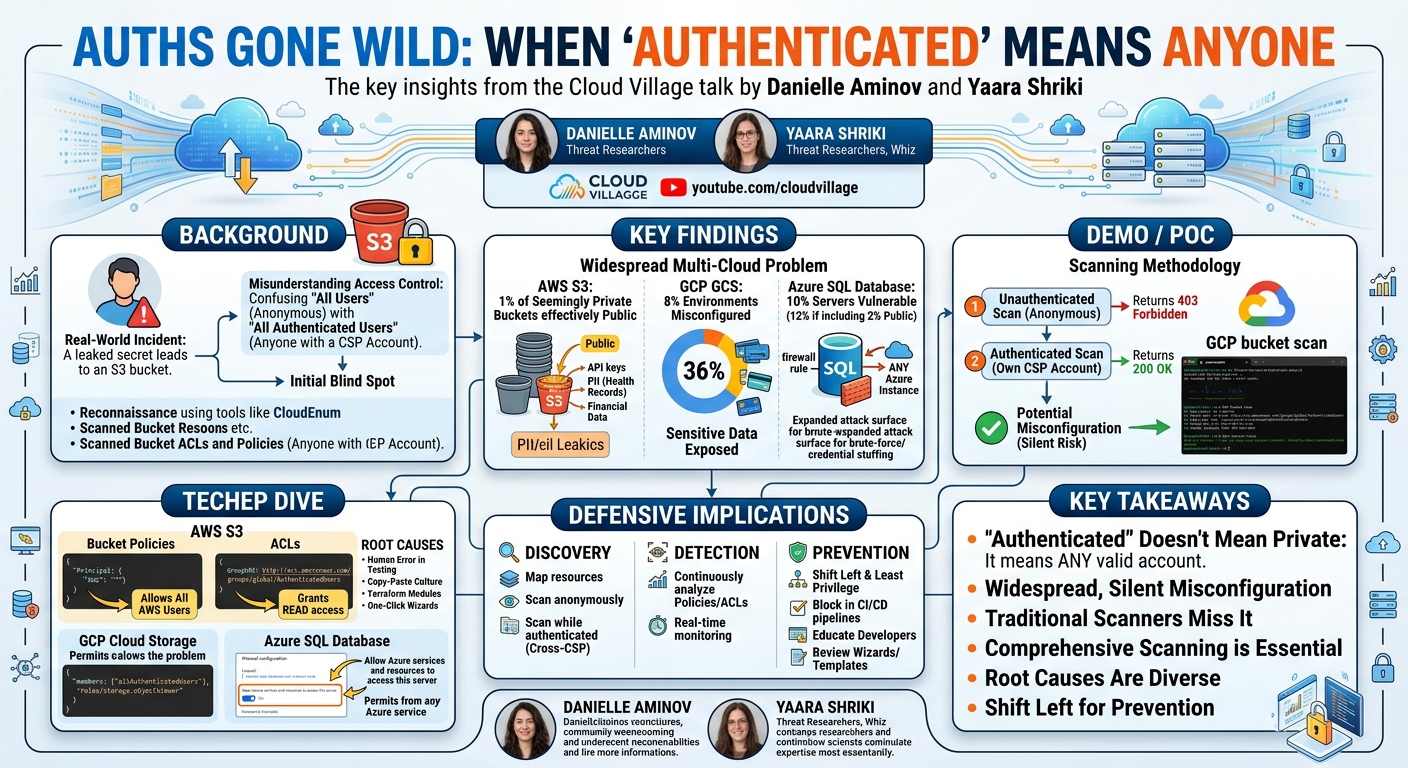
The genesis of this research stemmed from a real-world incident where the Whiz team encountered a leaked secret used by an attacker. Tracing the origin of this secret led them to an S3 bucket. Initial attempts to access the bucket anonymously resulted in a 403 Forbidden message, suggesting the bucket was private and secure. However, when the team re-attempted access while authenticated to their own AWS account, the response changed to 200 OK, allowing them to list and retrieve objects, including the previously leaked secret. This pivotal discovery revealed a critical misconfiguration: the bucket denied anonymous access but permitted access to any AWS account, effectively making it public.
This incident underscored a fundamental misunderstanding in cloud access control: the distinction between "all users" and "all authenticated users." In both AWS and GCP, All Users refers to any anonymous, unauthenticated entity attempting to access resources. Conversely, All Authenticated Users refers to any valid, authenticated principal within the respective CSP ecosystem. Crucially, anyone can register for an AWS or GCP account, meaning "all authenticated users" implicitly includes potential attackers. Most traditional security scanners primarily focus on detecting access granted to "all users," thus failing to identify resources exposed to "all authenticated users."
Attackers and bug bounty hunters typically begin their reconnaissance by enumerating bucket names using tools like CloudEnum or AWS CLI with account IDs. Once a list of potential targets is compiled, they proceed to scan for misconfigurations, primarily focusing on Bucket ACLs and Bucket Policies. However, if these scans are only performed anonymously, they will miss the type of misconfiguration highlighted in this talk, leaving a significant blind spot for organizations.
Key Findings
▶ Watch: Research origin: S3 bucket accessible by any AWS account (3:15)
The research conducted by Aminov and Shriki unveiled a pervasive and critical misconfiguration across major cloud service providers, demonstrating that the "Auths Gone Wild" scenario is not an isolated incident but a widespread silent risk.
For AWS S3 buckets, after scanning a sample of approximately 60,000 customer buckets, the team found that 96% initially appeared private, returning a 403 Forbidden message during anonymous scans. However, upon performing authenticated scans, they discovered that 1% of these seemingly private buckets were, in fact, effectively public. A majority of these misconfigured buckets were found to expose highly sensitive data, including:
- API keys and other secrets.
- Personally Identifiable Information (PII), such as health records.
- Financial data, including bank account numbers and credit card details.
- Specific examples shown included Slack user tokens and entire buckets filled with SSH private keys, all downloadable.
In Google Cloud Storage (GCP GCS), the findings were even more pronounced. The researchers observed that 8% of GCP environments scanned exhibited this "all authenticated users" misconfiguration. Alarmingly, 36% of these misconfigured GCP buckets contained sensitive data, such as:
- Credit card numbers.
- Social Security Numbers.
- Bank account information.
This indicates a significant exposure risk for organizations utilizing GCP.
While Azure Blob Storage was found not to be vulnerable to this specific "all authenticated users" misconfiguration by design, the team identified a similar risk vector in Azure SQL Database. Through a different mechanism, the "Allow Azure services and resources to access this server" firewall rule, 10% of the Azure SQL servers checked had this feature enabled. This misconfiguration effectively makes these databases accessible to any Azure instance, whether it belongs to the legitimate owner or an attacker. Furthermore, 2% of Azure SQL servers were found to be completely public. Although an external attacker might still face a "login failed" error, the ability to reach the server from any Azure service significantly expands the attack surface for brute-force or credential stuffing attacks.
These findings collectively underscore that the misconfiguration is a multi-cloud problem, manifesting through various technical mechanisms but leading to the same critical outcome: sensitive data exposure that bypasses traditional security checks.
Technical Deep Dive
▶ Watch: Key distinction: All Users vs. Authenticated Users (5:50)
The core of the "Auths Gone Wild" problem lies in specific access control configurations that grant permissions to broad groups of authenticated users within a CSP, rather than specific, trusted identities. This section breaks down the technical mechanisms across AWS, GCP, and Azure.
AWS S3 Misconfigurations
In AWS S3, the misconfiguration can hide in two primary access models: Bucket Policies and Access Control Lists (ACLs).
- Bucket Policies: These are JSON-based policies attached directly to an S3 bucket, allowing for fine-grained control over access. The critical misconfiguration here involves setting the
Principalproperty toAWS: "*".
In this example, Principal: {"AWS": "*"} explicitly means "any authenticated AWS user." Coupled with actions like s3:GetObject and s3:ListBucket, this grants read and list access to anyone with an AWS account.
- Access Control Lists (ACLs): ACLs are an older, XML-based access control mechanism for S3. They use a different naming convention but achieve the same effect. The misconfiguration in ACLs involves granting permissions to the
AuthenticatedUsersgroup, specified by its URI:http://acs.amazonaws.com/groups/global/AuthenticatedUsers.
The READ permission effectively allows listing a bucket's contents and getting objects from it. Both bucket policies and ACLs, when configured this way, result in the "all authenticated users" exposure.
Root Causes of Misconfiguration:
The speakers identified several reasons for these misconfigurations:
- Human Error: Developers often test access by attempting an anonymous scan (which correctly returns
403 Forbidden) and then an authenticated scan using their own AWS account (which correctly returns200 OK). They miss the crucial step of testing from a foreign AWS account, leading them to believe the bucket is private. - Copy-Paste Culture: Misleading or outdated code snippets found on platforms like Stack Overflow or generated by AI tools can propagate these insecure configurations.
- Terraform Modules and CloudFormation Templates: Infrastructure-as-Code (IaC) templates, if not properly vetted, can embed these misconfigurations, leading to widespread insecure deployments.
- One-Click/Overwhelming Wizards: CSP consoles sometimes offer "one-click" options or complex wizards where users might inadvertently select options that grant overly broad access, prioritizing functionality over security.
GCP Cloud Storage Misconfigurations
Google Cloud Storage (GCS) exhibits a similar vulnerability through its IAM (Identity and Access Management) policies. Here, the problematic principal is allAuthenticatedUsers. When an IAM policy grants roles like storage.objectViewer or storage.legacyBucketReader to allAuthenticatedUsers, any user with a valid Google account (which includes GCP accounts) can read the contents of the bucket.
As with AWS, an anonymous attempt to access such a bucket would result in an access denied error, but an authenticated attempt from any Google account would succeed, allowing data exfiltration.
Azure SQL Database Misconfigurations
Azure Blob Storage is not susceptible to the same "all authenticated users" misconfiguration as S3 and GCS by design. However, Azure SQL Database presents a different, yet equally concerning, exposure vector. The misconfiguration arises from a specific firewall rule setting: "Allow Azure services and resources to access this server."
When this option is enabled, Azure automatically adds a firewall rule that permits connections from any Azure service or resource, including Azure VMs, Azure Functions, or other services, regardless of the subscription or tenant they belong to.
While an attempt to connect from a local machine outside Azure might correctly be blocked with an "client IP address is not allowed" error, an attempt from an Azure VM (even one controlled by an attacker) would successfully reach the SQL server. The attacker would then receive a "login failed for the user" error, indicating that the server is reachable and vulnerable to credential-based attacks like brute-forcing or dictionary attacks, rather than being protected by a network-level firewall. This significantly expands the attack surface, as an attacker only needs an Azure account and an Azure service to attempt unauthorized access.
Demo / Proof of Concept
▶ Watch: S3 misconfigurations: Bucket Policies and ACLs (6:30)
The speakers demonstrated their findings through a practical scanning methodology and an open-source tool, authentikit, illustrating how organizations can identify these subtle yet critical misconfigurations.
Scanning Methodology
The core of their approach involves a two-stage scanning process designed to bypass the blind spots of traditional anonymous-only scans:
- Unauthenticated Scan (Anonymous): The first step is to scan target resources (e.g., S3 buckets, GCS buckets) as an anonymous user. The goal is to identify resources that return a
403 Forbiddenmessage, indicating they appear private to the outside world. These are the resources that typically pass conventional security checks. - Authenticated Scan (From Your Own CSP Account): The second step involves taking the list of resources that returned
403 Forbiddenin the first scan and re-scanning them while authenticated to your own AWS, GCP, or Azure account. If a resource's response status code changes from403 Forbiddento200 OK(or a similar success indicator that allows access), it is flagged as potentially misconfigured. The "potentially" qualifier acknowledges that in rare cases, this might be the developer's intended (though highly insecure) configuration. Confirmation of misconfiguration usually comes from discovering sensitive data within the accessible resource.
The speakers noted that they applied this methodology to a sample of approximately 60,000 AWS S3 buckets, discovering that 1% of those initially appearing private were, in fact, effectively public when accessed via an authenticated session.
Authentikit Tool Demonstration
To facilitate this multi-stage scanning, Aminov and Shriki developed and open-sourced a tool called authentikit. This command-line utility automates the two-scan methodology for AWS and GCP buckets, making it easier for security teams and developers to check their own environments. The tool's repository link and a QR code were provided at the end of the presentation.
A GCP bucket demo showcased authentikit in action:
- The tool was pointed at a specific GCP bucket name.
- It first performed an unauthenticated scan, which correctly yielded a
403 Forbiddenstatus code. - Subsequently, it executed an authenticated scan. This time, the status code returned was
200 OK, confirming that the bucket was accessible to any authenticated GCP user, despite appearing private to anonymous requests. The demo visually highlighted this change in status codes as the key indicator of the misconfiguration.
Azure SQL Database Demonstration
For Azure SQL Database, the demonstration used SQL CMD to illustrate the different access behaviors:
- Local Machine Scan: An attempt was made to connect to an Azure SQL Database server from a local machine. The result was an error message stating, "The client IP address is not allowed to access the server." This is the expected behavior for a properly firewalled server.
- Azure VM Instance Scan: The same
SQL CMDconnection attempt was then performed from within an Azure VM instance. While an error still occurred, the message changed to "Login failed for the users." This crucial difference indicated that the connection successfully reached the SQL server, bypassing the IP-based firewall. The server was now exposed to credential-based attacks (like brute-forcing or using leaked credentials) from any Azure service, significantly expanding the attack surface beyond what traditional IP-based scans would reveal.
These demonstrations effectively illustrated the subtle nature of these misconfigurations and the necessity of a comprehensive, multi-context scanning approach to uncover them.
Defensive Implications
▶ Watch: Developer testing errors leading to misconfigurations (7:25)
Understanding the "Auths Gone Wild" phenomenon is critical for defenders. The speakers provided a structured framework, moving from tactical discovery to strategic prevention, to help organizations mitigate this silent risk.
1. Discovery
The first step is to gain complete visibility into your cloud environment.
- Map All Resources: Identify every cloud resource that could potentially store sensitive data, including S3 buckets, GCP Cloud Storage buckets, Azure SQL Databases, and other services.
- Scan Anonymously: Perform initial scans of all identified resources as an unauthenticated user. This helps establish a baseline and identify resources that are truly public (returning
200 OKanonymously). - Scan While Authenticated (Cross-CSP): This is the most crucial step. For resources that returned
403 Forbiddenanonymously, re-scan them while authenticated to a foreign or test CSP account (or simply your own account, asauthentikitdoes). This reveals resources accessible to "all authenticated users." Furthermore, consider scanning from multiple CSPs (e.g., attempting to access an Azure resource from an AWS VM) to uncover cross-cloud exposure vectors. Theauthentikittool is designed specifically for this purpose.
2. Detection
Once resources are discovered, continuous monitoring is essential.
- Continuously Analyze Policies and ACLs: Implement automated checks that regularly review IAM policies (AWS, GCP) and ACLs (AWS S3) for patterns indicative of "all authenticated users" access, such as
"Principal": {"AWS": "*"}orallAuthenticatedUsers. For Azure SQL, monitor firewall rules for the "Allow Azure services and resources to access this server" setting. - Real-time Monitoring: Integrate policy analysis into real-time security monitoring tools and Cloud Security Posture Management (CSPM) solutions to detect new or modified configurations that introduce this risk immediately.
3. Prevention
The ultimate goal is to prevent these misconfigurations from reaching production environments.
- Shift Left and Enforce Least Privilege: Integrate security checks earlier in the development lifecycle. Implement policies that block risky configurations in CI/CD pipelines. This ensures that IaC templates (Terraform, CloudFormation, ARM templates) or direct deployments containing "all authenticated users" access are flagged and prevented before they are deployed to production.
- Default to Least Privilege: Configure cloud environments and services to default to the principle of least privilege, meaning resources are private by default and access is granted only to specific, necessary identities.
- Educate Developers: Raise awareness among developers about the misleading nature of "authenticated access" and the difference between "all users" and "all authenticated users." Provide clear guidelines and secure configuration patterns.
- Review Wizards and Templates: Carefully review any "one-click" deployment wizards or pre-configured templates provided by CSPs, as these can sometimes bake in overly permissive defaults.
By adopting this comprehensive framework, organizations can move beyond traditional security blind spots, proactively identify and remediate "Auths Gone Wild" misconfigurations, and significantly strengthen their overall cloud security posture.
Key Takeaways
- "Authenticated" Doesn't Mean Private: The critical insight is that "authenticated access" in cloud environments often means any valid account within that CSP, not just accounts belonging to the resource owner. This is a significant blind spot for traditional security scans.
- Widespread, Silent Misconfiguration: This issue is prevalent across major CSPs, including AWS S3, GCP Cloud Storage, and Azure SQL Database (via different mechanisms), leading to the exposure of highly sensitive data like PII, financial records, and secrets.
- Traditional Scanners Miss It: Most security tools primarily check for anonymous access. Resources configured with "all authenticated users" access will appear private to these tools because they correctly block unauthenticated requests.
- Comprehensive Scanning is Essential: To detect these misconfigurations, organizations must employ a two-stage scanning methodology: first, an anonymous scan to identify seemingly private resources, and then an authenticated scan (ideally from a foreign or test account, or using tools like
authentikit) to uncover broad authenticated access. - Root Causes Are Diverse: Misconfigurations stem from human error during testing, copy-pasting insecure code, flawed IaC templates, and misleading "one-click" configuration wizards.
- Shift Left for Prevention: The most robust defense involves integrating security checks into CI/CD pipelines to prevent risky configurations from ever reaching production, alongside continuous policy analysis and developer education.
About the Speaker(s)
Danielle Aminov is a Threat Researcher at Whiz. Her expertise lies in helping organizations understand and map their external attack surface within cloud environments, and in developing strategies to defend against emerging cloud threats.
Yaara Shriki is also a Threat Researcher at Whiz. She specializes in researching and identifying new and evolving threats specifically targeting cloud environments, contributing to the proactive defense of cloud infrastructure.
Reviews
Dr. Zero (Offensive Security Researcher) — SOLID
Competent, well-structured research on a real misconfiguration class that traditional scanners miss — but this is a Cloud Village talk, not a Black Hat main stage slot, and it fits that tier exactly. The core finding (authenticated != private, and scanners only test anon) is genuine and the empirical data from 60k buckets gives it teeth, but the underlying concept isn't new to anyone who's spent serious time in cloud IAM. The authentikit tool is a useful artifact, but it's a relatively thin implementation of a two-step scan.
Heather Calloway (CISO) — SOLID
Credible, well-scoped research on a real misconfiguration that evades conventional scanning — the data is real and the tooling is useful. But the talk stays close to the technical surface and never quite reaches the institutional question: why does this persist at scale, who owns the accountability gap, and what does a CISO actually do with this on Monday morning.