Beyond the Surface: Uncovering the Unprotected Components of Android Against Overlay Attack
Hao Zhou
Network and Distributed System Security (NDSS) Symposium 2024 · Day 1 · Android & IoT Security · Android & IoT Security
Overview
The Android operating system, renowned for its flexibility and user experience, incorporates a powerful feature known as overlays or floating windows. This functionality allows applications to draw content on top of other running applications, facilitating concurrent interaction and enhancing usability, as seen in popular features like Facebook Messenger chat heads or YouTube's picture-in-picture mode. However, this very capability, while beneficial, has become a notorious vector for overlay attacks, commonly referred to as tapjacking. Malicious applications exploit overlays to obscure critical user interface (UI) elements, tricking users into revealing sensitive information or unknowingly granting dangerous permissions. Given that system applications manage many security-sensitive operations, their protection against such attacks is paramount.
Key moments
- 0:00 Introduction to overlay attacks and HNSOW
- 1:30 Research goals: systematic study, guideline, OverlayChecker
- 2:55 Deep dive into HNSOW protection mechanism
- 3:30 Persistent problem: Vague HNSOW guidelines, CVEs
- 4:10 Technical approach: Deriving HNSOW protection guidelines
Beyond the Surface: Uncovering the Unprotected Components of Android Against Overlay Attack
Speakers: Hao Zhou
Conference: NDSS Symposium
YouTube: https://www.youtube.com/watch?v=D3y41yk5yq8
Overview
The Android operating system, renowned for its flexibility and user experience, incorporates a powerful feature known as overlays or floating windows. This functionality allows applications to draw content on top of other running applications, facilitating concurrent interaction and enhancing usability, as seen in popular features like Facebook Messenger chat heads or YouTube's picture-in-picture mode. However, this very capability, while beneficial, has become a notorious vector for overlay attacks, commonly referred to as tapjacking. Malicious applications exploit overlays to obscure critical user interface (UI) elements, tricking users into revealing sensitive information or unknowingly granting dangerous permissions. Given that system applications manage many security-sensitive operations, their protection against such attacks is paramount.
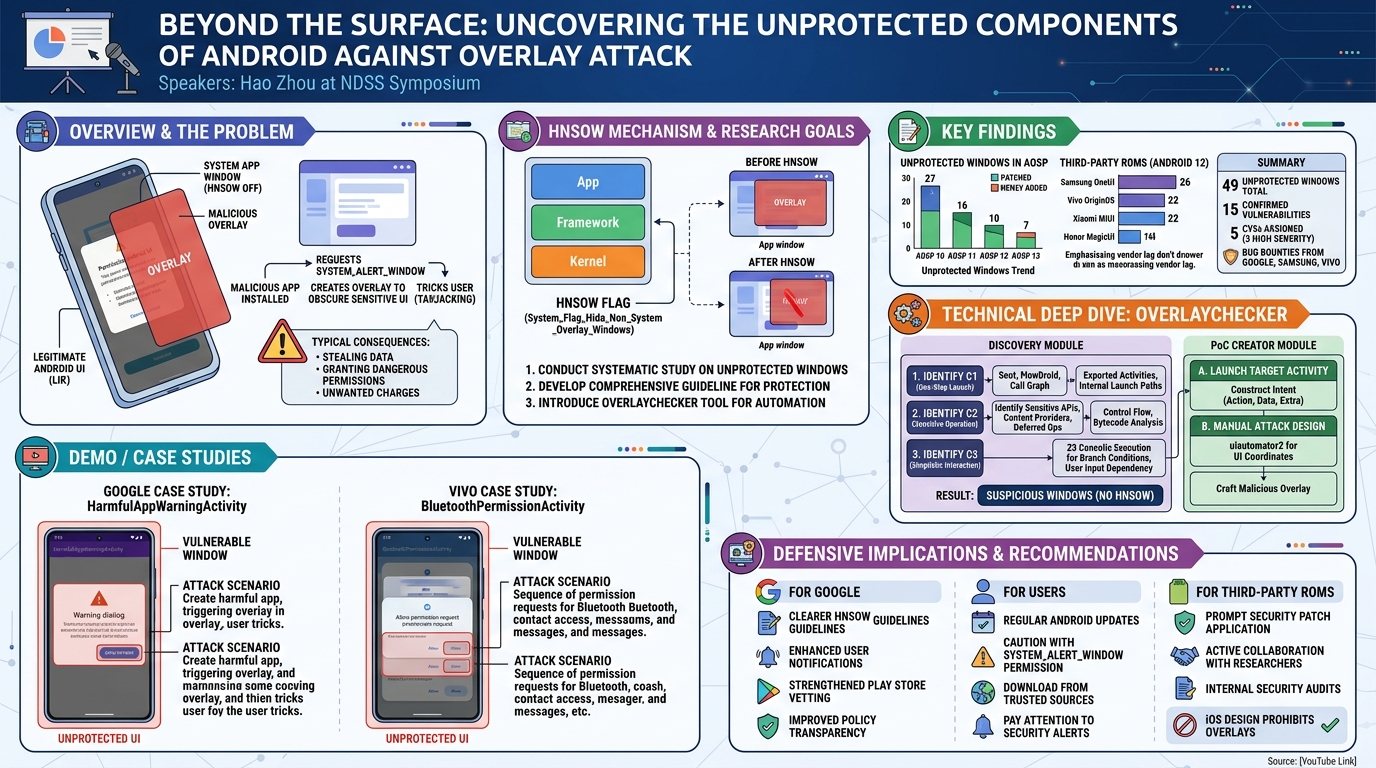
To counteract these threats, Android 10.0 and subsequent versions introduced a crucial security mechanism: the SYSTEM_FLAG_HIDE_NON_SYSTEM_OVERLAY_WINDOWS (HNSOW) flag. When enabled, HNSOW prevents third-party applications from drawing overlays over a system app's window, thereby mitigating tapjacking and consent bypass attacks. Despite its importance, the continuous stream of patches from Google to enable HNSOW in various system apps across Android versions 10.0 to 13.0 points to a persistent problem: a lack of comprehensive and clear guidelines for its implementation. This ambiguity leaves numerous windows in both the official Android Open Source Project (AOSP) and customized third-party Android ROMs vulnerable.
This article delves into the systematic investigation presented by Hao Zhou, which addresses this critical gap. The research conducts the first systematic study on unprotected system app windows against overlay attacks, proposing a comprehensive guideline for identifying windows requiring protection. It introduces OverlayChecker, a novel tool designed to automatically uncover these missing protections. The findings, validated through Proof-of-Concept (PoC) apps and responsible disclosures, led to the discovery of numerous vulnerable windows, with several confirmed by vendors, assigned CVEs, and awarded bug bounties. This work underscores the ongoing challenge of securing Android's complex UI against sophisticated overlay-based exploits.
Background
▶ Watch: Introduction to overlay attacks and HNSOW (0:00)
Understanding the architectural nuances of Android is essential to grasp the intricacies of overlay attacks and their defenses. At its core, the Android user interface is built upon fundamental concepts: an Activity represents a single screen that users interact with, each typically possessing its own Window, which serves as the top-level container for UI content. Communication between different app components is facilitated by Intents, messaging objects that carry data and specify actions, crucial for launching activities with specific contexts. The Android system itself is a multi-layered architecture, comprising the Library, Android Framework, and Application layers, with system services in the Framework layer providing APIs for sensitive operations.
The overlay feature, which allows an app to draw content over others, has a history of exploitation. Prior to Android 7, the SYSTEM_ALERT_WINDOW permission, necessary for creating overlays, was automatically granted to apps from the Google Play Store. This permissive stance enabled severe attacks, most notably the Cloak & Dagger Attack, where malicious apps abused overlays to monitor user input or trick users into granting permissions. Subsequent Android versions tightened controls, requiring explicit user consent for this permission.
To further bolster defenses, Android 10 and later introduced the SYSTEM_FLAG_HIDE_NON_SYSTEM_OVERLAY_WINDOWS (HNSOW) flag. This flag, when activated by a system app, prevents non-system (third-party) apps from drawing over its windows. For instance, the GrantPermissionsActivity within the permission management system app explicitly enables HNSOW to protect the sensitive operation of granting runtime permissions. It's important to note that HNSOW is applied selectively, balancing security with user experience; enabling it universally would render overlays largely impractical.
Despite the introduction of HNSOW, a series of vulnerabilities, such as CVE-2021-0333 (affecting BluetoothPermissionActivity), highlighted a persistent issue: the absence of clear guidelines for HNSOW usage. Google's official documentation provides only vague guidance, primarily covering windows related to granting permissions, approving app installations, or displaying privacy-sensitive notifications. The research team found this guidance insufficient, as many reported CVEs fell outside these narrow categories. This lack of comprehensive directives forms the primary motivation for the systematic study presented, aiming to bridge the gap in understanding and implementation of HNSOW protection.
Related work in the security community has extensively covered overlay-based attacks, including various forms of tapjacking, side-channel vulnerabilities, and exploits leveraging accessibility services. Most early vulnerabilities have since been patched. Defensive research has focused on analyzing overlay usage patterns, employing static analysis for malware detection, and proposing new security indicators or flags like HNSOW. Beyond overlays, other GUI attacks like task hijacking, false transparency, and phishing via notifications or WebViews have also been explored. This current work builds upon this foundation by systematically investigating the contemporary state of HNSOW protection and the prevalence of unprotected system app windows.
Key Findings
▶ Watch: Research goals: systematic study, guideline, OverlayChecker (1:30)
The research yielded several significant findings, fundamentally altering the understanding of Android's overlay protection landscape. A cornerstone of this work was the derivation of a comprehensive guideline for identifying system app windows that necessitate HNSOW protection. This guideline, refined through a semi-automated analysis of existing protected windows in AOSP Android 12, consolidates common features into three critical criteria:
- Criterion 1 (C1): One-Step Launch. Protected windows are typically launchable in a single step, making them highly vulnerable to direct invocation by malware.
- Criterion 2 (C2): Sensitive Operation. These windows perform security-sensitive operations, such as managing permissions, modifying device settings, or accessing sensitive data.
- Criterion 3 (C3): Simplistic Interaction. Sensitive operations in protected windows can usually be triggered with no more than one user interaction, excluding the initial launch, making single-click exploits highly effective.
The reliability of these guidelines was rigorously validated, showing over 90% compliance with already protected windows across Android 10-13, confirming their robustness.
Equipped with these guidelines, the researchers developed OverlayChecker, a novel tool designed to systematically uncover system app windows missing HNSOW protection. Applying OverlayChecker to a diverse set of 8 commercial Android systems across Android versions 10 to 13 (including AOSP, Samsung OneUI, Vivo OriginOS, Xiaomi MIUI, and Honor MagicUI), the study uncovered a staggering 49 unprotected windows.
Specifically, in AOSP Android 12 and 13, 10 unprotected windows were identified, with 7 persisting into Android 13. Intriguingly, 3 windows from Android 12 were found to be patched in Android 13, indicating Google's ongoing, albeit reactive, patching efforts. Analyzing the evolution of AOSP, OverlayChecker found 27 unprotected windows in AOSP 10, 16 in AOSP 11, 10 in AOSP 12, and 7 in AOSP 13. This trend reveals a gradual reduction in vulnerabilities but also highlights the continuous introduction of new unprotected windows in newer AOSP versions (e.g., 2 in A11, 1 in A12).
The situation in third-party Android ROMs proved even more critical. OverlayChecker identified 39 unprotected windows across Samsung OneUI (26), Vivo OriginOS (22), Xiaomi MIUI (22), and Honor MagicUI (14), all on Android 12. Crucially, all unprotected windows found in AOSP Android 12 were also unprotected in these customized ROMs. This underscores a significant problem: mobile vendors often lag in applying Google's security patches, leaving their users exposed to known vulnerabilities. For instance, RequestToggleWiFiActivity (CVE-2021-0837), patched in AOSP Android 12, remained vulnerable in Samsung OneUI Android 12.
The responsible disclosure of these findings to mobile vendors led to substantial outcomes: 15 confirmed vulnerabilities, 5 assigned CVEs (with 3 rated as high severity), and bug bounty rewards from Google, Samsung, and Vivo. This systematic investigation, therefore, not only exposed a widespread and persistent security flaw but also catalyzed concrete improvements in Android's security posture.
Technical Deep Dive
▶ Watch: Deep dive into HNSOW protection mechanism (2:55)
The core of this research lies in OverlayChecker, a sophisticated tool designed to systematically identify system app windows that lack HNSOW protection despite satisfying the defined criteria. OverlayChecker is structured into two main components: the Discovery Module and the PoC Creator Module.
The Discovery Module is responsible for identifying candidate windows that require protection but currently lack HNSOW. This module operates in a three-step process, directly mirroring the three criteria (C1, C2, C3) established in the guidelines:
- Identifying One-Step Launchable Windows (C1): This step aims to find all activities and dialogs that can be launched directly, making them prime targets for malware.
- External App Launch via Intent: The module first uses FlowDroid to parse the app's
AndroidManifest.xmlfile. It identifies activities where bothexportedandenabledattributes are true, indicating they can be launched by external apps directly via anIntentobject. - Internal Launch Mechanism Analysis: For activities that are enabled but not explicitly exported, a deeper analysis is performed. OverlayChecker constructs the call graph of system apps using Soot and traverses it backward from known activity launch points, such as
startActivityorDialog.showcalls. This helps identify the components that can trigger these windows, including activity startup methods (onCreate,onStart,onResume),Intenthandling methods inBroadcastReceivers(onReceive), system app services (onCreate,onStartCommand,onHandleIntent), or interfaces of system services callable by apps. - Asynchronous Launch Mechanisms: The tool also accounts for complex asynchronous launch mechanisms involving
Thread,Message Handler, andAsyncTaskby recovering implicit function calls, ensuring a comprehensive identification of all one-step launchable windows.
- Identifying Sensitive Operations (C2): This step determines if a window performs security-sensitive operations. These operations typically manifest in two ways:
- Invoking Sensitive APIs: System services implement critical functionalities, often protected by permission checks. OverlayChecker analyzes the bytecode of system services to identify interfaces that invoke permission check methods. These interfaces are then classified as sensitive APIs. The tool then inspects the control flow of the target window's event handlers (e.g.,
onClickmethods) to ascertain if they call these sensitive APIs in response to user interactions. - Accessing Sensitive Content Providers: System apps can also perform sensitive operations by accessing permission-protected Content Providers (e.g., modifying system data). The module detects the use of
ContentResolverwithin event handlers and infers the specific content provider being accessed. It then checks the content provider's manifest for required permissions, indicating sensitive access. - Deferred Sensitive Operations: A special case involves sensitive operations that are deferred to a parent activity. This occurs when a parent activity launches a child activity using
startActivityForResult. The child performs an action, returns aresultCodeandresultdata, and the parent'sonActivityResultthen executes sensitive operations based on this result. OverlayChecker handles this by backward slicing on thestartActivityForResultarguments and analyzing the data and control dependencies ofresultCodeandresulton sensitive operations withinonActivityResult.
- Identifying Simplistic Interaction (C3): This step determines if sensitive operations can be triggered by a single user interaction.
- Control Flow Analysis: The tool analyzes the control flow of the event handler containing the sensitive operations. It identifies any branch statements (e.g.,
ifconditions) that precede the sensitive operation. - Concolic Execution: If a global variable is used in the branch condition, OverlayChecker employs Z3 for concolic execution to check if its default value (initialized in
init,onCreate, oronStart) can satisfy the branch condition. If it can, C3 is met, as no prior user interaction is needed to fulfill the condition. - User Input Dependency: Conversely, if the branch condition relies on return values from user-input-dependent methods (e.g.,
getText()from an input field,isChecked()from a checkbox), then C3 is not met, as multiple interactions would be required to reach the sensitive operation.
Once all windows satisfying these three criteria are identified, the Discovery Module proceeds to verify whether HNSOW has been enabled for them. Any window meeting the criteria but lacking HNSOW is flagged as suspicious and a potential vulnerability. The implementation of OverlayChecker leverages over 8,000 lines of Java code and approximately 1,000 lines of Python, integrating tools like ADB for device interaction, Apktool for decompiling APKs, Soot for static analysis (call graphs, data/control flow), Z3 for concolic execution, and Fax for Intent construction, demonstrating a robust and multi-faceted technical approach.
Demo / Proof of Concept
▶ Watch: Persistent problem: Vague HNSOW guidelines, CVEs (3:30)
The second crucial component of OverlayChecker is the PoC Creator Module, designed to automate the construction of Proof-of-Concept (PoC) apps for the suspicious windows identified by the Discovery Module. This module enables practical confirmation of vulnerabilities with minimal manual effort.
A. Launching Target Activity:
To successfully launch a target activity, the PoC Creator Module must construct a proper Intent object, supplying the correct context via its Action, View, and Extra attributes.
- Basic Attributes: For basic
Intentattributes declared in the manifest (e.g., Action, Category, Data, Type), the module scans theAndroidManifest.xmlfile to determine their expected values. For example, if an activity likeNfcImportVCardActivityexpects theNDEF_DISCOVEREDAction and aDataattribute specifyingtext/vcard, the PoC constructs anIntentwith these precise values, often using random text for data types. - Extra Attributes: These are key-value pairs passed within the
Intent. The module identifies system APIs (e.g.,getStringExtra,getParcelableExtra) used to retrieve these extra attributes within the target activity'sonCreatemethod. It then tracks data flow to determine the type of the expected value (e.g.,String,Parcelable,Serializable) and assigns random, but type-appropriate, values. - Manual Intervention: For activities that cannot be launched through automatically constructed Intents (e.g., due to highly complex conditional constraints or specific custom data requirements), manual code analysis is employed. Tools like JEB are used, particularly for third-party ROMs where source code may not be readily available.
B. Manual Attack Design:
Once a suspicious window can be reliably launched, the next step involves manually designing an overlay for the PoC app to demonstrate the tapjacking attack.
- UI Element Identification: The uiautomator2 Android UI testing framework is utilized to obtain the precise coordinates and size of the suspicious window and its critical UI elements (e.g., buttons).
- Deceptive Overlay: The PoC app then requests the
SYSTEM_ALERT_WINDOWpermission, aligning with the threat model. It swiftly draws an overlay that covers the entire region of the vulnerable system window, making it visually indistinguishable from the underlying legitimate UI. - Widget Placement: Through manual analysis of the suspicious window's code, the specific widget (e.g., an "Allow" button) that triggers the sensitive operation is identified. A deceptive widget is then crafted within the overlay and precisely placed at the exact coordinates of the sensitive widget in the actual activity. This ensures that when a user interacts with what they perceive as the legitimate UI element, they are, in fact, interacting with the malicious overlay, triggering the attacker's desired action.
Case Studies:
The research provided compelling case studies demonstrating the severe security impacts of these missing protections:
- Google Case Study:
HarmfulAppWarningActivity
The HarmfulAppWarningActivity, a critical system activity designed to warn users about potentially harmful applications, was found to lack overlay protection. The PoC involved creating a malicious app, marking it as harmful via ADB, and then using a secondary app (with SYSTEM_ALERT_WINDOW permission) to launch the harmful app. Simultaneously, the secondary app drew an overlay over the "OPEN ANYWAY" button on the warning screen. This exploit could trick users into bypassing the warning and opening harmful apps, leading to unauthorized data access, unwanted charges, further malware installation, and potentially complete device compromise.
- VIVO Case Study:
BluetoothPermissionActivity
On a Vivo IQOO 8 device, Vivo's BluetoothPermissionActivity, responsible for managing Bluetooth permissions, was found to be unprotected. The PoC involved a malicious app requesting Bluetooth operation permissions and simultaneously drawing an overlay over the BluetoothPermissionActivity that appeared. The malware carefully sequenced permission requests, deceiving the user into granting permissions for Bluetooth device connection, access to contacts and call records, text messages, and SIM card operations. This vulnerability could allow an attacker to establish a Bluetooth connection without user consent, facilitating malicious file distribution or eavesdropping. With granted permissions, the attacker could access sensitive personal data, leading to privacy breaches, identity theft, blackmail, or sophisticated targeted attacks.
These case studies, alongside comprehensive tables summarizing broad security implications across AOSP and third-party ROMs (including manipulating app widgets, setting up work profiles, connecting to unvalidated networks, adjusting phone accounts, enabling debugging, and accessing sensitive data), powerfully illustrate the real-world risks posed by these seemingly subtle missing protections.
Defensive Implications
▶ Watch: Technical approach: Deriving HNSOW protection guidelines (4:10)
The findings of this systematic study carry significant defensive implications for various stakeholders within the Android ecosystem. Addressing the pervasive issue of unprotected system app windows against overlay attacks requires a multi-pronged strategy.
For Google (AOSP and Android Platform Developers):
- Clearer HNSOW Guidelines: The most critical recommendation is for Google to establish more concrete, unambiguous, and comprehensive guidelines for HNSOW usage. These guidelines should be enriched with practical examples and cover the diverse range of scenarios identified by the research, moving beyond the current vague directives. This would empower developers to correctly implement HNSOW from the outset, reducing the need for reactive patching.
- Enhanced User Notifications: Android should expand and improve user notifications regarding overlays, making them more conspicuous and precise. Users should be made more explicitly aware when an overlay is active, especially over sensitive system windows, to help them identify potential tapjacking attempts.
- Strengthened Play Store Vetting: Google Play Store vetting processes should be strengthened to leverage overlay detection features and machine learning. This could help identify apps that create deceptive overlays or request
SYSTEM_ALERT_WINDOWpermission without a clear, legitimate use case. - Improved Policy Transparency: Google should require stricter disclosure from apps regarding their use of the
SYSTEM_ALERT_WINDOWpermission, detailing why it's needed and how it's used. This increased transparency can aid users and security researchers in identifying potentially malicious behavior.
For Users:
- Regular Android Updates: Users should consistently update their Android devices to the latest available versions. While not a complete panacea, updates often include security patches that address known vulnerabilities, including those related to HNSOW.
- Caution with
SYSTEM_ALERT_WINDOWPermission: Exercise extreme caution when prompted to grant theSYSTEM_ALERT_WINDOWpermission to any app. Understand why the app needs this powerful permission and only grant it to trusted applications with legitimate reasons. - Download Apps from Trusted Sources: Restrict app downloads to trusted sources like the Google Play Store. Avoid sideloading apps from unknown or unofficial repositories, as these are more likely to harbor malicious code.
- Pay Attention to Security Alerts: Be vigilant and pay close attention to any security alerts or unusual behavior in the notification drawer or on screen. Unexplained UI changes or unexpected permission requests, especially when an overlay is present, should raise immediate suspicion.
For Third-party ROMs (Mobile Vendors like Samsung, Vivo, Xiaomi, Honor):
- Prompt Application of Security Patches: Mobile vendors must prioritize and promptly apply Google's security patches to their customized Android ROMs. The research clearly demonstrated that critical vulnerabilities, even those fixed in AOSP, often persist in third-party systems due to delayed patching.
- Active Collaboration with Security Researchers: Vendors should actively collaborate with security researchers and the broader security community. Establishing clear channels for vulnerability disclosure and engaging with research findings can significantly improve the security posture of their devices.
- Internal Security Audits: Conduct thorough internal security audits of their customized system applications and UI components to ensure HNSOW is correctly implemented wherever sensitive operations are performed.
It's also worth noting the contrasting approach of iOS. Apple's operating system generally prohibits apps from drawing floating windows over other applications, effectively eliminating the fundamental attack vector for overlay attacks, with limited exceptions like iPad's Slide Over and Split View. This design philosophy, rooted in a strong emphasis on user privacy and strict app sandboxing, highlights a fundamental difference in how Android and iOS balance flexibility with security. While Android's open nature offers unparalleled customization and features, it inherently introduces more complex security challenges that require continuous, systematic scrutiny and robust defensive measures.
Key Takeaways
- Persistent Vulnerability: Despite the introduction of HNSOW, Android system apps continue to suffer from widespread missing overlay protections, both in official AOSP and especially in third-party ROMs.
- Comprehensive Guideline: A systematic guideline, based on "One-Step Launch," "Sensitive Operation," and "Simplistic Interaction," reliably identifies system app windows requiring HNSOW protection.
- Automated Detection Tool: OverlayChecker is a novel, effective tool capable of automatically uncovering these unprotected windows by applying the derived guidelines through static and dynamic analysis.
- Significant Discoveries: The research identified 49 unprotected windows across 8 commercial Android systems, leading to 15 confirmed vulnerabilities, 5 CVEs (3 high severity), and bug bounties.
- Third-Party ROM Lag: Mobile vendors are significantly lagging in applying Google's security patches, leaving their customized systems vulnerable to issues already addressed in AOSP.
- Actionable Recommendations: Clear recommendations for Google (better guidelines, vetting), users (updates, caution), and third-party ROMs (prompt patching, collaboration) are crucial for enhancing Android's security.
About the Speaker(s)
Hao Zhou is the presenter of the work titled "Beyond the Surface: Uncovering the Unprotected Components of Android Against Overlay Attack" at the NDSS Symposium. In this talk, Hao Zhou detailed the first systematic study into Android system app vulnerabilities against overlay attacks, describing the comprehensive guidelines derived, the novel OverlayChecker tool developed, and the significant number of unprotected windows discovered across various Android systems. The presentation highlighted the critical need for improved security measures and clearer guidelines within the Android ecosystem.
All talks from Network and Distributed System Security (NDSS) Symposium 2024