UntrustIDE: Exploiting Weaknesses in VS Code Extensions
Elizabeth Lin
Network and Distributed System Security (NDSS) Symposium 2024 · Day 2 · Software Security
Overview
In an era where the software supply chain faces relentless attack, developer Integrated Development Environments (IDEs) have emerged as a critical, yet often overlooked, target. The talk "UntrustIDE: Exploiting Weaknesses in VS Code Extensions" by Elizabeth Lin at the NDSS Symposium sheds light on the systemic vulnerabilities present in Visual Studio Code (VS Code) extensions. VS Code, a dominant force in the developer ecosystem with over 74% market share according to the 2022 Stack Overflow survey, owes much of its popularity to its vast and rapidly expanding extension marketplace, which grew from 39,000 to over 47,000 extensions in just nine months.
Key moments
- 0:00 VS Code extensions: popular, unsandboxed, attractive target
- 1:09 Demonstrating arbitrary code execution via LaTeX Workshop extension
- 1:52 Research contributions: threat model, 21 vulnerabilities, npm dependencies
- 2:45 Workspace Trust: VS Code's security feature and limitations
- 3:00 Four main entry points for VS Code extension adversaries
- 4:00 Study assumptions and Node.js ecosystem vulnerability context
- 4:30 Methodology: Custom CodeQL SAST rules for analysis
UntrustIDE: Exploiting Weaknesses in VS Code Extensions
Speakers: Elizabeth Lin
Conference: NDSS Symposium
YouTube: https://www.youtube.com/watch?v=QQ9W2FM1X-w
Overview
In an era where the software supply chain faces relentless attack, developer Integrated Development Environments (IDEs) have emerged as a critical, yet often overlooked, target. The talk "UntrustIDE: Exploiting Weaknesses in VS Code Extensions" by Elizabeth Lin at the NDSS Symposium sheds light on the systemic vulnerabilities present in Visual Studio Code (VS Code) extensions. VS Code, a dominant force in the developer ecosystem with over 74% market share according to the 2022 Stack Overflow survey, owes much of its popularity to its vast and rapidly expanding extension marketplace, which grew from 39,000 to over 47,000 extensions in just nine months.
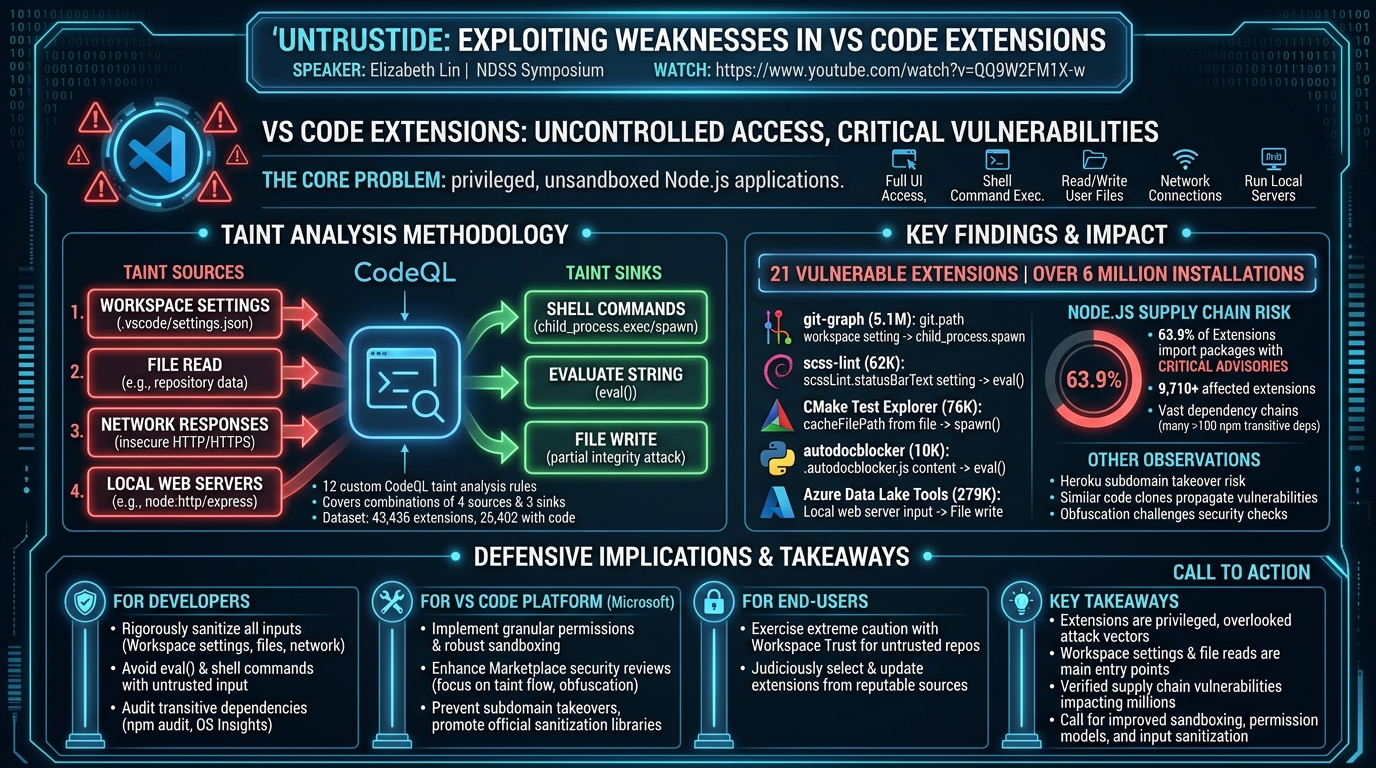
The core of the problem lies in VS Code's architecture: built on Electron, extensions are essentially Node.js applications with significant privileges. Crucially, they are not sandboxed, granting them full access to the user interface, the ability to execute shell commands, read and write user files, establish network connections, and even run local web servers—all with the same privileges as the VS Code application itself. While the underlying Node.js and Electron frameworks have been scrutinized for vulnerabilities, VS Code extensions have largely remained an uncharted territory for systematic security analysis. This research fills that gap by presenting a comprehensive study of the VS Code extension landscape, identifying novel threat models, developing specialized static analysis tools, and uncovering critical vulnerabilities impacting millions of developers.
The research's significance is underscored by its key contributions: the identification of a specific threat model for VS Code extension vulnerabilities, encoded into 12 custom CodeQL taint analysis rules; the discovery and verification of code execution vulnerabilities in 21 extensions, collectively impacting over 6 million installations; and a stark demonstration of the significant supply chain risk posed by the Node.js ecosystem, with thousands of extensions depending on vulnerable npm packages. These findings call for a fundamental re-evaluation of extension security, emphasizing the need for enhanced sanitization, stricter privilege models, and improved security checks within the VS Code ecosystem to protect developer workstations from increasingly sophisticated supply chain attacks.
Background
▶ Watch: VS Code extensions: popular, unsandboxed, attractive target (0:00)
Visual Studio Code's architecture provides a powerful yet inherently risky platform for extensions. As an Electron application, it leverages Chromium for its user interface and Node.js for backend functionalities. Extensions, written in JavaScript or TypeScript, can utilize a wide array of built-in Node.js modules and external npm packages. The vscode.commands interface allows extensions to interact directly with the IDE, manipulating windows or adding comments. Each extension defines its metadata and dependencies in a package.json manifest file, with activationEvents determining when an extension's activate() function is triggered, such as onLanguage, onCommand, or workspaceContains.
A central component of VS Code development is the concept of workspaces. Users can define project-specific configurations in a settings.json file located at the root of a workspace directory, often committed to a Git repository. Extensions can programmatically access these settings via the workspace object. A critical security feature, Workspace Trust, prompts users to decide whether to trust the authors of a folder. In "trusted mode," all features, including extensions and debugging, are enabled. In "restricted mode," functionality is limited, and extensions might be disabled. However, for developer convenience, users frequently disable restricted mode when opening potentially untrusted repositories, inadvertently exposing themselves to risk. This research assumes users might disable restricted mode, reflecting a common real-world scenario.
The threat model for VS Code extensions developed in this research diverges significantly from traditional web application security, primarily because user input within the IDE context is often implicitly trusted. The study identifies four main entry points for adversaries:
- Workspace Repository Control: An attacker controls the code in the active VS Code workspace, injecting malicious strings into
settings.jsonor other project files. - Web Browser Execution: If an extension runs a local web server (e.g., using Node.js
node:httporexpress), JavaScript executing in a web browser on the same host can connect to it and send malicious data. The 2021 Snyk vulnerability in the popular LaTeX Workshop extension, where a malicious website could connect via WebSocket to a local server and trigger arbitrary code execution (e.g., launching Calculator), serves as a motivating example. - On-path Network Adversary: If an extension makes insecure HTTP requests, an on-path attacker can modify server responses. Even with HTTPS, an attacker might influence the URL via untrusted workspace settings.
- Malicious Web Server: The attacker controls a web server that the extension connects to, influencing its response. This could facilitate multi-stage attacks, where an extension reads malformed configuration from one source, constructs a malicious URL, connects to an attacker-controlled server, and downloads a malicious file like
.bashrc.
The research operates under several assumptions: that VS Code extension developers do not intentionally create malicious extensions; that users are not intentionally attacking their own systems; that users explicitly disable restricted mode when cloning potentially untrusted repositories; and that files outside the VS Code workspace (e.g., local user files) are considered trusted.
This work builds upon extensive research into the Node.js and npm ecosystems, which have long been recognized as sources of security vulnerabilities. Previous studies by Cox et al. highlighted increased risks from outdated dependencies, Zahan et al. identified unmaintained packages as weak links, and Decan et al. showed that over 50% of packages are affected by vulnerabilities in their transitive dependencies. The notorious left-pad incident famously demonstrated how a trivial package can disrupt the entire ecosystem. Efforts to mitigate these issues include permission systems and static analysis tools like Nodest and Synode. "UntrustIDE" extends this understanding by applying similar principles to the unique and highly privileged context of VS Code extensions.
Key Findings
▶ Watch: Research contributions: threat model, 21 vulnerabilities, npm dependencies (1:52)
The "UntrustIDE" study systematically analyzed the security landscape of VS Code extensions, revealing significant vulnerabilities that impact millions of developers. The research's core contributions and key findings are multifaceted, spanning both specific security flaws and broader ecosystem insights.
Foremost, the study confirms that while vulnerabilities in VS Code extensions are not universally pervasive, their impact is substantial due to the popularity and privileged nature of the platform. A critical finding is the identification and verification of code execution vulnerabilities in 21 distinct extensions, collectively impacting over 6 million installations. These vulnerabilities primarily stem from two common sources: untrusted data originating from workspace settings and file reads within the active workspace. The most prevalent attack targets, or sinks, were shell command execution and the eval() function, allowing adversaries to inject and execute arbitrary code on the developer's machine.
A significant aspect of the findings pertains to the Node.js ecosystem's supply chain risk. The analysis revealed that out of 15,185 extensions for which transitive dependency data was collected, a staggering 9,710 extensions (63.9%) imported a package with a critical-level advisory. Furthermore, 13,655 extensions had over 100 npm transitive dependencies, highlighting the vast and often unmonitored attack surface introduced by the dependency chain. This underscores that even well-intentioned extension developers can inadvertently expose users to risk through their reliance on external packages.
Beyond direct vulnerabilities, the research yielded several interesting observations about the broader extension ecosystem:
- Heroku URLs: The discovery of extensions making requests to deleted Heroku subdomains presents a subdomain takeover risk. An adversary could register new applications under these expired subdomains and serve malicious payloads to unsuspecting developers.
- Similar Code: A high degree of code similarity was observed across different extensions. Using the Moss system, 28 out of 45 comparisons between similar extensions showed over 90% matched lines. This suggests that a vulnerability discovered in one extension could easily propagate through code clones, amplifying its potential impact.
- Security Measures: The study emphasizes the critical need for better sanitization and string checking for any data flowing into sensitive sinks. The effectiveness of current marketplace security checks on extension source code remains unclear, and the common practice of code obfuscation further complicates robust security reviews.
Specific examples of verified exploits included:
- The git-graph extension (5.1 million installations) was found vulnerable to code execution via workspace settings. Malicious input to the
git.pathsetting flowed directly tochild_process.spawn. - The scss-lint extension (62,000 installations) allowed code injection via
eval()by crafting malicious JavaScript in thescssLint.statusBarTextworkspace setting. - CMake Test Explorer (76,000 installations) was vulnerable to code execution when reading
cacheFilePathfrom a workspace file, which then flowed tospawn(). - The autodocblocker extension (10,000 installations) allowed code injection by reading content from a
.autodocblocker.jsfile within the workspace, which was subsequently passed toeval(). - Azure Data Lake Tools (279,000 installations) demonstrated a partial file integrity attack, where data from a network response (or local web server input) could be written to an arbitrary filename within the workspace.
These findings collectively highlight that developer workstations, through their reliance on VS Code extensions, are a significant and under-explored target for software supply chain attacks, necessitating urgent attention from both extension developers and the VS Code platform maintainers.
Technical Deep Dive
▶ Watch: Workspace Trust: VS Code's security feature and limitations (2:45)
The systematic identification of code injection and file integrity vulnerabilities in VS Code extensions was achieved through a rigorous taint analysis methodology. The researchers built their analysis rules on CodeQL, a powerful static program analysis tool developed by GitHub. CodeQL converts a program's source code into a queryable database, enabling the definition of custom classes and queries to match specific code patterns and track data flows. Recognizing that CodeQL's built-in classes for common JavaScript vulnerabilities often do not directly apply to the unique threat model of VS Code extensions, the team developed 12 custom taint analysis rules, comprising four distinct taint sources and three security-sensitive taint sinks.
Taint Sources
The four identified taint sources represent the entry points through which an adversary can inject malicious data:
- Workspace Settings: These are configurations defined in
settings.jsonfiles within the.vscodedirectory of a project, which can be controlled by an adversary. Extensions retrieve these settings using thevscode.workspace.getConfigurationAPI. The CodeQL implementation involved creating a customVSCodeWorkspaceConfigclass to identifyvscodemodule imports, track data flows, and specifically look for calls togetConfiguration, focusing solely on workspace-level settings. - File Read: Adversaries can distribute malformed data in other files within a repository. Extensions frequently read files for configuration or templates using Node.js's
node:fsmodule (e.g.,readFile,readFileSync) or VS Code'svscode.workspace.fs.readFile. The analysis leveraged CodeQL's built-inFileSystemReadAccessclass to identify data nodes reading from files. A crucial automated filtering step excluded files read from within the extension's own directory, assuming the extension developer is trusted. However, statically tracking complex file paths (e.g.,path.join(user_dir(), 'settings.json')) proved challenging, often requiring manual inspection of 3-4 nodes in the data flow path to confirm if a file path was within the untrusted workspace. - Network Responses: Extensions often make network requests. If an insecure protocol like HTTP is used, an on-path adversary can inject malicious data. Even with HTTPS, an adversary might influence the network destination via untrusted workspace settings. CodeQL's built-in
Http::ResponseNodeclass was used, augmented by customUntrustedURLandHttpURLclasses to filter for URLs derived from untrusted sources or those using the insecurehttp://protocol. - Local Web Servers: Some extensions spawn local web servers (e.g., using
node:httporexpress). JavaScript executing in a web browser on the same host can connect to these servers and send malicious input. CodeQL'sHttp::RouteHandlerclass was employed to identify callback functions that handle incoming requests to web server API endpoints.
Taint Sinks
The three taint sinks represent security-sensitive operations where untrusted data could lead to an exploit:
- Shell Commands: Node.js's
child_processmodule (exec,spawn) allows applications to execute shell commands. If an adversary controls parts of the command string, they can inject arbitrary commands using characters like&,;, or|. CodeQL's existingSystemCommandExecutionclass effectively captured these invocations. - Evaluate String as Code (
eval()): Theeval()function executes a string as JavaScript code. Untrusted data flowing toeval()can lead to arbitrary code injection. CodeQL'sDirectEvalclass was used, with an automated filter added to exclude strings enclosed in brackets (e.g.,(and)), which are often used for evaluating JSON objects or expressions rather than full statements, thereby reducing false positives. - File Write: Node.js's
node:fsmodule provides APIs likewriteFileandappendFile. For this to be an exploitable vulnerability, an adversary must control both the file path and the content being written. CodeQL'sFileSystemWriteAccessclass was used, with queries combined to ensure data flows from untrusted sources to both the file path and content arguments. Similar to file reads, manual inspection was often required to confirm exploitability, especially when an extension reads from and writes to the same file.
Analysis Pipeline
The entire analysis pipeline was structured into four main stages, orchestrated using the BullMQ framework, a Node.js library built on top of Redis queues, facilitating a microservice architecture:
- Package Downloader: A scraper collected extension metadata (name, publisher, update status, installs, GitHub links) from the Microsoft Visual Studio Marketplace. Download links were added to a BullMQ queue, and worker processes downloaded and unpacked the extension source code.
- Database Builder: Unpacked source code jobs were queued for database creation. Another worker then executed CodeQL commands to build a CodeQL database for each extension.
- Multiple Query Runners: Once databases were built, this stage executed the 12 custom CodeQL taint analysis rules. Separate queues and workers ran these queries in parallel, covering all combinations of the four taint sources and three taint sinks.
- Query Result Parsers: Upon query completion, results were added to a parser queue. A worker processed these, transformed them into a standardized format, and saved them into a MongoDB database. Finally, additional filters were applied, followed by crucial manual verification of identified vulnerabilities.
The dataset, collected in January 2023, comprised 43,436 extensions from the marketplace. Notably, only 25,402 of these contained JavaScript or TypeScript code, with the remainder being primarily theme or snippet extensions. The researchers also collected GitHub repository content and npm advisory data from Open Source Insights to enrich their analysis.
The characterization of this dataset revealed that 40% of extensions had not been updated in over two years, though over 54% of installations were for more recently updated extensions. Dependency analysis showed that while 80% of extensions had fewer than five direct dependencies, 37% of installations were for extensions with over ten direct dependencies. For transitive dependencies, 13,655 extensions had over 100 transitive dependencies, and critically, 9,710 extensions (63.9%) imported a package with a critical-level advisory, highlighting pervasive supply chain risks. Furthermore, a significant number of extensions exhibited privileged system resource access: 322 spawned web servers (65 upon activation), 5,112 accessed files, 4,074 made network requests, and 1,902 called shell commands, underscoring the extensive capabilities granted to these extensions.
Demo / Proof of Concept
▶ Watch: Study assumptions and Node.js ecosystem vulnerability context (4:00)
The "UntrustIDE" research provided concrete demonstrations and proof-of-concept exploits for several identified vulnerabilities, illustrating the real-world impact of untrusted data flowing to sensitive sinks. These examples spanned various combinations of taint sources and sinks, validating the effectiveness of the custom CodeQL rules and the severity of the findings.
Workspace Settings to Shell Command Execution
One of the most impactful demonstrations involved the git-graph extension, with over 5.1 million installations. The vulnerability stemmed from the extension's use of the git.path workspace setting, which was directly incorporated into a child_process.spawn call without proper sanitization. An attacker could craft a malicious settings.json file within a repository, setting git.path to a path that points to an attacker-controlled shell script. Upon opening the untrusted workspace, the extension would execute this script, leading to arbitrary code execution on the developer's machine. A similar vulnerability was found in the Django Commands extension (49,000 downloads), where workspace configuration values flowed to a shell command, demonstrating a common pattern across different extensions.
Workspace Settings to eval() Code Injection
Another critical exploit pathway involved the eval() sink. The scss-lint extension, with over 62,000 installations, was found vulnerable. The scssLint.statusBarText workspace setting was used in a context that flowed directly to an eval() call. By injecting a crafted JavaScript string into this setting within the settings.json file, an attacker could achieve arbitrary JavaScript code injection and execution. This highlights the dangers of using eval() with any input derived from potentially untrusted sources, even if it appears to be simple configuration text.
Files to Shell Command Execution
Vulnerabilities originating from file reads within the workspace were also demonstrated. The CMake Test Explorer extension (76,000 installations) was exploited by manipulating a file read. The extension read a cacheFilePath from a workspace file, and this path subsequently flowed to a spawn() function. An attacker could create a malicious CMakeCache.txt file in the workspace containing an exploit, leading to arbitrary code execution when the extension processed this file. This vector emphasizes that not just settings.json, but any configuration or data file within an untrusted repository can be a source of malicious input.
Files to eval() Code Injection
The autodocblocker extension (10,000 installations) provided a clear example of code injection via file reads to an eval() sink. The extension read content from a .autodocblocker.js file located within the workspace. This content was then directly passed to eval(). An attacker could inject a malicious exec() call or other arbitrary JavaScript code into this .autodocblocker.js file, which would be executed when the extension processed it. This scenario is particularly dangerous as it allows for direct injection of executable JavaScript code.
Network Response / Local Web Server to File Write (Partial File Integrity Attack)
A demonstration of a partial file integrity attack was observed in the Azure Data Lake Tools extension, impacting over 279,000 installations. This extension ran a local web server, and a web server API received data that subsequently flowed to a file write operation. An attacker, by sending a crafted payload to this local web server, could specify an arbitrary filename and arbitrary content to be written within the workspace. While the file extension was sometimes hardcoded or certain directories were protected, allowing for only "partial" control over the file path, this still represented a significant threat. It could lead to overwriting or creating files with malicious content, potentially corrupting project data or laying the groundwork for further exploitation. This vulnerability highlighted the risk posed by extensions exposing local web servers to client-side JavaScript, as demonstrated by the earlier LaTeX Workshop example.
These proof-of-concept exploits underscore that the identified vulnerabilities are not theoretical but practical attack vectors that can lead to significant compromise of a developer's machine and potentially the entire software supply chain.
Defensive Implications
▶ Watch: Methodology: Custom CodeQL SAST rules for analysis (4:30)
The findings from "UntrustIDE" carry significant defensive implications for extension developers, the VS Code platform, and end-users. Addressing these vulnerabilities requires a multi-layered approach to bolster the security of the developer workstation.
For Extension Developers:
- Strict Input Sanitization and Validation: This is paramount. All data originating from untrusted sources—specifically workspace settings, files within the workspace, and network responses—must be rigorously sanitized and validated before being used in any security-sensitive operation. This includes escaping shell commands, validating file paths, and ensuring that any string intended for dynamic code execution (
eval()) is not influenced by external input. - Avoid Dynamic Code Execution: Developers should, wherever possible, avoid using functions like
eval()andchild_process.exec()with untrusted or partially trusted input. If dynamic execution is unavoidable, robust sandboxing mechanisms or tightly constrained execution environments are essential. - Principle of Least Privilege: Extension developers should critically re-evaluate the extensive access currently granted to extensions. Only necessary permissions should be requested and utilized. For instance, if an extension only needs to read a specific file type, it should not be capable of executing arbitrary shell commands.
- Secure Dependency Management: Given the high prevalence of vulnerable npm dependencies, developers must actively audit and update their transitive dependencies. Tools like
npm auditand services like Open Source Insights should be integrated into the development workflow to identify and mitigate known vulnerabilities. - Secure Configuration Practices: Developers should guide users on secure workspace settings and educate them about the implications of disabling Workspace Trust. Default settings should prioritize security over convenience where possible.
For the VS Code Ecosystem (Microsoft):
- Enhanced Sandboxing and Permission Models: The current "all or nothing" approach to extension privileges is insufficient. Microsoft should explore more granular permission models or robust sandboxing for extensions, similar to browser extension security models, to restrict their access to the host system and sensitive files.
- Improved Marketplace Security Review: The effectiveness of existing marketplace security checks needs to be significantly enhanced. This includes more sophisticated static and dynamic analysis of extension source code, with a particular focus on detecting the taint flows identified in this research. Techniques to counteract code obfuscation during security reviews should also be explored.
- Strengthened Default Security Settings: Default security settings, particularly regarding Workspace Trust, should be strengthened to make it harder for users to inadvertently disable critical protections for convenience. Clearer warnings and educational prompts are necessary.
- Subdomain Takeover Prevention: Microsoft should monitor for extensions connecting to potentially expired domains (e.g., Heroku subdomains) and alert developers or block such connections to prevent subdomain takeover attacks.
- Sanitization Libraries and Best Practices: Develop and promote official sanitization libraries and secure coding best practices specifically tailored for VS Code extension development to help developers avoid common pitfalls.
For End-Users (Developers):
- Exercise Workspace Trust: Users should exercise extreme caution and fully understand the implications before trusting a workspace, especially when cloning repositories from unknown or untrusted sources. Defaulting to restricted mode is the safest approach.
- Judicious Extension Selection: Be selective about which extensions to install. Prefer extensions from reputable publishers, those with a strong security track record, and those that are actively maintained.
- Review Workspace Settings: Be wary of project-specific
settings.jsonfiles in untrusted repositories. Malicious configurations can be hidden within these files. - Stay Updated: Keep VS Code and all installed extensions updated to benefit from the latest security patches.
By implementing these defensive strategies across the entire ecosystem, the security posture of developer workstations can be significantly improved, mitigating the risks posed by untrusted code within VS Code extensions.
Key Takeaways
- VS Code extensions represent a critical and under-explored attack vector in the software supply chain, posing significant risks to developer workstations due to their high privileges and lack of sandboxing.
- The most prevalent sources of vulnerabilities are untrusted workspace settings and file reads within the active repository, which can lead to arbitrary code execution via shell commands or
eval()functions. - The study identified and verified code execution vulnerabilities in 21 distinct extensions, collectively impacting over 6 million installations, demonstrating the widespread potential impact of these flaws.
- The Node.js/npm ecosystem introduces substantial supply chain risk, with 63.9% of extensions depending on packages containing critical-level advisories and many having over 100 transitive dependencies.
- Current security features like Workspace Trust are often bypassed by developers for convenience, highlighting the need for stronger default security and robust input sanitization within extensions.
- Effective defense requires improved input sanitization, more granular permission models for extensions, enhanced marketplace security reviews (especially for obfuscated code), and active dependency management by developers.
About the Speaker(s)
The talk "UntrustIDE: Exploiting Weaknesses in VS Code Extensions" was delivered by Elizabeth Lin. Unfortunately, the provided talk metadata and transcript do not contain further biographical details about the speaker, such as their title or company.
All talks from Network and Distributed System Security (NDSS) Symposium 2024