Draining Your Credentials From Popular MacOS Password Managers - Wojciech Regula
Wojciech Regula (Head of Mobile Security · Securing)
Nullcon Goa 2025 · Main Stage
Overview
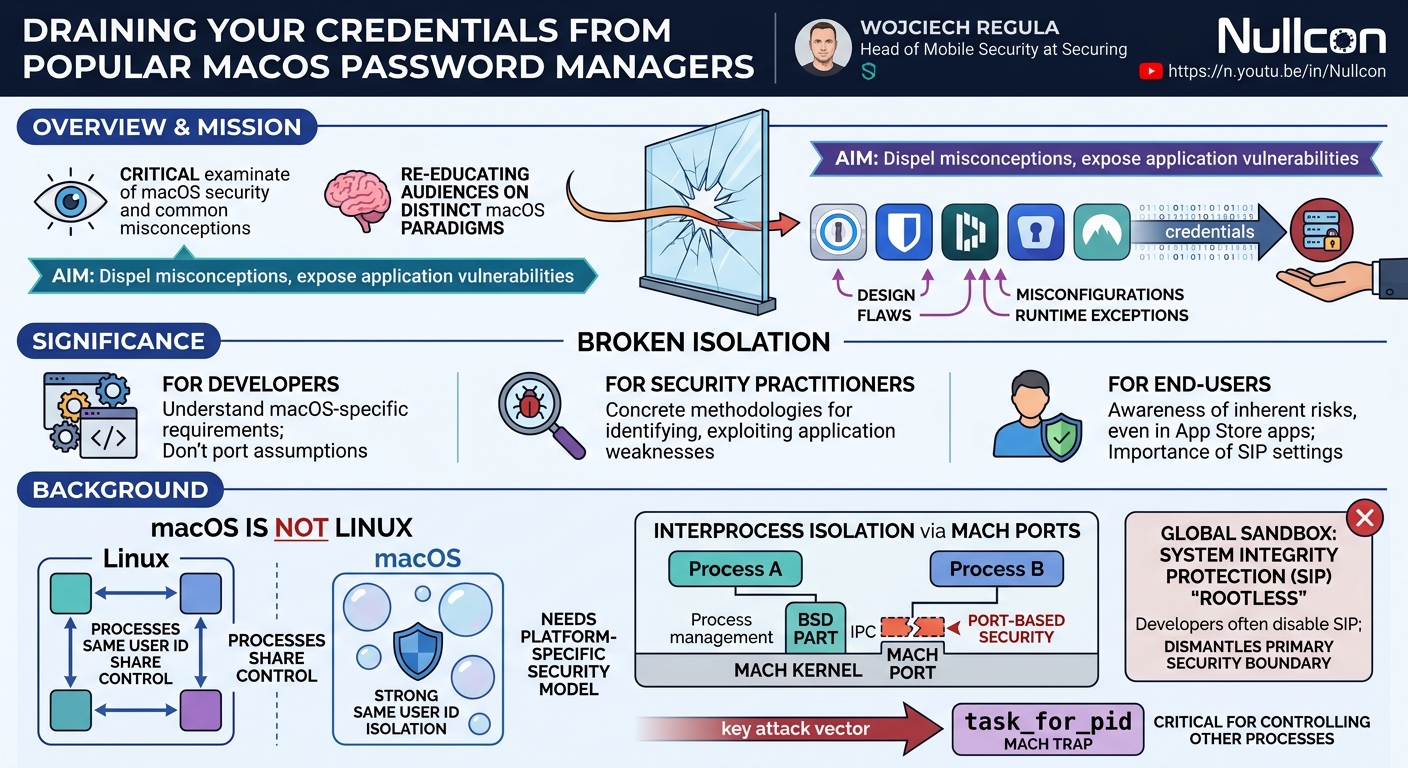
Wojciech Regula's Nullcon talk, "Broken Isolation: Draining Your Credentials From Popular MacOS Password Managers," delivers a critical examination of macOS security, aiming to dispel common misconceptions and expose vulnerabilities in widely used third-party applications. Regula, a seasoned macOS and iOS security researcher, argues that many developers and users erroneously equate macOS's security model with that of Linux, leading to a fundamental misunderstanding of its isolation mechanisms. This talk serves as a mission to re-educate the audience on the distinct architecture and security paradigms of macOS.
Key moments
- 0:00 Speaker introduction and talk overview
- 2:00 Agenda: M/OS security, password managers, recommendations
- 3:30 Mac OS unique architecture: FreeBSD and NeXTSTEP foundations
- 4:30 Understanding Mac OS Port vs. BSD process ownership security
- 6:00 Mac OS sandboxing, SIP, and global hallucination
- 8:00 Summary: Mac OS is not Linux, different user ID control
- 8:30 Why ptrace is limited on Mac OS
Draining Your Credentials From Popular MacOS Password Managers - Wojciech Regula
Speakers: Wojciech Regula, Head of Mobile Security at Securing
Conference: Nullcon
YouTube: https://www.youtube.com/watch?v=XevoGMlgAtw
Overview
Wojciech Regula's Nullcon talk, "Broken Isolation: Draining Your Credentials From Popular MacOS Password Managers," delivers a critical examination of macOS security, aiming to dispel common misconceptions and expose vulnerabilities in widely used third-party applications. Regula, a seasoned macOS and iOS security researcher, argues that many developers and users erroneously equate macOS's security model with that of Linux, leading to a fundamental misunderstanding of its isolation mechanisms. This talk serves as a mission to re-educate the audience on the distinct architecture and security paradigms of macOS.
The core of the presentation dives into practical exploitation techniques against five popular macOS password managers. Regula demonstrates how various design flaws, misconfigurations, and specific runtime exceptions in these applications—ranging from native Objective-C to Electron-based and browser-extension-only solutions—can be leveraged to bypass macOS's intended security boundaries. The talk highlights that even with robust platform-level protections like System Integrity Protection (SIP) and Hardened Runtime, applications can inadvertently create attack surfaces, allowing an attacker operating at the same user privilege level to extract sensitive credentials.
This research is highly significant for several reasons. Firstly, it underscores the critical importance for developers to deeply understand the platform-specific security requirements of macOS, rather than porting assumptions from other operating systems. Secondly, for security practitioners and bounty hunters, it provides concrete methodologies and tools for identifying and exploiting common weaknesses in macOS applications. Finally, for end-users, it raises awareness about the inherent risks associated with popular software, even those downloaded from trusted sources like the Mac App Store, and the necessity of maintaining system integrity settings.
Background
▶ Watch: Speaker introduction and talk overview (0:00)
The foundation of Regula's talk rests on a crucial distinction: macOS is fundamentally different from Linux, particularly in its security model. While macOS shares a Unix-like base (derived from FreeBSD), it also incorporates the NeXTSTEP/Mach kernel architecture. This dual parentage results in a kernel split into two parts: the BSD part handles traditional Unix tasks like process management and syscalls, while the Mach microkernel is responsible for processor scheduling, virtual memory, and interprocess communication (IPC) via Mach ports. This leads to two distinct security models: BSD's process ownership and Mach's port-based security. On macOS, the latter is paramount for inter-process isolation, even for processes running under the same user ID.
This same user ID isolation is a cornerstone of macOS security, contrasting sharply with Linux, where processes sharing the same user ID can often control each other. Without this isolation on macOS, an attacker could impersonate private entitlements, bypass TCC (Privacy framework), escalate privileges from user to root, and even bypass System Integrity Protection (SIP). SIP, often referred to as rootless, is a global sandbox enforced by a sandbox kernel extension that restricts access to many system directories and prevents debuggers from attaching to platform binaries or Apple-signed processes, even with root privileges. Alarmingly, Regula notes a common practice among developers to disable SIP to fix issues, a move that effectively dismantles macOS's primary security boundary.
Central to controlling other processes on macOS is the task_for_pid Mach trap, which grants access to a target process's memory space. This function is heavily restricted and controlled by the Task Gate daemon and AMFI (Apple Mobile File Integrity). By default, task_for_pid requests are denied for platform binaries or apps with Hardened Runtime enabled. Hardened Runtime is a critical security feature that protects the runtime integrity of software by preventing code injection, dynamic library hijacking, and process memory space tampering. It is enforced for all applications distributed outside the Mac App Store through notarization, a process where Apple scans apps for malicious content and verifies their security properties. However, a significant loophole exists: applications distributed via the Mac App Store are not required to undergo notarization, meaning they might not have Hardened Runtime enabled by default, potentially weakening their security posture compared to directly downloaded, notarized apps.
Despite these strong protections, developers can inadvertently introduce vulnerabilities through runtime exceptions. Two particularly relevant exceptions for code injection are allow-dyld-environment-variables (which allows dynamic libraries to be loaded via environment variables, similar to Linux's LD_PRELOAD) and disable-library-validation (which permits the loading of untrusted dynamic libraries not signed by Apple or the app's developer). While Apple's code signing prevents easy modification of these attributes, if an application explicitly includes disable-library-validation, it opens a significant attack vector, especially when combined with unprotected plugin directories. Regula's research exploits these nuanced aspects of macOS security, demonstrating that even well-intentioned features or overlooked configuration details can lead to complete compromise of sensitive data.
Key Findings
▶ Watch: Mac OS unique architecture: FreeBSD and NeXTSTEP foundations (3:30)
Regula's primary finding is that the fundamental macOS principle of same user ID isolation is frequently broken by popular third-party password managers, leading to credential leakage. This breakage is not necessarily due to direct zero-day exploits in macOS itself, but rather a combination of developer choices, misconfigurations, and overlooked design flaws in the applications. He systematically demonstrates that despite macOS's robust underlying security architecture, including System Integrity Protection (SIP) and Hardened Runtime, applications can be vulnerable through several distinct vectors:
- Exploiting Runtime Exceptions: Applications that enable
disable-library-validationas a runtime exception (e.g., for plugin support) create a direct path for injecting untrusted code. Even if the application itself is protected by Hardened Runtime and app protection mechanisms, if it loads plugins from user-writable, unprotected directories, an attacker can simply place a malicious dynamic library there. - Absence of Hardened Runtime in Mac App Store Apps: A critical discovery is that applications distributed through the Mac App Store are not subject to the same notarization requirements as apps distributed elsewhere. This means they often lack Hardened Runtime, which is a best practice but not mandatory for App Store submissions. The absence of Hardened Runtime makes these applications susceptible to straightforward dynamic library injection attacks, even without specific runtime exceptions.
- Vulnerable Electron Fuses: Electron-based applications often come with a set of security configurations known as "fuses." Regula identifies that certain "problematic" fuses, such as
enable-node-ci-inspect-arguments, when enabled, can be abused to gain control over the application's process and execute arbitrary code. This allows for exploitation even if Hardened Runtime is present. - Compromised Browser Extension Isolation: Browser extensions, particularly those that are part of a desktop password manager or operate as standalone solutions, often exhibit weak isolation practices within the browser's context. This can manifest as:
- Storing sensitive private keys or communication IDs in accessible locations (like browser local storage or logs), enabling an attacker to spoof communication with the main application without injection.
- Operating entirely within the browser's JavaScript runtime, making them vulnerable to control via browser automation tools like Selenium, which can force the extension to decrypt and dump credentials.
- Misconceptions about macOS Security: Underlying all these vulnerabilities is a pervasive misunderstanding among developers regarding macOS's unique same user ID isolation model. The assumption that "if it works on Linux, it works on macOS" or that disabling SIP for convenience is acceptable, directly leads to these security weaknesses.
In essence, Regula demonstrates that the macOS security model, while powerful, is only as strong as the weakest link in the application stack. Developers' choices regarding entitlements, runtime configurations, distribution channels, and platform-specific security awareness are crucial determinants of an application's resilience against credential draining attacks.
Technical Deep Dive
▶ Watch: Understanding Mac OS Port vs. BSD process ownership security (4:30)
Regula begins the technical deep dive by reiterating the unique macOS kernel architecture, which combines FreeBSD and NeXTSTEP/Mach. This results in two distinct security models: the BSD model based on process ownership and the Mach model based on ports. The Mach port security model is crucial for same user ID isolation on macOS, where processes, even under the same user, are inherently isolated unless explicit permissions are granted. This contrasts with Linux, where the same user ID typically implies shared control.
The speaker emphasizes System Integrity Protection (SIP) as a "global sandbox" enforced by a sandbox kernel extension. When enabled, SIP prevents even root users from performing actions like modifying system directories, attaching debuggers to Apple-signed processes, or loading arbitrary kernel extensions. Disabling SIP, often done for debugging or compatibility, essentially removes this critical security boundary, leading to a complete loss of isolation and trivial privilege escalation from user to root. The command csrutil status is provided to check SIP's status.
A key mechanism for process control is the task_for_pid Mach trap, which allows a process to obtain the task port of another, granting significant control over its memory and execution. This function is heavily restricted by the Task Gate daemon and AMFI (Apple Mobile File Integrity). Debugging a process, which requires task_for_pid, is generally denied if the target app is a platform binary or has Hardened Runtime enabled. Exceptions exist:
- If the target app has the public
com.apple.security.get-task-allowentitlement, debugging is possible even by the same user without root. - If the target app lacks Hardened Runtime and
get-task-allow, root permissions are needed (and it must not be an Apple app). - If the debugger holds the private
system.task_portentitlement, injection is always possible, but official debuggers likelldbdo not possess this. Regula shared a past anecdote where he found Apple debug builds withget-task-allowand private TCC permissions, enabling him to take over Apple daemons.
Hardened Runtime is a code signing attribute that prevents common exploit classes like code injection and dynamic library hijacking. It's enforced by notarization for apps distributed outside the Mac App Store. The codesign -d --entitlements - command can reveal if Hardened Runtime is enabled (indicated by flags=0x10000(runtime)). However, runtime exceptions can weaken Hardened Runtime. Two critical exceptions are:
allow-dyld-environment-variables: Allows loading dynamic libraries via environment variables (e.g.,DYLD_INSERT_LIBRARIES), similar toLD_PRELOAD.disable-library-validation: Permits loading untrusted dynamic libraries that are not signed by Apple or the application's team identifier. This is often used for plugin architectures. Firefox was cited as an example, enabling this for Flash compatibility.
For Electron applications, Regula references his tool, electron-zap, and previous work on electron fuses. These fuses are internal Electron configurations that, if misconfigured (e.g., enable-node-ci-inspect-arguments enabled), can expose the application to code injection, even with Hardened Runtime. The npx electron-fuses read command allows inspection of these fuses.
The talk highlights that Mac App Store apps are a special case; they are not required to be notarized, and thus Hardened Runtime is not enforced. Apple's documentation states it's "best practice for new code" but "not necessary for App Store apps," creating a security disparity between App Store and non-App Store distributions. This omission directly facilitates simpler code injection attacks against Mac App Store apps.
Demo / Proof of Concept
▶ Watch: Summary: Mac OS is not Linux, different user ID control (8:00)
Regula demonstrated several practical exploits against popular password managers, showcasing different attack vectors based on the technical vulnerabilities discussed:
- MacPass (Native Objective-C client for KeePass):
- Vulnerability: MacPass had Hardened Runtime enabled but crucially also the
disable-library-validationruntime exception. Additionally, it loaded plugins from a user-writable, unprotected directory (~/Library/Application Support/MacPass). Modern macOS app protection prevents modifying an app's bundle directly without a zero-day, but user-specific plugin directories remain unprotected by design. - Exploitation: The attacker first determined MacPass's identifier and enabled loading of untrusted plugins by modifying a preference. Then, a malicious dynamic library (plugin) was copied into the designated plugin directory. Upon the user unlocking their vault, the plugin, running within MacPass's process context, would execute and dump all stored entries and the master password to a temporary file.
- Outcome: Credentials drained without requiring root privileges, exploiting a design decision for plugin extensibility.
- Keeper (Electron-based, from Mac App Store):
- Vulnerability: Keeper, distributed via the Mac App Store, was found to have no Hardened Runtime enabled. As Regula explained, notarization (which enforces Hardened Runtime) is not mandatory for Mac App Store apps, creating a weaker security baseline.
- Exploitation: Due to the absence of Hardened Runtime, the attacker could simply inject an untrusted dynamic library (a keylogger in this demo) into the Keeper process.
- Outcome: The keylogger captured the master password as it was typed, breaking the process isolation with minimal effort.
- NordPass (Electron-based, direct download):
- Vulnerability: NordPass was distributed directly and likely had Hardened Runtime. However, it had a problematic Electron fuse enabled:
enable-node-ci-inspect-arguments. This fuse, if enabled, provides an attack surface for process control. - Exploitation: Regula used his electron-zap tool, which leverages environment variables to abuse the enabled fuse. This allowed the attacker to take over the application's task port and gain code execution within its context.
- Outcome: The exploit dumped the master password to a temporary file, demonstrating how Electron-specific misconfigurations can bypass Hardened Runtime.
- KeePassXC (Native Qt-based, Browser Extension):
- Vulnerability: This scenario focused on KeePassXC's browser extension. While the main app is robust, the browser extension communicates with it using asymmetric crypto. The vulnerability arose because the browser extension stored its private key and communication ID in easily accessible locations (e.g., local storage or logs within the browser's profile). Browsers are generally not known for strong isolation practices in this context.
- Exploitation: The attacker extracted the private key and communication ID from the browser's storage. Using a custom Python library designed to interact with KeePassXC's documented communication protocol, the attacker then spoofed the browser extension's communication with the main KeePassXC application.
- Outcome: All entries from the KeePassXC vault were successfully drained without directly injecting into the main password manager or the browser extension itself; the exploit merely leveraged exposed communication credentials.
- LastPass (Browser Plugin-only):
- Vulnerability: LastPass as a plugin-only solution performs all decryption and encryption within the browser's JavaScript runtime. The core vulnerability here is that if an attacker can control the browser, they can control the extension.
- Exploitation: The attacker used Selenium, a browser automation tool typically used for quality assurance, to programmatically control the browser. By simulating user actions, Selenium forced the LastPass extension to decrypt its vault.
- Outcome: The attacker was able to extract specific entries (e.g., for
gmail.com) directly from the browser's memory after the vault was unlocked, effectively bypassing any cryptographic protections by operating at the layer where the decrypted data was exposed.
These demos collectively illustrate that while macOS provides strong platform security, the design and configuration choices of third-party applications remain critical determinants of overall security.
Defensive Implications
▶ Watch: Why ptrace is limited on Mac OS (8:30)
The findings presented by Wojciech Regula carry significant defensive implications for both macOS application developers and end-users/system administrators. Understanding these allows for a more robust security posture against credential draining attacks.
For macOS Application Developers:
- Enable Hardened Runtime: This is the most crucial step for applications distributed outside the Mac App Store. Hardened Runtime is a powerful defense against code injection and dynamic library hijacking. Ensure it's active and properly configured.
- Review Runtime Exceptions: If Hardened Runtime is enabled, meticulously review and minimize the use of runtime exceptions like
allow-dyld-environment-variablesanddisable-library-validation. These exceptions should only be used when absolutely necessary and with a thorough understanding of the security implications. If plugin support is required, ensure plugins are loaded from cryptographically protected locations or are themselves signed and validated. - Enable Sandboxing: While not mandatory for all macOS apps, enabling sandboxing provides an additional layer of isolation. It restricts an application's access to system resources and creates a protected container for its data, which is further secured by TCC.
- Notarize Your Applications: For apps distributed outside the Mac App Store, notarization is essential. It enforces Hardened Runtime and provides an initial scan for malicious components, reassuring users and strengthening the app's integrity.
- Disable Problematic Electron Fuses: If developing Electron applications, carefully configure Electron fuses. Disable any fuses that introduce unnecessary debugging capabilities or weaken the application's isolation, such as
enable-node-ci-inspect-arguments. Refer to security best practices for Electron development. - Pentest Your Applications: Regularly conduct security assessments and penetration tests of your macOS applications, specifically focusing on inter-process communication, entitlement usage, runtime configurations, and how sensitive data is handled in memory and on disk.
- Understand Mac App Store Differences: Developers distributing via the Mac App Store should be aware that notarization and Hardened Runtime are not strictly enforced. While it may simplify submission, it places a greater burden on the developer to manually implement equivalent security measures.
For macOS Users and System Administrators:
- Maintain System Integrity Protection (SIP) Enabled: Always ensure SIP is turned on (
csrutil status). Never disable SIP as a troubleshooting step, as it creates massive security holes, rendering the system vulnerable to trivial privilege escalation and complete loss of isolation. - Be Wary of Mac App Store vs. Notarized Apps: Understand that apps from the Mac App Store might not have the same level of Hardened Runtime protection as notarized apps downloaded directly. While the App Store has its own review process, this specific technical difference is noteworthy.
- Exercise Caution with Browser Extensions: Be selective about installing browser extensions, especially password managers. Understand that if the browser itself can be controlled (e.g., via automation tools or other browser exploits), the extension's data may be exposed.
- Regularly Update Software: Keep macOS and all installed applications (including password managers and browsers) updated to their latest versions to benefit from security patches addressing known vulnerabilities.
By adopting these defensive strategies, the macOS ecosystem can significantly mitigate the risks highlighted by Regula's research, moving towards a more secure environment where the intended isolation mechanisms are truly effective.
Key Takeaways
- macOS isolation is distinct and critical: Unlike Linux, macOS relies heavily on Mach port-based security for same user ID isolation, which is fundamental to its security model. Misunderstanding this difference leads to significant vulnerabilities.
- System Integrity Protection (SIP) is non-negotiable: SIP acts as a global sandbox, preventing even root users from compromising system integrity. Disabling SIP, often suggested as a "fix," completely eliminates macOS's primary security boundary and should be strictly avoided.
- Hardened Runtime and notarization are vital but not universal: For apps distributed outside the Mac App Store, Hardened Runtime enforced by notarization is crucial for preventing code injection. However, Mac App Store apps are exempt from notarization, potentially leaving them less secure.
- Runtime exceptions and Electron fuses introduce attack surfaces: Even with Hardened Runtime, specific runtime exceptions (e.g.,
disable-library-validation) and misconfigured Electron fuses can create pathways for untrusted code injection, allowing attackers to bypass intended security controls. - Browser extensions are often weak links: Password managers operating as browser extensions, or relying on browser-side components, are vulnerable to credential draining via exposed communication keys or through browser automation tools like Selenium, even without direct code injection.
- Developer education is paramount: Many vulnerabilities stem from developers not fully understanding macOS's unique security requirements, making design choices (like plugin loading from unprotected directories) or configurations (like Electron fuses) that undermine platform-level protections.
About the Speaker(s)
Wojciech Regula is the Head of Mobile Security at Securing, a prominent figure in the realm of macOS and iOS application security research. With a prolific career, he has reported over 60 CVEs to Apple, highlighting his deep expertise and persistent focus on uncovering vulnerabilities within Apple's ecosystem. Regula is also recognized as the creator of the "Certified iOS Application Security Engineer" course, sharing his knowledge with aspiring security professionals and developers. He maintains a blog at voja.blog (also accessible via osx.re and osx.doz), where he regularly publishes his research findings. Furthermore, Regula is the architect behind iOS Security Suite, an open-source jailbreak detection library designed to assist developers in achieving compliance with the OWASP Mobile Application Security Verification Standard (MASVS). His work consistently emphasizes the critical need for a nuanced understanding of Apple's proprietary security mechanisms.
Reviews
Dr. Zero (Offensive Security Researcher) — STRONG ACCEPT
Regula delivers concrete, reproducible attack chains against five named password managers using a coherent framework — macOS same-UID isolation is misunderstood, here's exactly how that gets exploited. The demos are differentiated by attack class (dylib injection, missing Hardened Runtime, Electron fuses, protocol spoofing, browser automation), not just the same trick five times, which shows genuine research breadth.
Heather Calloway (CISO) — SOLID
Credible, technically rigorous research that lands cleanly for developers and AppSec practitioners. The vulnerabilities are real, the demos are concrete, and the Mac App Store/notarization gap is a genuinely useful institutional insight. But this stays in the weeds of macOS internals — it doesn't reach the security leaders and procurement decision-makers who actually choose and mandate password manager tooling at scale.