Windows Projected File System — The Reality Stone
Casey Smith
ShmooCon XX (Final) · Day 2 · Build It
Overview
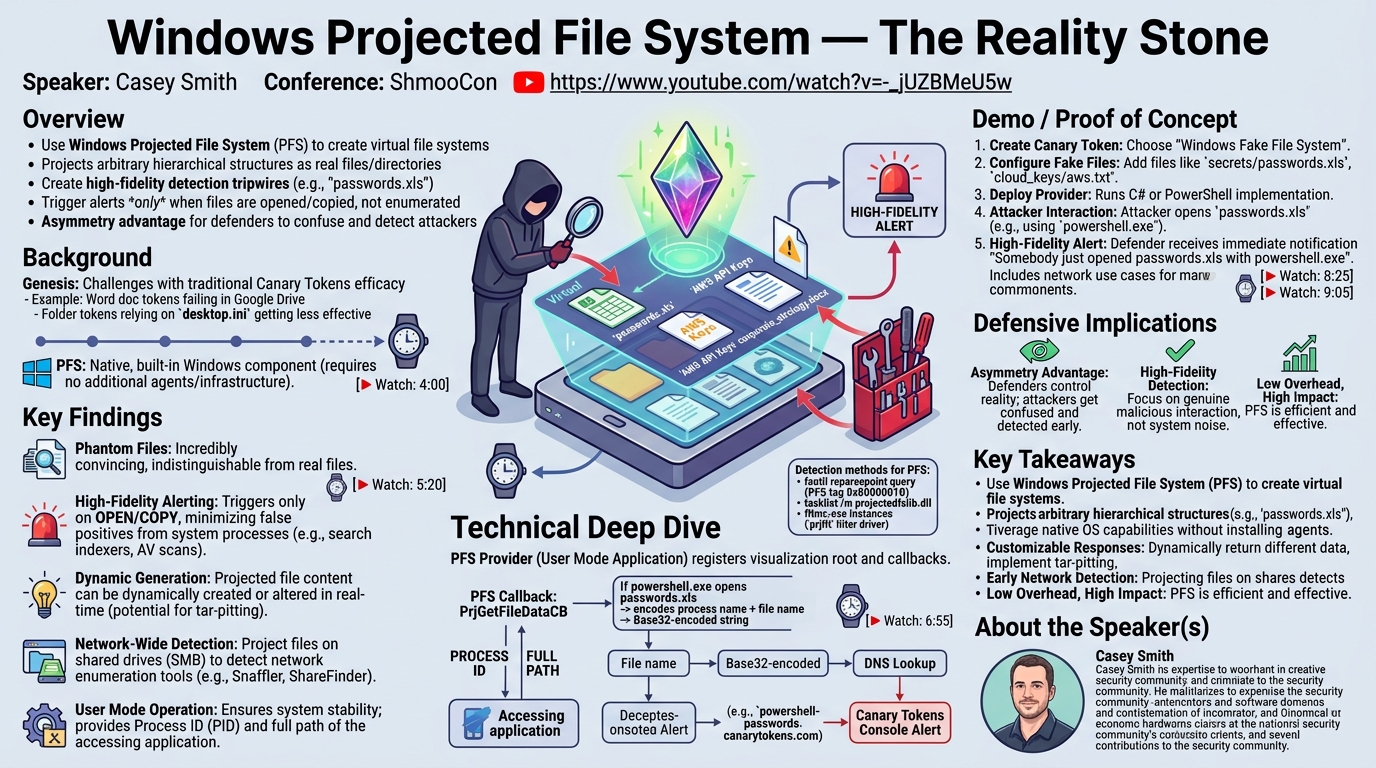
In his ShmooCon talk, "Windows Projected File System — The Reality Stone," renowned security researcher Casey Smith introduced a novel and powerful defensive technique leveraging the Windows Projected File System (PFS). This often-overlooked, built-in Windows feature allows defenders to create a virtual file system that projects arbitrary hierarchical structures as if they were real files and directories on disk. Smith, the creator of the popular open-source Canary Tokens project, demonstrates how PFS can be weaponized to create high-fidelity detection tripwires, effectively controlling the "reality" an attacker perceives on a compromised system.
Key moments
- 4:00 Introduction to Windows Projected File System (ProjFS)
- 4:45 ProjFS: Faking reality for attackers
- 5:20 Overview of Canary Tokens project
- 6:55 Why ProjFS improves token efficacy
- 7:55 ProjFS mechanism: Projecting fake file structures
- 8:25 ProjFS can project registry and kernel objects
- 9:05 Example: Creating a fake 'passwords' file tripwire
Windows Projected File System — The Reality Stone
Speakers: Casey Smith
Conference: ShmooCon
YouTube: https://www.youtube.com/watch?v=-_jUZBMeU5w
Overview
In his ShmooCon talk, "Windows Projected File System — The Reality Stone," renowned security researcher Casey Smith introduced a novel and powerful defensive technique leveraging the Windows Projected File System (PFS). This often-overlooked, built-in Windows feature allows defenders to create a virtual file system that projects arbitrary hierarchical structures as if they were real files and directories on disk. Smith, the creator of the popular open-source Canary Tokens project, demonstrates how PFS can be weaponized to create high-fidelity detection tripwires, effectively controlling the "reality" an attacker perceives on a compromised system.
The core premise of Smith's research is to exploit the attacker's need for reconnaissance and orientation within a new environment. By projecting convincing but fake files—such as "passwords.xls" or "AWS API Keys"—defenders can lure attackers into interacting with these deceptive artifacts. Unlike traditional file system monitoring, PFS allows for granular control, triggering alerts only when a file is opened or copied, thereby reducing noise from benign system processes. This innovative approach offers a significant asymmetry advantage to defenders, enabling them to detect, disorient, and delay adversaries without deploying additional agents or complex infrastructure.
Background
▶ Watch: Introduction to Windows Projected File System (ProjFS) (4:00)
The genesis of this research stems from the challenges faced by traditional detection mechanisms, particularly the diminishing efficacy of certain Canary Tokens over time. Canary Tokens, an open-source project pioneered by Smith's team, are designed to alert defenders when specific resources (like documents, folders, or network shares) are accessed. These tokens typically rely on simple primitives such as HTTP lookups or DNS requests triggered by an interaction. For instance, an embedded image in a Word document might attempt to fetch a resource from a unique URL, generating an alert.
However, as security postures evolve and software environments change, the reliability of these tokens can degrade. Smith cited examples such as Word document tokens failing to trigger when opened in Google Drive, or Windows folder tokens relying on UNC paths in desktop.ini files becoming less effective due to updated security controls. The need for a more robust, native, and customizable mechanism led Smith to explore PFS. The appeal of PFS lies in its availability as a default Windows component, requiring no installation of agents or third-party software—a significant advantage for "defending off the land" strategies. PFS provides a unique capability to present a virtual file system, allowing for the projection of any hierarchical structure, be it files, directories, or even registry keys, as if they physically exist on the disk. This capability transforms the file system into a malleable canvas for defensive deception.
Key Findings
▶ Watch: Overview of Canary Tokens project (5:20)
Casey Smith's exploration of the Windows Projected File System revealed several critical findings that empower defenders with a potent new tool for detection and deception:
Firstly, PFS enables the creation of phantom files and directories that appear indistinguishable from legitimate system resources to an attacker or their enumeration tools. This illusion is crucial for luring adversaries into interaction. Smith demonstrated how a simple comma-separated file list can define paths, file sizes, and last access times, making projected files like "passwords.xls" or "device_passwords.xls" highly convincing.
Secondly, and most importantly for detection, PFS offers high-fidelity alerting. Unlike noisy file system watchers that trigger on every enumeration, PFS is configured to alert only when a projected file is opened or copied. This significantly reduces false positives from legitimate system activities like search indexers or antivirus scans, allowing defenders to focus on genuine malicious interactions. Smith emphasized that this capability was a critical bar that had to be crossed for the solution to be viable.
Thirdly, the system is incredibly dynamic. The backing data for projected files can be dynamically generated and altered. This means defenders could potentially change the content or even the file structure presented to an attacker in real-time. Smith envisioned advanced scenarios like tar-pitting, where responses to an attacker's file requests could be intentionally delayed (e.g., increasing delay exponentially per request) or connections dropped, disrupting and frustrating their operations.
Fourthly, PFS can be deployed on network shares. By projecting a fake file system on a C drive and then offering it as an SMB share, defenders can intercept network enumeration tools like Snaffler or ShareFinder. The moment an attacker's tool attempts to open or copy a projected file from the share, an alert is triggered, providing early detection of lateral movement or data exfiltration attempts.
Finally, the operation of PFS in user mode is a significant advantage. This ensures that the detection mechanism is generally stable and less prone to crashing the system compared to kernel-mode filter drivers. Crucially, the PFS callback mechanism provides the process ID and full path of the process attempting to access the projected file. This granular context allows defenders to identify who is accessing the file (e.g., powershell.exe) and what they are trying to do, enabling highly targeted responses.
Technical Deep Dive
▶ Watch: Why ProjFS improves token efficacy (6:55)
The technical underpinning of the Windows Projected File System lies in its ability to virtualize file system operations through a provider model. A PFS provider is essentially a user-mode application that registers a virtualization root (a directory where the fake files will appear) and a set of callbacks. These callbacks are functions executed by the operating system when specific file system events occur within the virtualization root.
The most critical callback for Smith's detection strategy is PrjGetFileDataCB. This callback is invoked when an application attempts to open or read data from a projected file. Within this callback, the provider receives crucial information: the process ID (processId) of the application making the request and the full path (filePath) of the file being accessed. This allows the provider to inspect the context of the access attempt. As Smith demonstrated, a defender could programmatically differentiate between legitimate applications (e.g., returning real data if the accessing process is Notepad) and potentially malicious ones (e.g., returning garbage data or triggering an alert if the process is PowerShell).
For Canary Tokens, the alert mechanism is ingenious. When PrjGetFileDataCB is triggered by an attacker opening a fake file, the provider encodes the process name and the file name using Base32. This Base32-encoded string is then used to construct a DNS lookup query. For example, powershell.exe opening passwords.xls might result in a DNS query like powershell-passwords.canarytokens.com. The Canary Tokens console monitors for these unique DNS requests, providing a robust, out-of-band alerting mechanism that is highly resilient. Base32 is chosen for its alphanumeric nature, which avoids character casing issues that can arise in DNS queries.
The development of a PFS provider involves three main components:
- The Provider: A user-mode application (implemented in C# and PowerShell by Canary Tokens) responsible for managing the virtualization root and handling callbacks.
- Callbacks: The functions registered with PFS that respond to file system events like
PrjGetFileDataCB. - Virtualization Root: The empty directory on the disk that will host the projected file system. Smith's implementation focuses on projecting fake files for detection and does not typically handle file writes within these virtualized directories, prioritizing high-fidelity alerts over full file system emulation.
For red teamers or those seeking to identify PFS deployments, Smith outlined several detection methods:
- Reparse Points: PFS leverages reparse points to mark directories as virtualization roots. An attacker can use
fsutil reparsepoint query <path>on a suspicious directory. If the output includes a specific Microsoft-registered tag for PFS (e.g.,0x8000001B), it indicates that the directory is projected, suggesting a potential trap. - DLL Loading: Any active PFS provider will load the
projectedfslib.dll. A simple query usingtasklist /m projectedfslib.dllcan identify processes that are currently hosting a projected file system. While this reveals which process is running a provider, it doesn't directly map to which specific directories are being projected, an area Smith noted for further research. - Filter Drivers: PFS operates using a kernel-mode filter driver. The command
fltmc.exe instancescan enumerate active filter drivers. The presence ofprjflt(the Projected File System filter driver) with at least one instance indicates that PFS is active on the system. However, this is a broad indicator, as PFS is used by legitimate applications and development tools (e.g., Git Virtual File System).
Smith also highlighted the official Projected File System Programming Guide on MSDN as an invaluable resource for those looking to delve deeper into its capabilities, use cases, and callback routines.
Demo / Proof of Concept
▶ Watch: ProjFS can project registry and kernel objects (8:25)
Casey Smith's presentation included a clear demonstration of the Windows Fake File System token within the Canary Tokens platform. This proof of concept illustrates how easily defenders can deploy this advanced detection capability.
The process begins on the Canary Tokens website, where a user selects the option to create a "Windows Fake File System" token. The user is then prompted to define the desired fake file paths and types. For instance, a defender might configure a fake directory C:\secrets and populate it with enticing file names such as passwords.xls, aws_api_keys.txt, kubernetes_config.yaml, or device_passwords.xls. The platform provides options to bootstrap these configurations with industry-specific templates (e.g., "home networking" or "cloud developer keys"), and even suggests using AI for dynamic generation of highly realistic file structures.
Once configured, the Canary Tokens platform generates the necessary provider components (C# and PowerShell implementations are provided) for deployment on a Windows machine. When this provider is active, the specified fake files and directories appear to exist at their designated locations.
The "demo" aspect really shines when an attacker interacts with these projected files. If an attacker, during their reconnaissance phase, enumerates C:\secrets and discovers device_passwords.xls, their natural inclination is to open or copy it. The moment they perform either of these actions—for example, by opening it with powershell.exe—the PFS provider's PrjGetFileDataCB callback is triggered. This callback captures the process ID and full path. The provider then encodes the process name (powershell.exe) and the filename (device_passwords.xls) into a Base32 string and initiates a DNS lookup to the Canary Tokens infrastructure.
Crucially, the defender receives an immediate, high-fidelity alert in their Canary Tokens console, stating precisely that "somebody just opened device_passwords.xls and they opened it with powershell.exe." This alert provides actionable intelligence, including the specific file, the accessing process, and the timestamp, enabling a rapid response.
Smith further extended the proof of concept to network scenarios. By running a PFS provider on a system and then sharing the virtualization root over SMB, the fake files become accessible across the network. If an attacker uses tools like Snaffler or other SMB share finders to sweep the network for interesting files, they will discover these projected files. The instant they attempt to open or copy such a file from the network share, the same high-fidelity alert is generated, providing early detection of lateral movement or data exfiltration attempts over the network. Smith also noted that extensive testing showed that common background processes like Windows search indexer or typical antivirus scans do not trigger these specific alerts, reinforcing the high signal-to-noise ratio.
Defensive Implications
▶ Watch: Example: Creating a fake 'passwords' file tripwire (9:05)
The Windows Projected File System, as presented by Casey Smith, offers a paradigm shift in defensive strategy, leveraging deception as a primary detection mechanism. The implications for defenders are profound:
- Asymmetry Advantage: PFS creates a powerful asymmetry, giving defenders the upper hand. Attackers rely on accurate reconnaissance to orient themselves. By presenting a false reality—a "reality stone"—defenders can confuse, disorient, delay, and ultimately detect adversaries much earlier in the kill chain. This turns the attacker's own reconnaissance efforts against them.
- High-Fidelity Detection: One of the most significant benefits is the ability to generate high-fidelity alerts. Traditional file system monitoring often suffers from excessive noise. PFS, by design, only triggers alerts on explicit file open or copy operations, not mere enumeration. This distinction is critical, as it filters out benign activities from legitimate system processes (like the Windows search indexer or antivirus scanners) that would otherwise generate false positives. Defenders receive precise, actionable intelligence about malicious interactions.
- "Defending Off The Land": PFS is a built-in Windows feature, available in later versions of the operating system. This aligns perfectly with the "Defending Off The Land" philosophy, meaning defenders can leverage native OS capabilities without installing additional agents, drivers, or complex software. This simplifies deployment, reduces attack surface, and enhances stability. A simple command or checkbox can enable this powerful detection capability.
- Customizable Responses: The granular control offered by PFS callbacks allows for highly customizable defensive actions. As Smith highlighted, defenders can programmatically inspect the process ID and path of the accessing application. This enables dynamic responses:
- Content Manipulation: Return legitimate data to expected applications (e.g., Notepad) but return garbled, misleading, or even malicious data to suspicious processes (e.g., PowerShell).
- Tar-Pitting: Intentionally slow down malicious processes by delaying file responses, frustrating attackers and buying valuable time for incident response.
- Quarantine/Action: Integrate with other security tools to automatically quarantine processes or trigger further investigative actions based on the detected interaction.
- Early Detection of Lateral Movement and Exfiltration: By projecting fake files on shared drives, PFS becomes a potent sensor for detecting lateral movement and data exfiltration attempts. Tools like Snaffler, commonly used by red teams, will trigger alerts the moment they interact with these projected files, providing early warning signs of an adversary sweeping the network.
- Low Overhead, High Impact: Given its native integration and user-mode operation, PFS imposes minimal overhead on system performance. Yet, its impact on detection capabilities is substantial, providing a cost-effective and efficient way to enhance an organization's security posture against sophisticated attackers.
Key Takeaways
- Windows Projected File System (PFS) is a native Windows feature enabling the creation of virtual file systems that project hierarchical structures as if they were real files on disk.
- Canary Tokens leverages PFS to create highly effective, high-fidelity detection tripwires, aptly named "The Reality Stone," by presenting fake but convincing files to attackers.
- PFS is designed to trigger alerts only on explicit file open or copy actions, not mere enumeration, significantly reducing noise and false positives from benign system processes.
- Defenders gain a significant asymmetry advantage, using PFS to confuse, disorient, delay, and detect attackers by controlling the perceived file system reality.
- The PFS provider's callbacks (
PrjGetFileDataCB) offer critical forensic data, including the process ID and full path of the accessing application, enabling targeted responses and detailed incident analysis. - Red teamers and penetration testers should be aware of methods to detect PFS deployments, such as querying reparse points with
fsutil, checking forprojectedfslib.dllin process modules, and enumerating theprjfltfilter driver.
About the Speaker(s)
Casey Smith is a highly respected security researcher and the driving force behind the popular open-source project Canary Tokens. His work consistently focuses on empowering defenders with practical, effective, and often "off-the-land" security tools and techniques. Smith is known for his deep understanding of Windows internals and his ability to identify and weaponize built-in operating system features for defensive purposes. Through Canary Tokens, he provides free, scalable detection solutions that have been adopted by countless organizations, monitoring millions of logins daily. His contributions emphasize the importance of leveraging existing system capabilities to gain an advantage against adversaries, making complex security concepts accessible and actionable for the broader defensive community.
Reviews
Dr. Zero (Offensive Security Researcher) — STRONG ACCEPT
This session presents a highly effective and novel defensive technique leveraging Windows Projected File System (PFS) for high-fidelity deception and detection. By creating 'fake' file systems that only trigger alerts on actual file interaction (open/copy), it provides a powerful asymmetry against attackers enumerating systems. The speaker, Casey Smith, demonstrates a deep understanding of PFS internals and offers practical, open-source tooling, making this a truly actionable and impactful piece of research for defenders.
Heather Calloway (CISO) — MUST SEE
Casey Smith's presentation on leveraging the Windows Projected File System (PFS) for high-fidelity detection and deception is a transformative concept for security leaders. By creating virtual file systems to lure and detect attackers, this approach offers a significant asymmetry advantage, providing precise, actionable intelligence without relying on agents or complex infrastructure. It directly impacts an organization's ability to manage business risk and enhance institutional resilience, making it a critical addition to any CISO's strategic toolkit.