Building Burp Extensions with Kotlin
Nick Coblentz
BSides NYC 2024 · Day 1 · Tech - Red
Overview
This presentation, delivered by Nick Coblentz, a seasoned application penetration tester and PortSwigger Discord moderator, delves into the advantages and practicalities of developing Burp Suite extensions using Kotlin. The talk addresses a common frustration among penetration testers: the time-consuming and repetitive manual tasks involved in security assessments, often exacerbated by the perceived complexity and overhead of building custom Burp extensions. Coblentz makes a compelling case for Kotlin as a more enjoyable and efficient alternative to Java for this purpose.
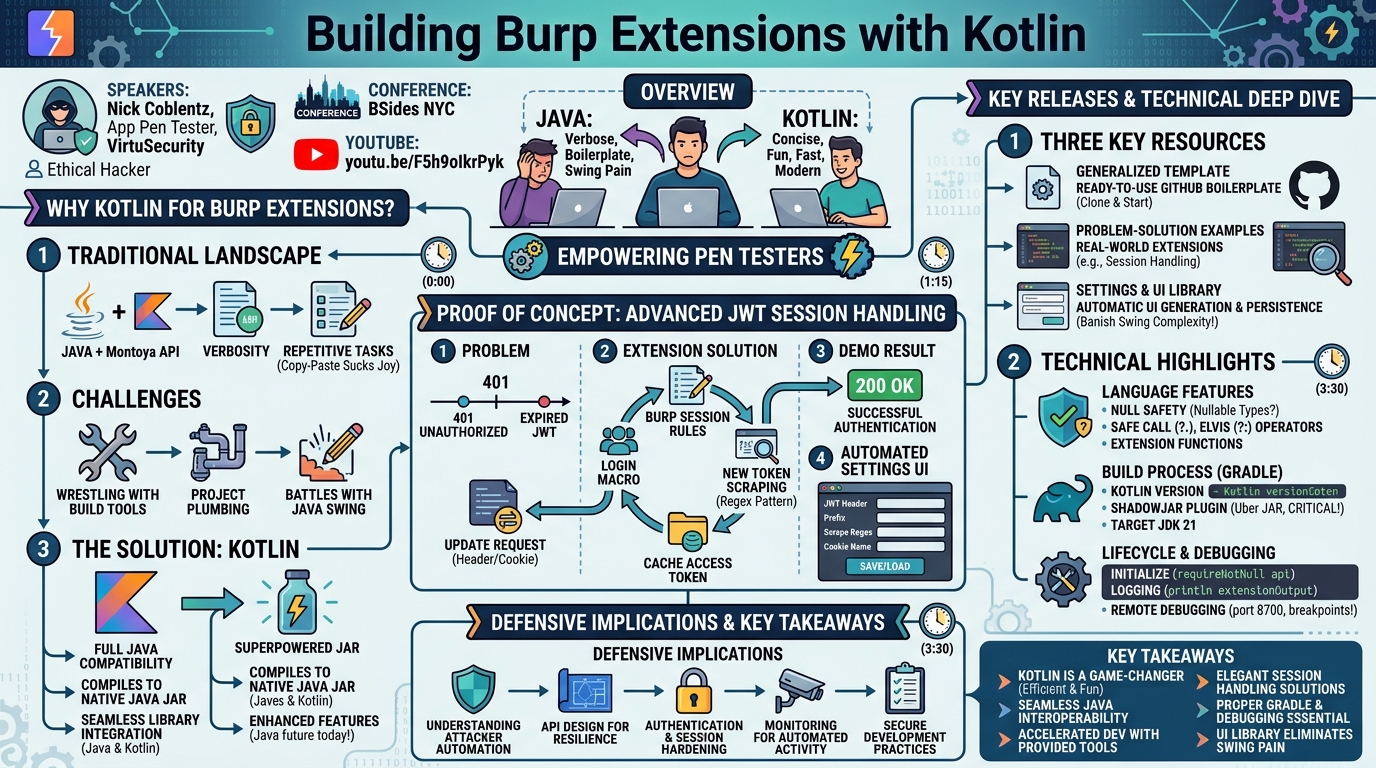
Key moments
- 0:00 Introduction: Why Kotlin for Burp Extensions?
- 1:15 Three Key Releases: Template, Examples, UI Library
- 3:30 Kotlin's Full Compatibility with Java for Burp Extensions
- 4:20 Benefits of Kotlin: More Fun, Concise, Efficient
- 5:10 Quick Kotlin Syntax Overview: Functions and Classes
Building Burp Extensions with Kotlin
Speakers: Nick Coblentz, App Pen Tester, VirtuSecurity
Conference: BSides NYC
YouTube: https://www.youtube.com/watch?v=F5h9oIkrPyk
Overview
This presentation, delivered by Nick Coblentz, a seasoned application penetration tester and PortSwigger Discord moderator, delves into the advantages and practicalities of developing Burp Suite extensions using Kotlin. The talk addresses a common frustration among penetration testers: the time-consuming and repetitive manual tasks involved in security assessments, often exacerbated by the perceived complexity and overhead of building custom Burp extensions. Coblentz makes a compelling case for Kotlin as a more enjoyable and efficient alternative to Java for this purpose.
The core message of the talk is to empower pen testers to automate tedious workflows directly within Burp Suite, thereby enhancing the breadth and depth of their testing. By showcasing Kotlin's seamless interoperability with Java and its modern language features, Coblentz aims to lower the barrier to entry for extension development. He not only shares his enthusiasm for Kotlin but also provides concrete tools: a generalized template for quick starts, problem-solution example extensions, and a novel library that simplifies persistent settings and automatic UI generation, eliminating the notorious pain points of Java Swing development.
Ultimately, this presentation is significant for the security community because it offers a practical pathway to increased efficiency and enjoyment in application security testing. By streamlining the development of custom tooling, testers can move beyond repetitive copy-pasting, focus on more complex vulnerabilities, and conduct more thorough assessments. The resources provided by Coblentz promise to significantly accelerate the adoption of Kotlin for Burp extension development, fostering a more dynamic and productive testing environment.
Background
▶ Watch: Introduction: Why Kotlin for Burp Extensions? (0:00)
The landscape of Burp Suite extensibility has traditionally been dominated by Java, with support for scripting languages like Jython and JRuby in older versions. While Java remains the primary language for building extensions via the modern Montoya API, many penetration testers find its verbosity and certain language constructs cumbersome, especially when needing to quickly prototype or adapt tools during an active assessment. This often leads to a reliance on manual processes – copying data from Burp Repeater, pasting it into external console applications for transformation, and then pasting it back – a cycle that "sucks the joy out of it" and limits testing scope.
The problem is compounded by the perceived difficulty and time investment required to build a robust extension. Concerns about wrestling with build tools like Gradle, configuring project plumbing, or battling with Java's graphical user interface (GUI) framework, Swing, often deter testers from building custom solutions. This creates a gap where repetitive tasks persist because the effort to automate them seems too high.
Kotlin emerges as a compelling solution to these challenges. Developed by JetBrains, Kotlin is an open-source, statically typed programming language that has gained significant traction, particularly as the preferred language for Android application development. Its key advantage in the context of Burp Suite is its full compatibility with Java. When a Kotlin project is built, it compiles into standard Java class files and JAR files, which Burp Suite readily accepts for extensions. Furthermore, Kotlin allows developers to seamlessly integrate Java's standard library, Kotlin's standard library, and any Java or Kotlin libraries available on Maven Central. This means testers don't need to learn an entirely new ecosystem of libraries but can leverage existing Java knowledge while benefiting from Kotlin's modern syntax and features. Coblentz highlights that Kotlin is "more fun to use," concise, and efficient, offering features that Java is only beginning to introduce in preview versions (e.g., in future versions like Java 25). This blend of compatibility and modern expressiveness positions Kotlin as an ideal candidate to reinvigorate Burp extension development.
Key Findings
▶ Watch: Three Key Releases: Template, Examples, UI Library (1:15)
The presentation underscores several key findings regarding the utility and benefits of employing Kotlin for Burp Suite extension development:
- Kotlin's Viability and Enjoyment: Contrary to initial resistance from Java-proficient developers, Kotlin proves to be a highly effective and, importantly, enjoyable language for building Burp extensions. Its concise syntax and modern features significantly enhance the developer experience, making the process less arduous and more engaging.
- Seamless Java Interoperability: Kotlin's fundamental compatibility with Java is the cornerstone of its utility for Burp extensions. It compiles directly to Java JAR files, which Burp Suite can load natively. This compatibility extends to library usage, allowing developers to mix and match Java and Kotlin libraries without issue.
- Enhanced Language Features: Kotlin introduces several features that streamline development compared to traditional Java. These include concise function and class declarations, explicit handling of nullable types (preventing
NullPointerExceptionsat compile time), safe call operator (?.), and the Elvis operator (?:) for simplified null checks, and extension functions that allow adding new functionality to existing classes without modifying their source code. - Accelerated Development with Provided Resources: A significant contribution of this talk is the release of practical tools designed to kickstart and simplify Kotlin extension development:
- Generalized Template: A ready-to-use GitHub repository serving as a boilerplate for new Kotlin Burp extensions, pre-configured with Gradle settings and necessary dependencies, allowing developers to "clone and get started."
- Problem-Solution Example Extensions: A collection of pre-built extensions demonstrating solutions to common penetration testing challenges, such as complex session handling, which can be adapted by testers for their specific needs.
- Settings and UI Library: A custom library that automatically handles the persistence of extension settings (to the project file or Burp preferences) and generates a user interface for editing these settings, completely abstracting away the complexities of Java Swing UI development. This is a monumental improvement for creating configurable and reusable extensions.
These findings collectively demonstrate that Kotlin not only addresses the pain points associated with traditional Burp extension development but also introduces a more productive and pleasant experience, ultimately empowering penetration testers to automate more effectively.
Technical Deep Dive
▶ Watch: Kotlin's Full Compatibility with Java for Burp Extensions (3:30)
The technical core of Coblentz's presentation revolves around demonstrating how Kotlin integrates with Burp Suite's Montoya API and showcasing the practical tools he has developed.
Kotlin Language Features for Burp Extensions
Coblentz provides a brief but crucial overview of Kotlin syntax, sufficient for Java developers to follow along:
- Functions: Declared with the
funkeyword, parameters follow the formatname: Type, and the return type follows the function signature(): ReturnType. Functions can have a block body or a single-expression body. - Classes: Declared with the
classkeyword. Kotlin allows constructor arguments directly in the class header, which can implicitly declare properties (likeradius: Double) with automatic public getters and setters, streamlining data encapsulation. Thenewkeyword is not required for instantiation. - Variable Declarations:
var: Declares a mutable variable whose value or reference can change (e.g.,var myFavoriteDrink: String = "coffee").val: Declares a read-only reference. The reference itself cannot change, though the object it points to might still be mutable if it's a class instance (e.g.,val myName = "Nick").- Nullability: Kotlin enforces null safety. Variables cannot be assigned
nullunless explicitly declared as nullable using a question mark (e.g.,var whereAmI: String? = null). The compiler ensures null checks are performed before accessing nullable variables. - Safe Call Operator (
?.): Allows calling a method or accessing a property only if the object is not null. If the object is null, the entire expression evaluates to null (e.g.,whereAmI?.uppercase()). - Elvis Operator (
?:): Provides a default value if the expression on the left is null (e.g.,whereAmI ?: "nowhere").
Gradle Build System and Project Setup
The speaker emphasizes the importance of Gradle as the build tool for Kotlin Burp extensions. Key configuration points in the build.gradle.kts file include:
- Kotlin Version: Specifying the Kotlin compiler version.
- ShadowJAR Plugin: This plugin is critical. It creates an "uber JAR" that bundles all project dependencies, including the Kotlin standard libraries and any third-party libraries from Maven Central, into a single JAR file. Without it, Burp Suite would throw
ClassNotFoundExceptionerrors because it wouldn't find the necessary dependencies. The output JAR file will typically have a-allsuffix (e.g.,myextension-all.jar). - Dependencies: Including the
Montoya APIas an implementation dependency (implementation("net.portswigger.burp.extensions:montoya-api:2023.10.1")) to enable interaction with Burp Suite. - JDK Target: Setting the target JDK version to JDK 21 (
targetCompatibility = JavaVersion.VERSION_21), matching Burp Stable's current runtime environment and enabling features like virtual threads.
To build, developers refresh Gradle dependencies in IntelliJ and then execute the ShadowJAR task, which generates the deployable JAR. Loading into Burp Suite involves navigating to "Extensions," "Add," selecting "Java," and choosing the -all.jar file.
Burp Extension Lifecycle and Debugging
A Burp extension written in Kotlin must implement the BurpExtension interface. Burp Suite loads the extension by instantiating the class and calling its initialize function.
initializeFunction: This function receives aMontoyaApiobject, which is the primary gateway for interacting with Burp Suite's features (logging, HTTP requests, UI components, etc.). Coblentz notes that theMontoyaApiparameter is nullable due to Burp Suite's Java origin. He uses Kotlin'srequireNotNullfunction to handle this, which throws anIllegalArgumentExceptionif the API is null, ensuring early failure if a critical component is missing. TheMontoyaApiinstance is then stored as a private property (private var api: MontoyaApi) for use throughout the extension.- Logging: Crucially, Coblentz highlights the use of
api.logging.extensionOutput.println()for logging. He advises developers to observe the "started loading the extension" and "finished loading the extension" messages in Burp's extension output. If the "finished" message doesn't appear, it indicates an error in the early initialization phase, saving significant debugging time. - Debugging: Kotlin extensions can be interactively debugged. By adding a JVM option (
-agentlib:jdwp=transport=dt_socket,server=y,suspend=n,address=8700) to Burp Suite'suser.vmoptionsfile, Burp can listen for a remote debugger on port 8700. Developers can then use IntelliJ's "Attach to Process" feature to connect to Burp Suite and set breakpoints, inspect variables, and step through code just like any other Java/Kotlin application.
Advanced Session Handling Example
Coblentz demonstrates a practical extension for handling rapidly expiring JWT tokens in applications like OAuth Juice Shop. The challenge is that JWTs might expire every two minutes, requiring constant re-authentication and token updates in requests.
The solution augments Burp's built-in session handling rules:
- Session Handling Rules: Two rules are configured:
- One rule calls the extension to apply the current JWT token to outgoing requests (as an
Authorization: Bearerheader and atokencookie). - Another rule, "Check session is valid," is triggered if a 401 Unauthorized response is received. This rule is configured to execute a pre-recorded login macro (e.g., username/password submission) and then pass the response of that macro back to the extension.
- Extension's Role (
SessionHandlingAction): The Kotlin extension registers itself as aSessionHandlingActionusingapi.http.registerSessionHandlingAction(). This requires implementing thename()andperformAction()functions.
performAction(): This is the core logic.- Scraping JWT: If a login macro has just run,
actionData.macroRequestsResponseswill contain the macro's HTTP responses. The extension iterates through these, applying a regex pattern (e.g.,token:\"([^\"]+)\") to extract the new JWT from the response body. This token is then cached in anaccessTokenproperty within the extension. - Applying JWT: If a valid
accessTokenexists, the extension modifies the current HTTP request by calling custom extension functions likeaddOrUpdateHeader()andaddOrUpdateCookie(). These functions, created by Coblentz, simplify the logic of adding a header/cookie if it doesn't exist or updating it if it does, a common pain point in the raw Montoya API. The modified request is then returned to Burp Suite for re-issuance.
Automated UI Generation for Settings
A major innovation presented is a custom library that addresses the notorious difficulty of creating user interfaces for Burp extensions. Instead of wrestling with Java Swing layouts, developers can:
- Declare Settings Properties: Define properties at the top of the class, e.g.,
val cookieNameSetting = StringSetting(...). - Instantiate Settings: In the
initializefunction, instantiate these settings using the library'sStringSetting,BooleanSetting,ListSetting, etc., providing theMontoyaApi, a display name, a unique storage key, a default value, and specifying whether to store in the project file or Burp's global preferences. - Generate UI: Create a list of these settings and pass it to the library's
FormGenerator. Calling.run()on theFormGeneratorautomatically constructs the UI. - Context Menu Integration: Register a
ContextMenuItemProviderfrom the library to make the settings UI accessible via a right-click context menu within Burp. - Cleanup: Implement an
unloadhandler to properly dispose of Swing components, as they do not automatically clean up when an extension is unloaded. - Access Settings: Retrieve the current value of a setting anywhere in the extension using
.currentValue(e.g.,accessTokenPatternSetting.currentValue).
This library dramatically simplifies the creation of configurable and reusable extensions, allowing settings to persist with the project file and be easily shared with team members.
Demo / Proof of Concept
▶ Watch: Benefits of Kotlin: More Fun, Concise, Efficient (4:20)
Coblentz provided compelling demonstrations of the practical applications of his Kotlin extensions and library:
- JWT Session Handling:
- He first showcased a scenario where a request to an OAuth Juice Shop API endpoint would result in a 401 Unauthorized response due to an expired or invalid JWT token. This highlighted the common problem faced by pen testers.
- He then activated the custom Kotlin extension, which worked in conjunction with Burp's session handling rules. When the same request was sent, the session tracer showed that upon receiving the 401, Burp automatically triggered the pre-configured login macro.
- Following the login, the extension intercepted the macro's response, extracted the new, valid JWT token using a regex pattern, cached it, and then applied it to the original request (both as an
Authorization: Bearerheader and atokencookie). The request was then re-sent, resulting in a successful 200 OK response, demonstrating seamless re-authentication and token management. This effectively eliminated the manual copy-pasting of JWTs.
- Automated Settings UI:
- The speaker demonstrated the power of his custom UI library by showing the settings panel for the JWT handler extension. By right-clicking within Burp and selecting "Extensions" -> "Jot Token Handler" -> "Settings," a clean, automatically generated UI window appeared.
- This UI allowed the user to configure various parameters: the header name for the JWT, an optional prefix (like "Bearer"), the regex pattern used to scrape the JWT from responses, and the cookie name.
- He emphasized that these settings, once saved, would persist with the Burp project file, ensuring that the extension's configuration travels with the assessment and is readily available to other team members or for future re-tests, without any manual Swing UI coding.
These demonstrations effectively illustrated how Kotlin, combined with Coblentz's tools, transforms common, frustrating pen-testing challenges into elegant, automated solutions, significantly improving workflow efficiency and reusability.
Defensive Implications
▶ Watch: Quick Kotlin Syntax Overview: Functions and Classes (5:10)
While the talk primarily focuses on offensive security tooling and enhancing the penetration tester's toolkit, there are several implicit defensive implications that can be drawn from understanding how advanced Burp extensions are built and utilized:
- Understanding Attacker Automation: Defenders can gain insight into how sophisticated attackers (or internal red teams) automate complex tasks within Burp Suite. Knowing that custom extensions can handle dynamic authentication schemes, session management, and data transformation highlights the need for robust, multi-layered defenses that cannot be easily bypassed by automated tools.
- API Design for Resilience: The pain points highlighted in the talk – rapidly expiring JWTs, tokens in various locations (headers, cookies), and the need for complex regex scraping – indicate areas where API design could be improved from a defensive standpoint. While security mechanisms like short-lived tokens are good, an overly complex or inconsistent implementation can lead to friction for legitimate clients and, as shown, drive testers to build sophisticated workarounds. Consistent token placement and clear API responses can make applications easier to test and potentially harder to exploit via unexpected automation.
- Authentication and Session Management Hardening: The session handling example underscores the critical importance of robust authentication and session management. If an application's session validity relies solely on a single JWT that can be scraped and re-applied, it might be vulnerable to session replay or other attacks if additional protective measures (e.g., IP binding, user agent checks, CSRF tokens, multi-factor authentication) are not in place. Defenders should ensure that even if an attacker manages to automate token acquisition, other layers of defense prevent unauthorized access.
- Monitoring for Automated Activity: The ability to automate complex interactions with a web application means that defenders should be vigilant in monitoring for patterns of automated activity. While Burp Suite is a legitimate testing tool, an understanding of how extensions operate can help distinguish between human interaction and automated scripts, potentially aiding in the detection of malicious activity or unauthorized access attempts.
- Secure Development Practices: The talk implicitly encourages secure development practices by making it easier to perform thorough security testing. When testers can automate tedious tasks, they have more time to uncover subtle vulnerabilities. Developers should embrace this by integrating security testing early and often, leveraging tools like Burp Suite and custom extensions to identify and remediate issues before deployment.
In essence, by understanding the capabilities of tools like Kotlin-powered Burp extensions, defenders can better anticipate attacker methodologies, design more resilient applications, and implement more effective monitoring strategies.
Key Takeaways
- Kotlin for Burp Extensions is a Game-Changer: Kotlin offers a more concise, efficient, and enjoyable development experience for Burp Suite extensions compared to traditional Java, thanks to its modern syntax and features.
- Seamless Java Interoperability is Key: Kotlin's full compatibility with Java, including compiling to JAR files and integrating with Java libraries (like the Montoya API), makes it a practical choice for existing Burp Suite users.
- Accelerated Development with Provided Tools: The speaker's released template, problem-solution examples, and especially the UI generation library, significantly reduce the barrier to entry and development time for custom Burp extensions.
- Automated Session Handling is Highly Effective: Complex session management challenges, such as rapidly expiring JWT tokens, can be elegantly solved by augmenting Burp's session handling rules with custom Kotlin extensions.
- Debugging and Build Process are Crucial: Proper Gradle configuration (especially the ShadowJAR plugin) and setting up remote debugging with IntelliJ are essential steps for successful development and troubleshooting.
- UI Generation Eliminates Swing Pain: The custom library that automatically creates a UI for extension settings abstracts away the complexities of Java Swing, making configurable and reusable extensions far more accessible and practical.
About the Speaker(s)
Nick Coblentz is an experienced application penetration tester with 18 years in the field. He works for VirtuSecurity, a company specializing in application, network, and cloud penetration testing. Beyond his professional role, Nick is a respected moderator for the PortSwigger Discord server, a community hub where individuals discuss Burp extensions, BAMDAs, B-checks, and general application security testing. He is also a prolific extension author, maintaining numerous personal extensions on his GitHub and contributing one to the official BApp Store. His passion for making security testing more efficient and enjoyable is evident in his advocacy for Kotlin and the tools he has developed.
Reviews
Dr. Zero (Offensive Security Researcher) — SOLID
Competent, practitioner-focused talk that delivers real value to appsec testers who want to stop copy-pasting JWTs and start writing actual tooling. The Kotlin pitch is honest and the released artifacts — template, examples, settings/UI library — are the talk's strongest contribution. Nothing here will make a researcher sit up, but it solves a genuine friction point for its target audience.
Heather Calloway (CISO) — PASS
Technically competent workshop content on Kotlin tooling for pen testers — wrong room for my lens. There is no governance angle, no institutional risk, no defender decision to be made. This is craft instruction for practitioners who write Burp extensions.