Sneaky Extensions The MV3 Escape Artists
Vivek Ramachandran, Shourya Pratap Singh
DEF CON 32 Creator Stage · Day 1 · Creator Stage
Overview
In "Sneaky Extensions: The MV3 Escape Artists," Vivek Ramachandran and Shourya Pratap Singh deliver a sobering assessment of the pervasive and often underestimated threat posed by malicious browser extensions. The talk, presented at DEF CON 32, delves into the mechanics of how these extensions exploit browser architecture and user trust, even within the confines of Chrome's Manifest V3 (MV3) security model. The speakers, both from browser-native security company Square X, highlight that despite common misconceptions, official browser stores like the Chrome Web Store offer only superficial security checks, leaving millions of users vulnerable to sophisticated attacks.
Key moments
- 0:00 Introduction and shocking live call interception claim
- 2:00 Statistics on 280M+ malicious extension installs
- 2:50 Browser extension architecture: manifest, service worker, content script
- 4:00 MV3 permission model and the danger of 'all URLs'
- 6:00 Demonstration: Simple content script injection on a webpage
- 7:00 Demonstration: Bypassing CSP using eval in extensions
Sneaky Extensions The MV3 Escape Artists
Speakers: Vivek Ramachandran, Shourya Pratap Singh
Conference: DEF CON 32
YouTube: https://www.youtube.com/watch?v=AS_bSDxTU4w
Overview
In "Sneaky Extensions: The MV3 Escape Artists," Vivek Ramachandran and Shourya Pratap Singh deliver a sobering assessment of the pervasive and often underestimated threat posed by malicious browser extensions. The talk, presented at DEF CON 32, delves into the mechanics of how these extensions exploit browser architecture and user trust, even within the confines of Chrome's Manifest V3 (MV3) security model. The speakers, both from browser-native security company Square X, highlight that despite common misconceptions, official browser stores like the Chrome Web Store offer only superficial security checks, leaving millions of users vulnerable to sophisticated attacks.
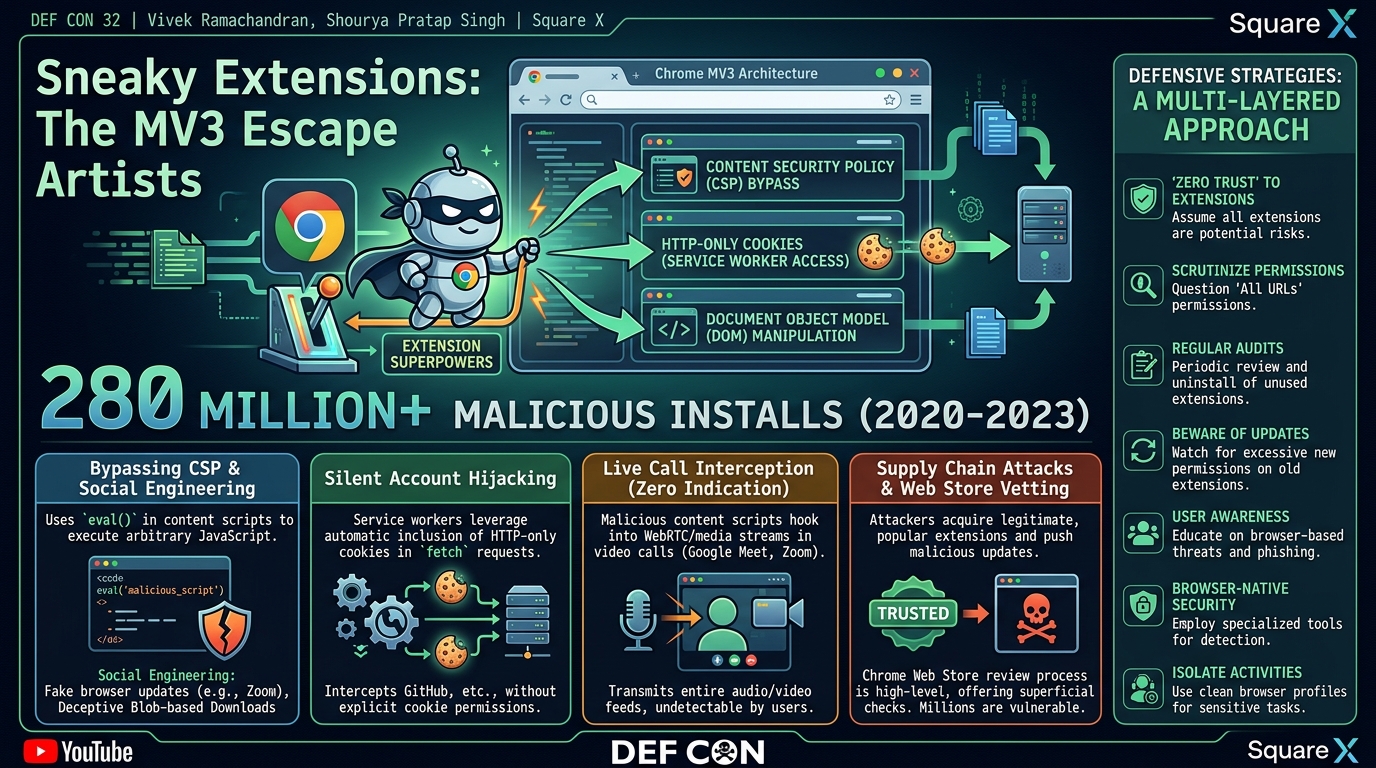
The core message of the presentation is that browser extensions, by their inherent design and privileged position, possess "superpowers" that allow them to operate one level above the traditional web page context. This elevated status enables them to perform actions that range from silent account hijacking and live video call interception to sophisticated social engineering and phishing campaigns, often without any visible indication to the user. The talk underscores the critical need for heightened awareness and robust defensive strategies against this rapidly evolving threat vector, which is compounded by the sheer volume of installs and the ease with which attackers can acquire popular extensions.
The scale of the problem is alarming: researchers from Stanford University and the CISPA Helmholtz Center for Information Security estimate that over 280 million installs of Chrome extensions containing malware occurred between July 2020 and February 2023. A staggering 75 million of these installs originated from just 32 malicious extensions. This data, coupled with the speakers' practical demonstrations of advanced attack techniques, firmly establishes browser extensions as a top-tier cybersecurity concern for individuals and organizations alike.
Background
▶ Watch: Introduction and shocking live call interception claim (0:00)
Browser extensions are ubiquitous tools designed to enhance user experience and productivity, ranging from password managers like OnePassword to grammar checkers like Grammarly. At their core, extensions are small software programs that extend the functionality of a web browser. A typical extension's code structure comprises four main components: a manifest file, a service worker (running in the background), content scripts (injected into web pages), and optionally, HTML pages for user interfaces like pop-ups or dedicated extension pages.
The manifest.json file is central to an extension's operation, explicitly declaring its metadata, required permissions, and resources. With the transition from Manifest V2 (MV2) to Manifest V3 (MV3), Google introduced changes aimed at improving security, privacy, and performance. One significant aspect of MV3 is a clearer permission model, where developers must declare upfront what permissions their extension requires. This shift was intended to provide users with more transparency regarding an extension's capabilities. However, as the speakers point out, despite these improvements, a significant percentage of extensions still request broad permissions, with "all URLs" being the third most commonly requested permission, granting extensions sweeping access to modify any web page.
Chromium browsers, including Chrome, operate on a multi-process architecture. This design isolates different browser components (like renderer processes for tabs, network processes for requests) into separate processes, aiming to enhance security by containing potential vulnerabilities. Inter-process communication (IPC) mechanisms facilitate controlled interaction between these isolated components. While this architecture provides a strong security foundation for web pages, extensions are designed to operate at a higher privilege level, often "one level above" the page itself. This elevated position allows them to bypass certain browser-level protections, such as Content Security Policy (CSP), which normally restrict the types of content that can be executed on a web page. The speakers demonstrate this by showing how a simple eval() function can be used within an extension's content script to execute arbitrary JavaScript, even when a page's CSP would typically block it. This fundamental capability, combined with the often-overlooked permissions granted by users, creates a fertile ground for sophisticated attacks.
Key Findings
▶ Watch: Browser extension architecture: manifest, service worker, content script (2:50)
The talk unveils several critical findings that underscore the potent threat of malicious browser extensions:
- Extensions' Superpowers: The most fundamental finding is that extensions operate at a highly privileged level, effectively "one level above" the page context. This allows them to manipulate web page content, intercept network requests, and interact with browser functionalities in ways that standard web pages cannot. This elevated privilege is analogous to kernel-mode access for an endpoint security solution, granting them profound control over the user's browsing environment.
- Silent Account Hijacking: Extensions can silently hijack user accounts by leveraging their access to HTTP-only cookies. Even though HTTP-only cookies are designed to be inaccessible to client-side JavaScript, a service worker making a
fetchcall in the background will automatically include these cookies with the request. This means an extension can authenticate to a service (like GitHub) on the user's behalf without explicit permission for cookie access and without the user ever being prompted or aware of the activity.
- Live Call Monitoring Without Indication: A particularly alarming demonstration revealed that malicious extensions can intercept and exfiltrate the entire audio and video feed of live calls on platforms like Google Meet and Zoom. Crucially, this monitoring occurs with zero indication within the meeting session itself, making it virtually undetectable by participants. This highlights a significant privacy and corporate espionage risk.
- Sophisticated Social Engineering and Phishing: Extensions can inject deceptive content into legitimate websites (e.g., a fake update prompt on zoom.us) and trigger blob-based downloads. These downloads appear to originate from the legitimate domain in the browser's download manager, fooling users into executing malicious files. Furthermore, extensions can override the functionality of legitimate browser elements, such as a password manager's icon, redirecting users to convincing phishing pages to steal credentials.
- Bypassing Content Security Policy (CSP): Despite CSP being a critical web security mechanism, extensions can bypass it. The speakers illustrate how an extension's content script can use functions like
eval()to execute arbitrary strings as JavaScript code, overriding the page's security policies and allowing for dynamic injection of malicious scripts from external servers.
- Supply Chain Attacks via Acquisition: A significant and growing threat vector involves attackers purchasing legitimate, widely installed extensions from their original developers. Once ownership is transferred, the attackers can push malicious updates to hundreds of thousands or even millions of trusting users, effectively turning a trusted tool into a widespread malware distribution channel. This highlights the vulnerability of the extension ecosystem beyond initial installation.
- Chrome Web Store Limitations: The talk reiterates that the Chrome Web Store's review process is "very high level, very basic sanity checks and nothing more than that." This minimal vetting allows a substantial number of malicious extensions to proliferate, as evidenced by the 280 million installs of malware-laden extensions reported by researchers.
Technical Deep Dive
▶ Watch: MV3 permission model and the danger of 'all URLs' (4:00)
The technical prowess of malicious extensions stems from their unique position within the browser's architecture, particularly in the context of Manifest V3 (MV3). While MV3 introduced stricter controls, sophisticated attackers can still leverage core extension functionalities for nefarious purposes.
An extension's lifecycle begins with its manifest.json file. This file dictates the extension's identity, version, and crucially, its permissions. Under MV3, permissions are categorized into permissions (APIs the extension can use, e.g., storage, tabs) and host_permissions (URLs the extension can interact with, e.g., https:///). While this separation aims for clarity, the speakers highlight that the "all URLs" permission (<all_urls>) remains a prevalent and dangerous request, granting an extension access to virtually any page the user visits.
Content scripts are JavaScript files injected by an extension into the context of web pages. They run in an isolated world, meaning they cannot directly access JavaScript variables or functions of the page, but they can interact with the page's Document Object Model (DOM). This capability is fundamental to many attacks. For instance, an extension can modify document.body.innerHTML to inject fake update prompts, phishing forms, or hidden input fields. The talk demonstrates how a simple content script can overwrite a page's content with "hello from extension," illustrating the direct manipulation possible.
A key vulnerability arises from how extensions can bypass Content Security Policy (CSP). CSP is a browser security mechanism designed to mitigate cross-site scripting (XSS) attacks by restricting the sources from which scripts, stylesheets, and other resources can be loaded or executed. However, content scripts, by virtue of being part of the browser's extension system, are exempt from the host page's CSP. This means an extension can use dynamic code execution functions like eval() within its content script to execute arbitrary JavaScript strings, even if the page's CSP explicitly forbids unsafe-eval. This allows an attacker to fetch and execute malicious code from an external server at runtime, bypassing static analysis performed during extension submission to the store.
Service workers are event-driven scripts that run in the background, independent of specific web pages. They are central to many advanced attacks because they can operate without a visible UI and persist across browser sessions. Unlike content scripts, service workers do not directly interact with the DOM of a web page. However, they can make network requests. Critically, when a service worker performs a fetch request, the browser automatically includes any HTTP-only cookies associated with the target domain. HTTP-only cookies are typically protected from client-side JavaScript access to prevent session hijacking via XSS. The speakers explain that an extension's service worker can leverage this automatic cookie inclusion to silently authenticate to services like GitHub and perform actions on the user's behalf (e.g., adding a collaborator to a private repository) without ever needing explicit permission to "access cookies" or making the user aware of the background activity. This is a subtle yet powerful bypass of a fundamental web security control.
For social engineering attacks, extensions can trigger blob-based downloads. A Blob (Binary Large Object) is a file-like object of immutable, raw data. An extension can create a Blob containing arbitrary data (e.g., a malicious executable) and then use the URL.createObjectURL() method to generate a temporary URL for this Blob. When this URL is used in a download link or by programmatic download, the browser's download manager will display the original URL of the page where the download was initiated (e.g., zoom.us), even though the file content is entirely controlled by the extension. This deceptive display makes the download appear legitimate, tricking users into executing malware.
Finally, the talk discusses the mechanism for live call monitoring. While the specific code isn't fully detailed in the transcript, the capability relies on the content script's ability to inject into the video conferencing page (e.g., Google Meet). Once injected, the content script can interact with the page's WebRTC elements or canvas APIs to capture video frames and audio streams. These captured feeds can then be exfiltrated to an attacker-controlled server, either directly via fetch requests from the content script or by relaying the data to the service worker for background transmission. The key is the extension's ability to operate within the page's context and access its underlying media streams, combined with its network privileges to send data externally.
Demo / Proof of Concept
▶ Watch: Demonstration: Simple content script injection on a webpage (6:00)
The speakers presented several compelling demonstrations to illustrate the capabilities of "sneaky extensions":
- Social Engineering via Fake Zoom Update:
- Scenario: A user navigates to the legitimate Zoom website.
- Extension Action: A malicious extension, using a content script, injects a prominent "Hey, there's an update now" object onto the Zoom page. This visual cue mimics a typical software update notification.
- User Interaction: The user, believing it's a legitimate Zoom update, clicks on the prompt.
- Result: This action triggers a blob-based download of an executable file. Crucially, in the browser's download manager, the file appears to originate from
zoom.us, making it indistinguishable from a legitimate download from Zoom's official site. If the user opens this executable, their computer could be compromised.
- Silent Account Hijacking (GitHub):
- Scenario: A user is logged into their GitHub account, which includes a private repository with no additional collaborators.
- Extension Action: A malicious extension is activated. In the background, its service worker makes a
fetchrequest to the GitHub homepage. Because the user is logged in, the HTTP-only cookies for GitHub are automatically sent with this request, authenticating the service worker. - Process: The service worker then parses the HTML response to identify the user's username and private repositories. It briefly creates a new, hidden browser tab for the private repository's member access page. A content script running on this hidden page checks if the malicious user is already added. If not, it programmatically fills out a hidden form to invite the malicious user as a new collaborator and submits it. The tab is then immediately closed.
- Result: The user observes nothing. However, upon checking their private GitHub repository, they find that an unauthorized collaborator has been silently added, granting the attacker access to their private code. This demonstrates an entirely stealthy takeover of online accounts.
- Live Call Monitoring (Google Meet/Zoom):
- Scenario: A user is participating in an active Google Meet or Zoom video call through their browser.
- Extension Action: A malicious extension, using a content script injected into the meeting page, silently hooks into the browser's media streams (WebRTC).
- Result: The extension captures the entire audio and video feed of the live call and transmits it to an external server controlled by the attacker. Crucially, there is zero indication within the Google Meet or Zoom user interface that any interception or monitoring is occurring, making this a highly insidious form of espionage.
- Password Manager Phishing:
- Scenario: A user relies on a password manager extension and attempts to log into a SaaS application.
- Extension Action: A malicious extension overrides the default action of the legitimate password manager's icon.
- User Interaction: When the user clicks on what they believe is their password manager's icon, they are redirected to a carefully crafted, fake login page that mimics the legitimate application or the password manager itself. For demonstration purposes, the speakers explicitly named their extension with "malware" in its title, but in a real attack, this would be concealed.
- Result: The user, thinking they might have been logged out or need to re-authenticate, enters their credentials into the fake page, which are then harvested by the attacker. The URL of the fake page might be subtly different or even obscured, making it difficult for the user to identify it as malicious.
These demonstrations collectively underscore the "sneaky" nature of these extensions, highlighting their ability to operate with high privileges, bypass security measures, and deceive users effectively.
Defensive Implications
▶ Watch: Demonstration: Bypassing CSP using eval in extensions (7:00)
Given the advanced capabilities of malicious browser extensions, a multi-layered defensive strategy is imperative for both individuals and organizations.
- Adopt a "Zero Trust" Approach to Extensions: Users and organizations should assume that any installed extension, regardless of its apparent benign nature or popularity, could potentially be compromised or malicious. This means regularly auditing and questioning the necessity and permissions of every extension.
- Scrutinize Permissions Carefully: While MV3 aims for clearer permissions, users must pay close attention to what an extension requests during installation. The "all URLs" permission (
<all_urls>) is particularly dangerous, granting an extension broad access to any website. If an extension's requested permissions seem excessive for its stated functionality (e.g., a simple color picker asking for "all URLs"), it should be viewed with extreme suspicion.
- Regular Extension Audits and Removal: Periodically review all installed extensions. If an extension is no longer used or its purpose is unclear, it should be uninstalled. For organizations, implementing policies for approved extensions and regularly auditing employee browsers can reduce risk.
- Beware of Supply Chain Attacks: The threat of popular, legitimate extensions being bought out by malicious actors is significant. Users should be cautious of updates to long-standing extensions, especially if they introduce new, broad permissions or significantly alter functionality. Organizations should consider limiting the use of third-party extensions or implementing controls that prevent automatic updates from unverified sources.
- Enhance User Awareness and Training: Educate users about the dangers of browser extensions, including how to identify suspicious behavior (e.g., unexpected pop-ups, redirects, or downloads), the importance of verifying download sources, and the deceptive nature of blob-based downloads. Emphasize that the Chrome Web Store provides only basic checks.
- Consider Browser-Native Security Solutions: Specialized security tools, such as those offered by Square X, are designed to detect and mitigate threats directly within the browser environment. These solutions can monitor extension behavior, identify malicious injections, and provide a layer of defense against sophisticated browser-based attacks that traditional endpoint security might miss.
- Isolate Sensitive Activities: For highly sensitive tasks (e.g., banking, corporate communications, accessing critical internal systems), consider using a dedicated, clean browser profile with no extensions installed, or even a separate browser altogether. This minimizes the attack surface from potentially compromised extensions.
- Disable Auto-Updates for Critical Extensions (with caution): While generally not recommended for security patches, for certain highly sensitive enterprise environments, disabling automatic updates for extensions and requiring manual, vetted updates might be considered, though this introduces its own management overhead and risk of missing security fixes.
By understanding the "superpowers" of extensions and the sophisticated attack vectors they enable, defenders can implement more targeted and effective strategies to protect against this pervasive and often-overlooked threat.
Key Takeaways
- Browser extensions possess "superpowers," allowing them to operate at a privileged level above standard web pages, enabling deep manipulation and interception.
- The prevalence of malicious extensions is alarming, with over 280 million installs of malware-containing Chrome extensions between July 2020 and February 2023.
- Even with Manifest V3's clearer permission model, broad permissions like "all URLs" grant dangerous capabilities, and the Chrome Web Store's checks are insufficient.
- Extensions can perform silent and highly impactful attacks, including account hijacking (via HTTP-only cookies in service workers), live video call monitoring without user indication, and sophisticated phishing via blob-based downloads and UI overrides.
- Supply chain attacks, where popular extensions are bought out by malicious actors, pose a significant and growing threat, turning trusted tools into malware distribution channels.
- Users and organizations must adopt a zero-trust approach to extensions, scrutinize permissions, conduct regular audits, and invest in user education and browser-native security solutions.
About the Speaker(s)
Vivek Ramachandran is a seasoned cybersecurity professional with over 20 years of experience in the field. He has been a speaker at DEF CON since 2007, demonstrating a long-standing commitment to sharing cutting-edge security research. Throughout his career, Vivek has discovered multiple vulnerabilities and founded several cybersecurity companies. He currently leads Square X, a company focused on browser-native security solutions, underscoring his expertise in the specific domain of browser and extension security.
Shourya Pratap Singh is a Principal Software Engineer at Square X. His work primarily involves in-depth research into malicious extensions and the development of effective methods to counter these threats. His practical demonstrations and technical explanations during the talk highlight his deep understanding of extension architecture, vulnerabilities, and exploitation techniques.