Evading Modern Defenses When Phishing with Pixels
Melvin Langvik
DEF CON 32 Creator Stage · Day 1 · Creator Stage
Overview
In an insightful talk at DEF CON 32, Melvin Langvik, known by his alias Flangvik, unveiled sophisticated techniques for bypassing contemporary email security defenses through novel QR code phishing methods. Titled "Evading Modern Defenses When Phishing with Pixels," Langvik's presentation highlighted a critical blind spot in many organizations' security postures: the reliance on image-based detection for QR codes. As QR code phishing, or quishing, becomes increasingly prevalent, attackers are innovating to circumvent established safeguards.
Key moments
- 0:00 Introduction and speaker Melvin Langvik
- 2:00 Talk game plan: QR codes, phishing, detection
- 2:20 QR codes 101: structure and function
- 4:00 Why attackers use QR codes for phishing
- 5:00 Attackers target mobile devices via QR codes
- 5:30 Common QR phishing examples (Microsoft MFA, DocuSign)
- 6:00 Basic QR code detection methods and flaws
Evading Modern Defenses When Phishing with Pixels
Speakers: Melvin Langvik, Offensive Security Team Lead, Covert AS
Conference: DEF CON 32
YouTube: https://www.youtube.com/watch?v=l89qpmb2CAQ
Overview
In an insightful talk at DEF CON 32, Melvin Langvik, known by his alias Flangvik, unveiled sophisticated techniques for bypassing contemporary email security defenses through novel QR code phishing methods. Titled "Evading Modern Defenses When Phishing with Pixels," Langvik's presentation highlighted a critical blind spot in many organizations' security postures: the reliance on image-based detection for QR codes. As QR code phishing, or quishing, becomes increasingly prevalent, attackers are innovating to circumvent established safeguards.
Langvik, an experienced offensive security expert, demonstrated how to craft QR codes that render perfectly in popular email clients without using traditional image files. By leveraging Cascading Style Sheets (CSS) and HTML tables, these "imageless" QR codes slip past email filters and sandboxes designed to scrutinize image attachments. The talk not only exposed these bypass techniques but also introduced Crucible, a new toolkit designed to automate the generation of such evasive QR codes, empowering red teamers and providing crucial insights for defenders.
The implications of these methods are significant. Organizations that have invested in solutions to detect malicious QR codes in images may find themselves vulnerable to these advanced tactics. Langvik's research underscores the need for a paradigm shift in email security, moving beyond superficial content inspection to deeper analysis of rendered email components. This presentation serves as a stark reminder that as defenses evolve, so too do the ingenuity and methods of adversaries.
Background
▶ Watch: Introduction and speaker Melvin Langvik (0:00)
QR codes, or Quick Response codes, are two-dimensional barcodes capable of storing a substantial amount of data, commonly URLs, text, or contact information. Their utility exploded during the COVID-19 pandemic, becoming ubiquitous for legitimate purposes such as ordering at restaurants, charging electric vehicles, or booking e-scooters. This widespread adoption, coupled with their ease of creation, has made them an attractive vector for attackers.
From an attacker's perspective, QR codes offer several advantages. They are simple to generate using readily available online tools or programming libraries, making them accessible even to less technical adversaries. More critically, QR codes inherently convey a sense of legitimacy to many users, who often mistakenly believe that only authorized entities can create them. This psychological aspect significantly lowers a victim's guard. The primary tactical benefit, however, lies in their ability to evade initial email filters and sandbox solutions. By embedding a malicious URL within a QR code rather than directly in the email body, traditional URL analysis and reputation checks can be circumvented.
Furthermore, QR code phishing campaigns often target users on their mobile devices. While corporate laptops and desktops are typically protected by robust endpoint detection and response (EDR) solutions and strict network policies, personal or even corporate-issued mobile phones often lack the same level of security scrutiny and telemetry for Security Operations Centers (SOCs). This effectively moves the initial access attempt off the heavily defended corporate machine onto a less monitored and protected personal device, making detection and response considerably more challenging. Common phishing lures include fake Microsoft multi-factor authentication (MFA) prompts or DocuSign requests, leveraging familiar corporate workflows to trick users into scanning malicious codes.
Recognizing the growing threat, security vendors and researchers have developed methods to detect QR code phishing. Melvin Langvik referenced a basic detection rule proposed by Liam Jones, which involves pulling image attachments from emails, attempting to parse them as QR codes, and then analyzing the extracted data. More advanced, "black box" solutions like Microsoft Sentinel also offer capabilities to identify URLs originating from QR codes within emails, automatically browsing them to assess their maliciousness. However, a critical flaw in many of these established defenses is their fundamental reliance on the QR code being delivered as an image file (e.g., PNG, JPEG, SVG). This assumption forms the basis of the evasion techniques discussed in Langvik's talk.
Key Findings
▶ Watch: QR codes 101: structure and function (2:20)
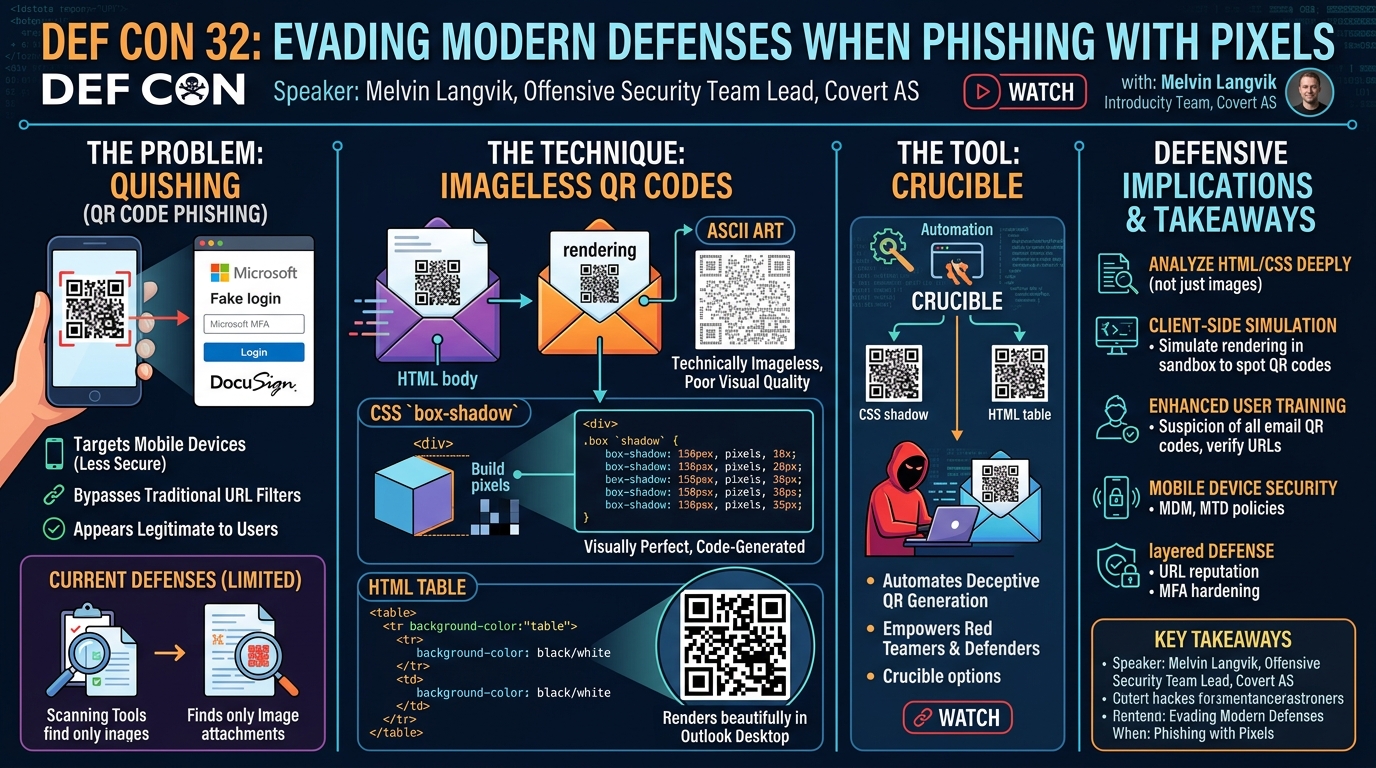
The central discovery presented by Melvin Langvik is the critical vulnerability in current QR code phishing detection mechanisms, which predominantly focus on scanning image attachments. This narrow scope leaves a significant gap that attackers can exploit through imageless QR codes. Langvik demonstrated that it is entirely feasible to construct fully functional QR codes using only standard HTML and CSS, rendering them invisible to image-centric security solutions.
Langvik highlighted two primary methods for achieving this imageless delivery:
- ASCII Art QR Codes: While acknowledged as a known technique (popularized by figures like John Hammond), Langvik noted that ASCII art QR codes, while technically imageless, often suffer from poor visual quality and are less convincing to end-users. This method uses various ASCII characters to form the pattern of a QR code, which can be rendered directly in plain text emails. However, its aesthetic limitations make it less effective for sophisticated phishing campaigns.
- CSS-Based QR Codes: This method represents a significant leap in stealth and visual fidelity. Inspired by web developer Jason Adelia's work showcasing a CSS-generated QR code, Langvik adapted the technique to phishing. By using a blank HTML canvas and strategically applying CSS
box-shadowproperties, individual "pixels" of the QR code can be drawn. This allows for the creation of a visually perfect QR code that is indistinguishable from an image-based one to the human eye, but contains no actual image file data. Email clients capable of rendering CSS will display these codes flawlessly.
- HTML Table-Based QR Codes: Building on the CSS concept, Langvik also explored constructing QR codes entirely out of HTML tables. This involves creating a grid of
<table>,<tr>(table row), and<td>(table data) elements. The "pixels" of the QR code are then formed by setting thebackground-colorof individual<td>cells to black or white, and precisely controllingcellspacingandcellpaddingto create a tight grid. This method also produces a high-fidelity QR code that renders beautifully in many email clients, including the Outlook desktop client, without relying on any embedded images.
Crucially, both the CSS and HTML table methods bypass email filters and sandboxes that are specifically designed to parse image attachments for QR code content. Since the malicious URL is encoded within the structure and styling of the HTML/CSS itself, rather than in an image file, these solutions fail to identify the embedded threat. To automate the generation of these sophisticated imageless QR codes, Langvik developed and released a new tool named Crucible, enabling red teamers to leverage these advanced phishing techniques.
Technical Deep Dive
▶ Watch: Why attackers use QR codes for phishing (4:00)
The technical foundation of imageless QR code phishing relies on understanding both the structure of QR codes and how email clients render HTML and CSS. A standard QR code consists of several key elements: finder patterns (large squares at three corners, for orientation), alignment markers (smaller squares, for correcting distortion), and data modules (the black and white squares encoding the actual information). QR codes also incorporate error correction, allowing them to remain scannable even if up to 30% of their data is obscured or damaged. Different versions dictate the size and data capacity, ranging from 21x21 modules up to 171x171, capable of storing over 4,000 alphanumeric characters.
Traditional QR code detection mechanisms, as highlighted by Langvik, often operate on the assumption that a QR code will be delivered as a visual image file. For instance, the detection rule by Liam Jones specifically targets common image extensions like .PNG, .JPEG, and .SVG. These rules typically involve:
- Identifying email attachments with image file extensions.
- Using image processing libraries to attempt to decode any QR code present within these images.
- Extracting the embedded URL or data for further analysis (e.g., URL reputation checks, sandboxing).
This approach is fundamentally flawed against imageless methods because it never encounters an "image" to process. Black-box solutions like Microsoft Sentinel, while more sophisticated, might still rely on heuristics that look for image-based QR code indicators or simply fail to fully render and interpret complex HTML/CSS in a way that reveals the hidden QR code.
Langvik's innovative techniques directly exploit this blind spot:
CSS box-shadow QR Codes
This method leverages the power of CSS to draw the QR code. The core idea, inspired by Jason Adelia's web design work, is to use a single HTML element (e.g., a <div>) as a blank canvas and then apply multiple box-shadow properties to it. Each box-shadow instance can create a small, offset rectangle of a specific color, effectively acting as a "pixel" in the QR code grid.
The process involves:
- QR Code Generation: A standard QR code library is used to generate the binary pattern (black and white modules) for a given URL or data.
- CSS Transformation: A Python script (or similar, Langvik mentioned using Python with assistance from ChatGPT) iterates through each module of the generated QR code.
- Dynamic
box-shadowApplication:
- For each "black" module at
(x, y)coordinates within the QR code grid, a correspondingbox-shadowrule is generated. - The
box-shadowproperty typically takes values foroffset-x,offset-y,blur-radius,spread-radius, andcolor. To create sharp, distinct pixels,blur-radiusis set to0, andspread-radiusis used to define the size of the "pixel." - Example: If a QR code module at
(5, 7)needs to be black, a CSS rule likebox-shadow: 5px 7px 0 1px black;could be generated (where1pxdefines the pixel size, and5px/7pxare offsets relative to the parent element).
- HTML Embedding: All these generated
box-shadowrules are then concatenated and applied to a single HTML<div>element within the email body.
The resulting HTML contains no <img src="..."> tags or attached image files. Instead, the QR code is rendered purely by the email client's CSS engine, making it visually identical to an image-based QR code but structurally entirely different.
HTML Table QR Codes
This method is perhaps even simpler in concept but equally effective for evasion. It relies on the fundamental structure of HTML tables to construct the QR code grid.
The process involves:
- QR Code Generation: Similar to the CSS method, the binary pattern of the QR code is first generated.
- HTML Table Construction:
- An HTML
<table>element is created. - For each row in the QR code pattern, a
<tr>(table row) element is added. - For each module (pixel) within that row, a
<td>(table data) element is added.
- Styling
<td>Cells:
- The
cellspacingandcellpaddingattributes of the<table>are set to0or a very small value to ensure the cells are tightly packed, forming a continuous grid. - The
widthandheightof each<td>can be set to a small, uniform value (e.g.,5px). - The
background-colorproperty of each<td>is dynamically set toblackorwhite(or transparent) based on the corresponding QR code module's state.
- Email Client Rendering: When an email client renders this HTML, it interprets the table structure and applies the background colors to each cell, visually reconstructing the QR code. Langvik specifically noted that this method renders "beautifully" in the Outlook desktop client.
Both imageless methods achieve the same goal: delivering a scannable QR code that traditional email security gateways, designed to inspect image attachments or embedded image data, will likely miss. The content is pure text-based HTML and CSS, which is often processed differently and less thoroughly for malicious patterns than binary image data.
Demo / Proof of Concept
▶ Watch: Common QR phishing examples (Microsoft MFA, DocuSign) (5:30)
Melvin Langvik concluded his technical deep dive with a demonstration of Crucible, the tool he developed to automate the creation of these advanced imageless QR codes. The demonstration showcased the practical application of the CSS box-shadow and HTML table techniques. While the specifics of the live demo were not fully detailed in the transcript, Langvik affirmed the tool's effectiveness, stating that the generated QR codes "work whether you're not demoing it live at Defcon," implying their robust rendering across various email clients.
The highlight of the demo was likely the visual confirmation that the HTML table method, in particular, renders "beautifully" in the Outlook desktop client. This is a significant point, as Outlook is a dominant email client in many enterprise environments. The ability to bypass its security features while maintaining visual integrity makes this a potent phishing vector. The demonstration served as a tangible proof of concept, validating the theoretical underpinnings of imageless QR code phishing. Langvik encouraged the audience to scan a QR code (presumably to access the Crucible project) and "go out there and fish somebody," emphasizing the tool's utility for red team operations and for strengthening defenses through offensive simulation.
Defensive Implications
▶ Watch: Basic QR code detection methods and flaws (6:00)
The emergence of imageless QR code phishing techniques, as demonstrated by Melvin Langvik, necessitates a significant re-evaluation of current email security strategies. Defenders can no longer assume that scanning image attachments for QR codes is sufficient.
- Advanced HTML/CSS Analysis: Email security gateways must evolve to perform deeper, more intelligent analysis of HTML and CSS content. This means looking beyond simple
<img>tags for patterns indicative of QR code construction. Solutions should be capable of:
- Detecting an unusually high density of
box-shadowproperties on a single element, particularly with specific offset and spread values. - Identifying HTML
<table>structures with numerous small<td>cells, tightly packed (e.g.,cellspacing="0",cellpadding="0"), and dynamically assignedbackground-colorproperties forming a grid pattern. - Analyzing the sheer volume and complexity of inline or embedded CSS that could be used to render such structures.
- Client-Side Rendering Simulation: The most robust defense against imageless QR codes might involve sandboxing and rendering email content in a simulated environment. By fully rendering the HTML and CSS as an email client would, security solutions could then apply optical character recognition (OCR) or image processing techniques to the rendered output to detect QR codes, regardless of their underlying construction method. This moves detection from static code analysis to dynamic visual analysis.
- Enhanced User Awareness Training: User education becomes even more critical. Employees must be trained to be highly suspicious of any QR code delivered via email, regardless of how "legitimate" it appears or whether it's an image or not. Training should emphasize:
- Verification: Always verify the sender and the context of any email containing a QR code. If unexpected, assume it's malicious.
- URL Pre-Scan: Advise users to use a QR code scanner app that displays the URL before navigating to it, allowing them to check for suspicious domains.
- Mobile Device Risk: Highlight that mobile devices are often less protected and are prime targets for these attacks.
- Mobile Device Security Posture: Given that these attacks often leverage mobile devices as the initial access vector, organizations need to bolster their Mobile Device Management (MDM) and security policies. This includes:
- Enforcing secure browser configurations.
- Implementing mobile threat defense (MTD) solutions.
- Ensuring mobile devices are enrolled in corporate security programs that provide telemetry and incident response capabilities, mirroring desktop protections where possible.
- Stricter Email Content Policies: Organizations might consider implementing stricter policies on complex HTML and CSS in inbound emails, potentially stripping certain advanced styling or table structures from external senders. However, this carries the risk of breaking legitimate email formatting and should be carefully evaluated.
- Robust URL Reputation and Phishing Detection: Even if the QR code itself bypasses initial detection, the ultimate goal of the attack is typically to direct the user to a malicious URL. Strong URL reputation services, real-time phishing site detection, and browser-level security warnings remain crucial last lines of defense. Organizations should ensure these systems are up-to-date and integrated.
In summary, defenders must move beyond signature-based and superficial content inspection. A layered approach combining advanced static analysis of HTML/CSS, dynamic rendering in sandboxes, robust endpoint and mobile device protection, and continuous, sophisticated user education is essential to counter the evolving threat of imageless QR code phishing.
Key Takeaways
- Traditional QR code phishing detection, primarily focused on scanning image attachments, is easily bypassed by modern imageless techniques.
- Attackers are leveraging advanced HTML and CSS (specifically
box-shadowproperties and<table>elements) to construct visually convincing QR codes directly within email bodies. - These imageless QR codes render perfectly in popular email clients like Thunderbird, Apple Mail, and the Outlook desktop client, making them highly effective for phishing campaigns.
- Mobile devices, often less secure and with reduced telemetry for corporate SOCs, are frequently the primary targets for these QR code-based attacks.
- Defenders must enhance email security solutions to perform deep analysis of HTML and CSS content, not just image attachments, and consider dynamic rendering in sandboxes.
- User education is paramount: employees need to be trained to exercise extreme caution with any QR code received via email and to verify URLs before scanning.
- The Crucible tool, released by Melvin Langvik, automates the generation of these sophisticated imageless QR codes, providing a valuable resource for red teamers and security researchers.
About the Speaker(s)
Melvin Langvik, who goes by the alias Flangvik, is an accomplished professional with a diverse background in technology and a focused expertise in offensive security. He currently serves as the Offensive Security Team Lead at Covert AS, a Norwegian penetration testing company. Prior to this role, Langvik was a key member of the targeted operations team at Trusted Sec, an internationally recognized security firm, where he was responsible for conducting sophisticated cyber attacks against some of the world's largest and most mature organizations.
Langvik began his career as a developer and integration consultant, gaining valuable experience in distributing critical backend infrastructure for an international customer base. This foundational understanding of systems and networks proved instrumental in his transition to offensive security. Beyond his professional engagements, Melvin is a prolific contributor to the cybersecurity community, having developed several well-known offensive security tools, including Sharp Collection and Team Filtration. He also actively creates "semi-goodish" infosec content on YouTube and Twitch, often streaming on Sundays. Langvik is also recognized for his humorous contributions to the community, such as the meme C2 and EDR tier lists.