Linux Hardening: It Doesn't Have To Be Hard - Esa Jääskelä
Esa Jääskelä (Embedded Systems Engineer · Netum)
Disobey 2026 · Main Stage
Overview
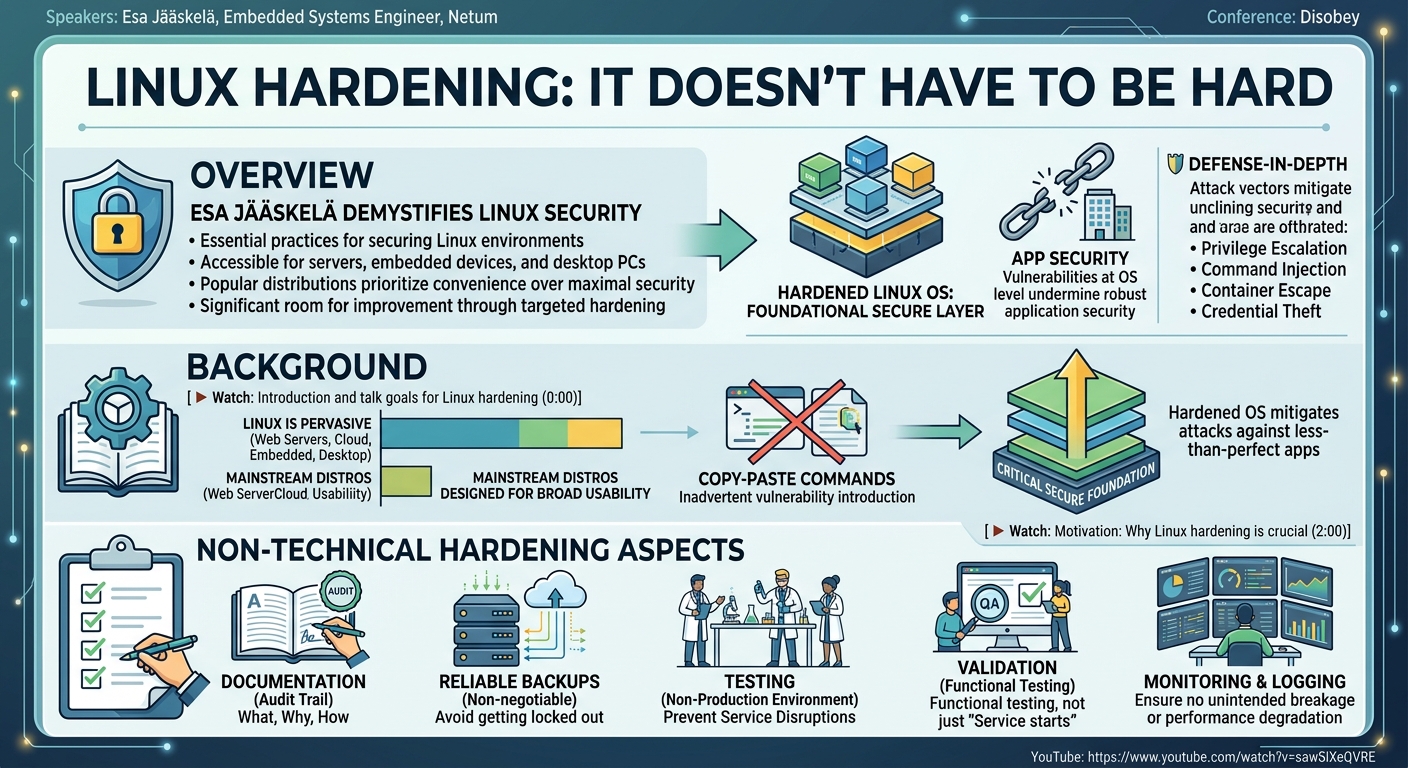
In his Disobey talk, "Linux Hardening: It Doesn't Have To Be Hard," Esa Jääskelä, an embedded systems engineer at Netum, delves into the essential practices for securing Linux environments. The presentation aims to demystify Linux hardening, making it accessible for administrators of servers, embedded devices, and even desktop PCs. Jääskelä emphasizes that while popular Linux distributions provide a secure baseline, they are often optimized for user convenience rather than maximal security, leaving significant room for improvement through targeted hardening efforts.
Key moments
- 0:00 Introduction and talk goals for Linux hardening
- 2:00 Motivation: Why Linux hardening is crucial
- 4:00 Non-technical tips for the hardening process
- 6:00 Beginning technical hardening: Focusing on interfaces
- 8:00 Disabling unneeded interfaces: Nmap, SS, LSOF
Linux Hardening: It Doesn't Have To Be Hard
Speakers: Esa Jääskelä, Embedded Systems Engineer, Netum
Conference: Disobey
YouTube: https://www.youtube.com/watch?v=sawSiXeQVRE
Overview
In his Disobey talk, "Linux Hardening: It Doesn't Have To Be Hard," Esa Jääskelä, an embedded systems engineer at Netum, delves into the essential practices for securing Linux environments. The presentation aims to demystify Linux hardening, making it accessible for administrators of servers, embedded devices, and even desktop PCs. Jääskelä emphasizes that while popular Linux distributions provide a secure baseline, they are often optimized for user convenience rather than maximal security, leaving significant room for improvement through targeted hardening efforts.
The talk underscores the critical importance of a robustly hardened Linux operating system as the foundational layer of any secure infrastructure. It highlights how even perfectly secured applications can be undermined by vulnerabilities at the OS level, making defense-in-depth mechanisms indispensable. Jääskelä illustrates this by citing common attack vectors such as privilege escalations, command injections, container escapes, and credential thefts, all of which can be mitigated by a properly secured Linux system. His insights, drawn from extensive experience in embedded systems and maintaining a security-oriented Linux distribution, offer practical, actionable advice ranging from fundamental concepts to intermediate technical configurations.
Background
▶ Watch: Introduction and talk goals for Linux hardening (0:00)
The pervasive nature of Linux across various computing paradigms—from web servers and cloud infrastructure to embedded systems and personal desktops—necessitates a strong focus on its inherent security. However, as Jääskelä points out, most mainstream Linux distributions are designed for broad usability and convenience, meaning their default configurations often do not prioritize the most stringent security posture. This leaves systems susceptible to misconfigurations by users or administrators who, in an effort to get things working, may inadvertently introduce vulnerabilities, often by copy-pasting commands without full understanding.
A secure Linux operating system provides a critical "secure foundation" upon which applications and services can safely run. Without this, even the most robust application-level security measures can be rendered ineffective if an attacker exploits a weakness in the underlying OS. This forms a crucial layer of defense in depth, where a hardened operating system can mitigate attacks that might otherwise succeed against less-than-perfectly hardened applications. Jääskelä's perspective is particularly informed by his background as an embedded systems engineer, where the attack surface is often smaller, but the need for stringent, low-level security is paramount. His experience maintaining a security-oriented embedded Linux distribution has directly inspired many of the practical hardening techniques discussed.
Before diving into technical specifics, Jääskelä outlines several non-technical but equally vital aspects of the hardening process. These include thorough documentation of what is being hardened, why, and how, to create an auditable paper trail. Reliable backups are presented as non-negotiable, given the high risk of inadvertently locking oneself out of a system during hardening. Crucially, all hardening changes must be tested in a non-production environment to prevent service disruptions. Finally, validation goes beyond merely confirming a service starts; it requires comprehensive functional testing, preferably with additional monitoring and logging, to ensure no unintended breakage or performance degradation has occurred.
Key Findings
▶ Watch: Motivation: Why Linux hardening is crucial (2:00)
Jääskelä's talk articulates a comprehensive approach to Linux hardening, structured around five core pillars: Interfaces, Users, Files, Processes, and Miscellaneous topics. The overarching theme is the application of the principle of least privilege across all layers of the system, ensuring that every component, from network interfaces to running processes, possesses only the minimum necessary permissions and access to perform its intended function.
A primary finding is that effective hardening begins with disabling unnecessary interfaces and rigorously firewalling the necessary ones. This forms the first line of defense against external threats. Internally, the management of users and their privileges, particularly the root user, is paramount. Jääskelä advocates for granular sudo configurations and leveraging Pluggable Authentication Modules (PAM) for advanced authentication factors, moving beyond simple passwords.
The talk highlights that "almost everything in Linux is a file," making file permissions and access controls critically important. This includes both traditional Discretionary Access Control (DAC) and more advanced Mandatory Access Control (MAC) systems like SELinux or AppArmor. For processes, the key is isolation and running services with the lowest possible privileges, utilizing tools like Systemd's extensive sandboxing capabilities and containers for further compartmentalization. Finally, supply chain security and resource limiting are presented as crucial miscellaneous considerations, addressing how software is obtained and how system resources are managed to prevent denial-of-service scenarios.
Technical Deep Dive
▶ Watch: Non-technical tips for the hardening process (4:00)
Jääskelä organizes the technical aspects of Linux hardening into logical, actionable categories, starting from the perimeter and moving inwards.
Interfaces
Interfaces represent the gateways into a Linux system. The initial step in hardening is to disable any interfaces that are not strictly necessary. This can be approached from both an "outside-in" and "inside-out" perspective. Externally, tools like Nmap can identify open ports, complemented by passive reconnaissance or certificate analysis. Internally, utilities such as ss and lsof reveal listening services and active network connections. Jääskelä stresses the importance of continuous manual auditing, as Nmap only provides a snapshot in time.
For interfaces that must remain open, hardening is critical. While application-specific hardening varies, common themes include configuring secure encryption mechanisms and defining allowed users and authentication methods. The talk specifically addresses SSH as a direct remote shell interface, recommending the use of secure keys (avoiding older RSA keys), limiting allowed users (especially preventing remote root login), and implementing key-based authentication or multi-factor authentication (MFA).
Firewalls are central to interface security. The process involves identifying and explicitly allowing necessary network traffic, then blocking everything else. Common Linux firewall tools include NFTables (a lower-level utility suitable for servers), UFW (Uncomplicated Firewall), and firewalld (more user-friendly options). Additionally, tools like CrowdSec or Fail2Ban can dynamically implement temporary firewall rules to block malicious actors, though caution is advised to prevent accidental self-lockouts.
Users
Linux users are not just for human administrators; services also run under specific user IDs. The root user, with its superuser privileges, is a primary target for attackers. Therefore, limiting root login is a cornerstone of hardening. This involves assessing the system's user requirements (e.g., multi-tenant vs. single administrator) and creating specific, non-root user accounts for all necessary tasks.
To enable privileged operations without direct root access, sudo configuration is essential. Jääskelä advocates for a granular sudo configuration that strictly adheres to the principle of least privilege, granting users only the commands they need. He also suggests considering multiple layers of authorization, splitting administrative duties among different users with varying sudo capabilities. A critical concern with sudo is shell escapes, where a seemingly innocuous command granted via sudo can be exploited to gain a root shell. The talk references GTFOBins (specifically gtfobins.github.io) as a resource illustrating how common binaries, even apt, can be misused for privilege escalation if sudo permissions are not carefully restricted. Once alternative administrative paths are established, direct root user login should be disabled (e.g., using passwd -l root or configuring SSH to deny root login), though administrators must be aware of its implications for rescue operations.
PAM (Pluggable Authentication Modules) provides a powerful, modular framework for authentication in Linux. It centralizes authentication logic, allowing applications like sudo and SSH to leverage complex authentication flows. PAM modules can enforce secure password policies (e.g., pam_pwquality for complexity requirements), integrate with directory services like LDAP or Active Directory (pam_sss, pam_ldap), and implement additional authentication factors. Jääskelä highlights time-based one-time passwords (TOTP) using pam_oath or Google Authenticator (which can be integrated with SSH for MFA), and even hardware-based authentication like U2F keys or smart cards (pam_u2f, pam_pkcs11) or fingerprints (pam_fprint) for local logins.
Files
Given that "almost everything in a Linux system is a file," securing files is fundamental. Linux employs Discretionary Access Control (DAC), where file owners set permissions (read, write, execute) for themselves, their group, and others. Key principles for DAC hardening include:
- Ensuring critical system files are owned by root.
- Making sure system configuration files are not writable by non-root users.
- Preventing security-sensitive information from being readable by non-root users.
- Ensuring log files are not world-readable to maintain integrity.
- Avoiding world-writable files unless absolutely necessary, as they undermine integrity.
- In multi-tenant systems, protecting user home directories from other users.
Manually auditing thousands of files is impractical. Jääskelä recommends auditing tools like Lynis or OpenSCAP, or using custom scripts to identify problematic files. Special attention is drawn to setuid (SUID) and setgid (SGID) binaries. These bits allow a program to run with the permissions of the file's owner (typically root) rather than the user executing it. While essential for tools like sudo, they pose significant risks if applied to vulnerable or incorrect binaries (e.g., a setuid shell would grant root access to any user). They should be reduced to an absolute minimum.
Beyond individual file permissions, filesystem mount options provide system-wide controls. Options like nosuid (prevents SUID/SGID bits from taking effect), noexec (prevents execution of binaries), and ro (mounts the filesystem as read-only) are powerful. The ultimate goal for high-security systems is to achieve read-only or noexec mounts across all partitions, preventing unauthorized code execution or persistent modification by non-root users.
Finally, Mandatory Access Controls (MAC), such as SELinux and AppArmor, offer a centralized, policy-driven security model that goes beyond DAC. Unlike DAC, MAC rules cannot be overridden by the root user, providing an additional layer of control, even over the superuser. While complex, MAC systems allow for fine-grained control over process interactions and resource access.
Processes
When a program runs, it becomes a process with an associated user ID. A critical hardening measure is to ensure that services run as non-root users with the least possible privileges. Running a service as root, especially one exposed remotely, creates a severe vulnerability: an exploit could grant an attacker full system control. If developing custom software, developers should implement capability dropping to limit a process's power to only what's strictly necessary.
For existing services, Systemd, the ubiquitous init system, offers extensive isolation mechanisms. Through Systemd service files, administrators can configure:
- File system isolation: Making parts of the filesystem inaccessible, read-only, or read-write only where needed.
- Network access limits: Restricting a service's network connectivity.
- System call limits: Using seccomp to restrict the system calls a process can make.
- Capability limits: Reducing the Linux capabilities granted to a process.
- Core system resource protection: Safeguarding critical kernel resources.
DynamicUser: Running a service as a temporary user ID that doesn't persist on the system, offering strong isolation.
Jääskelä recommends using systemd-analyze security to audit the hardening status of Systemd services, noting that while it often shows many services as "not utilizing Systemd services," this provides a clear roadmap for improvement.
Containers (e.g., Docker, Podman) offer another layer of isolation and sandboxing, particularly useful for public-facing services. If a containerized service is compromised, the attacker should theoretically be confined to the container. However, containers introduce their own set of hardening challenges:
- Supply chain issues: Base container images from public sources must be vetted for vulnerabilities.
- Container hardening: Containers themselves need hardening, including running processes as non-root, using read-only filesystems, applying resource limits, and configuring security options. This essentially means "a hardening exercise inside your hardening exercise."
Demo / Proof of Concept
▶ Watch: Beginning technical hardening: Focusing on interfaces (6:00)
While the talk did not feature a live, interactive demonstration, Esa Jääskelä effectively illustrated key concepts through practical examples and outputs. He presented the output of systemd-analyze security to visually convey the hardening status of services on a typical Linux Mint installation, highlighting areas where Systemd's isolation features were not being utilized. Additionally, Jääskelä referenced GTFOBins (specifically gtfobins.github.io) to demonstrate how seemingly innocuous commands, if granted sudo privileges, could be exploited for shell escapes and privilege escalation, using apt as a concrete example. He also briefly mentioned a real-world scenario involving a service with a world-writable socket (capabilities 666) leading to command execution, underscoring the dangers of incorrect file permissions.
Defensive Implications
▶ Watch: Disabling unneeded interfaces: Nmap, SS, LSOF (8:00)
The defensive implications of Jääskelä's talk are multifaceted, emphasizing a proactive, layered security approach.
- Start with Risk Assessment: Before implementing any hardening, organizations must perform a thorough risk assessment. This involves identifying critical assets, enumerating potential threats, evaluating the likelihood and impact of those threats, and then prioritizing hardening efforts based on this analysis.
- Audit and Monitor: Regular auditing of systems is crucial. Tools like Lynis, OpenSCAP, and
systemd-analyze securitycan help identify misconfigurations, open ports, and services lacking isolation. Continuous monitoring ensures that the hardened state is maintained and any new vulnerabilities or deviations are promptly detected. - Secure the Perimeter: Ensure that only known and necessary ports are open to the outside world. All public-facing services must be rigorously hardened, applying principles of least privilege and robust authentication. Firewalls configured with tools like NFTables, UFW, or firewalld are indispensable for controlling network traffic.
- Control Root Access: The security of a Linux system hinges significantly on how root authentication is managed. Implement strong authentication for root (if direct login is absolutely necessary) or, preferably, disable direct root login entirely, relying on
sudowith granular permissions. Leverage PAM to enforce strong password policies and integrate multi-factor authentication for all privileged accounts. - Strengthen Supply Chain Security: Be highly cautious about the provenance of installed packages. Stick to official, trusted package repositories. If external repositories are used, ensure packages are signed and transported securely. Consider setting up internal mirrors to gain more control and reaction time over updates. Implement automatic updates for the operating system and core packages, and carefully manage software installed outside of package managers (e.g., binaries pulled via
curlorwget, or dependencies managed bypipornpm), which often lack automatic update mechanisms. - Embrace Least Privilege Universally: Apply the principle of least privilege to every aspect of the system:
- Users: Grant only necessary
sudopermissions, avoid shell escapes. - Files: Ensure critical files are root-owned, configuration files are non-writable by non-root, and sensitive data is protected. Minimize
setuid/setgidbinaries. Utilizenoexec,nosuid, andromount options. - Processes: Run services as dedicated non-root users with limited capabilities. Leverage Systemd's isolation features (filesystem, network, syscall limits, dynamic users).
- Containers: Harden container images, run container processes as non-root, and apply resource limits and security options to the containers themselves.
- Layered Defense: Recognize that hardening is not a single solution but a combination of multiple layers of security controls. Each layer, from network firewalls to process isolation, contributes to a robust defense-in-depth strategy, mitigating the impact of a breach if one layer fails.
- Continuous Learning and Adaptation: The threat landscape evolves constantly. Defenders must continuously learn about new vulnerabilities and hardening techniques. Jääskelä explicitly mentions that topics like monitoring, integrity checking, and encryption, while not covered in his talk, are crucial areas for further exploration.
Key Takeaways
- Linux hardening is fundamental for robust security: Even with secure applications, a vulnerable underlying operating system can compromise the entire system. Hardening provides a crucial defense-in-depth mechanism against common attack vectors like privilege escalation and command injection.
- The principle of least privilege is paramount: Apply this concept across all layers—interfaces, users, files, and processes—to minimize potential damage from a compromise.
- Leverage built-in Linux capabilities for isolation: Tools like
sudofor granular privilege management,PAMfor advanced authentication (including MFA), andSystemdfor extensive service isolation and sandboxing are powerful defensive assets. - Secure the software supply chain: Be diligent about the origin and integrity of installed packages, prioritize official repositories, enable automatic updates, and carefully manage software installed outside package managers to prevent malware or vulnerable components.
- Regular auditing and risk assessment are non-negotiable: Proactively identify weaknesses using tools like
Lynisorsystemd-analyze security, document everything, and continuously test changes in non-production environments. - Containers enhance isolation but require their own hardening: While containers offer a valuable layer of sandboxing, they must be hardened internally (e.g., non-root users, read-only filesystems) to prevent container escapes and supply chain vulnerabilities.
About the Speaker(s)
Esa Jääskelä is an embedded systems engineer at Netum, where he works with Linux systems, often in specialized, resource-constrained environments. His practical experience in this field heavily influences his approach to security, focusing on the core operating system and user space. Jääskelä is also a prolific writer on cybersecurity and embedded systems, sharing his insights on his blog, atascll.dev. A significant inspiration for this presentation stems from his hobby of maintaining a security-oriented embedded Linux distribution, providing him with hands-on experience in implementing and refining the hardening techniques discussed.
Reviews
Dr. Zero (Offensive Security Researcher) — SOLID
Competent, well-organized intro-to-intermediate Linux hardening survey covering the standard checklist: interfaces, users, files, processes, supply chain. Nothing here will surprise anyone who's read the Arch Wiki hardening guide or run Lynis before, but it's delivered cleanly and without vendor nonsense, which puts it ahead of half the 'hardening' talks submitted to any con.
Heather Calloway (CISO) — SOLID
A competent, well-organized introduction to Linux hardening from an engineer who clearly knows the material. Useful for sysadmins and junior security practitioners, but it stops well short of institutional relevance — there's no governance thread, no risk prioritization framework, and no guidance on who owns these decisions inside an organization.