Admin Rights are not Human Rights - Sami Laiho
Sami Laiho
Disobey 2026 · Main Stage
Overview
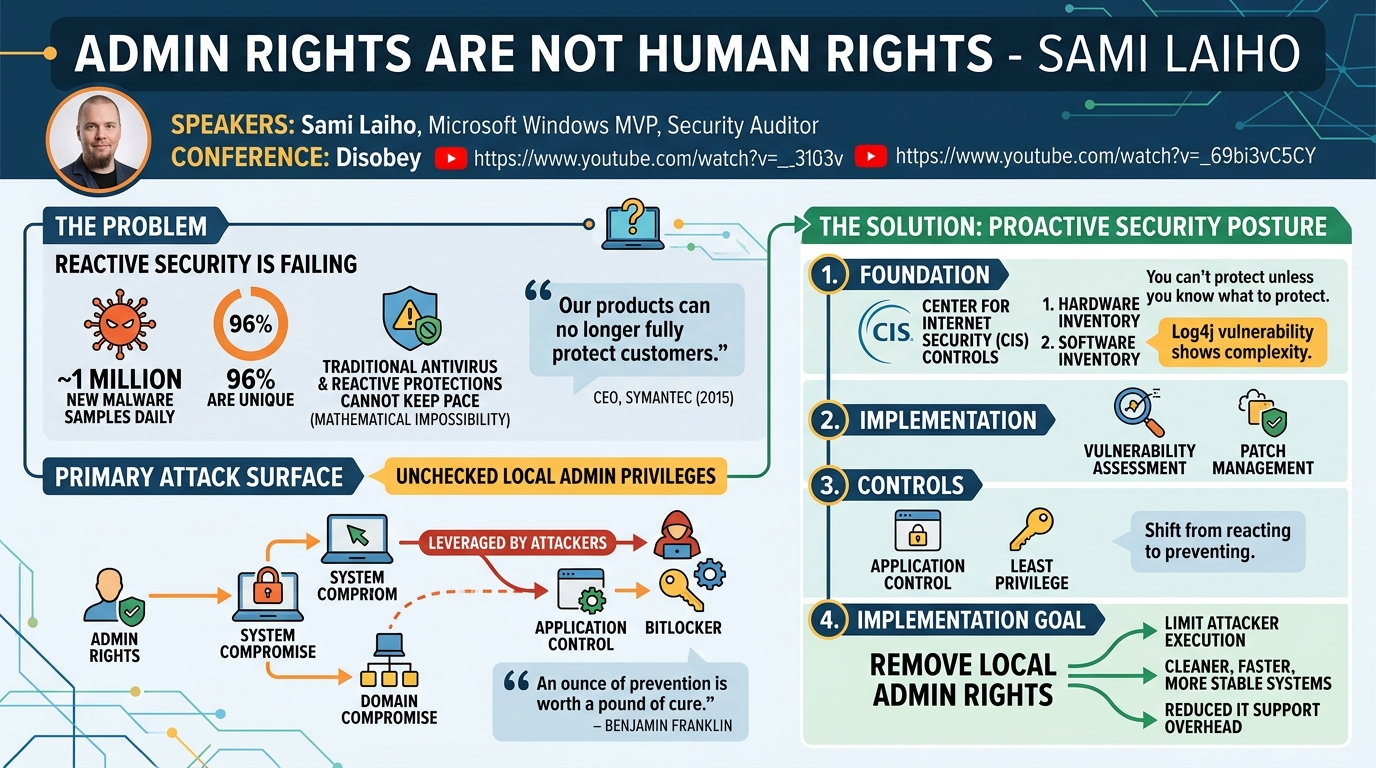
In his compelling talk, "Admin Rights are not Human Rights," Sami Laiho, a seasoned Microsoft Windows MVP and security auditor, delivers a stark warning about the futility of reactive security measures in today's threat landscape. Laiho argues that with approximately 1 million new pieces of malware appearing daily, 96% of which are unique, traditional antivirus and reactive protections are mathematically incapable of securing modern enterprises. Instead, he champions a proactive security posture, focusing heavily on the critical importance of removing local administrator rights from end-users and even developers.
Key moments
- 0:00 Admin rights are not human rights: setting the stage
- 2:00 Reactive security is failing: the shift to proactive
- 4:00 Security's job: slow down the enemy, not stop them
- 5:00 Why inventory is the most boring, yet crucial, control
- 6:00 Log4j and the need for Software Bill of Materials (SBOM)
- 8:00 Application control: essential for inventory and vulnerability prevention
- 8:50 Admins bypass application control: the core problem
Admin Rights are not Human Rights - Sami Laiho
Speakers: Sami Laiho, Microsoft Windows MVP, Security Auditor
Conference: Disobey
YouTube: https://www.youtube.com/watch?v=_69bi3vC5CY
Overview
In his compelling talk, "Admin Rights are not Human Rights," Sami Laiho, a seasoned Microsoft Windows MVP and security auditor, delivers a stark warning about the futility of reactive security measures in today's threat landscape. Laiho argues that with approximately 1 million new pieces of malware appearing daily, 96% of which are unique, traditional antivirus and reactive protections are mathematically incapable of securing modern enterprises. Instead, he champions a proactive security posture, focusing heavily on the critical importance of removing local administrator rights from end-users and even developers.
The talk meticulously dissects how the unchecked proliferation of admin privileges creates a primary attack surface, rendering other security controls, such as application control and BitLocker, significantly less effective. Laiho illustrates this through a series of live demonstrations, exposing common misconfigurations and attack techniques that leverage admin rights to achieve system and even domain compromise. His core message resonates: an "ounce of prevention is worth a pound of cure," urging organizations to shift their focus from an impossible fight against malware to foundational security principles that limit an attacker's ability to execute their payloads.
Laiho emphasizes that the journey to a more secure environment begins with robust inventory management, extends through the implementation of application control, and ultimately culminates in the principle of least privilege – specifically, the elimination of local admin rights. He challenges the common user perception that admin rights are necessary for productivity, demonstrating how their removal can lead to cleaner, faster, and more stable systems, ultimately reducing IT support overhead and enhancing overall security posture. This talk is crucial for any organization grappling with endpoint security, aiming to move beyond the reactive treadmill, and seeking practical, impactful strategies to bolster their defenses.
Background
▶ Watch: Admin rights are not human rights: setting the stage (0:00)
The landscape of cybersecurity has undergone a dramatic transformation over the past decade. Sami Laiho highlights that the era of relying primarily on reactive protections like traditional antivirus software is effectively over. Citing the staggering statistic of roughly one million new malware samples discovered daily, with 96% being unique, Laiho underscores the mathematical impossibility of keeping pace with threats using signature-based detection alone. This shift was publicly acknowledged as early as 2015 when the CEO of Symantec, a prominent cybersecurity vendor, stated that their products could no longer fully protect customers, signaling a fundamental flaw in the prevailing security paradigm.
This reality necessitates a pivot towards proactive security measures. Laiho invokes Benjamin Franklin's adage, "an ounce of prevention is worth a pound of cure," to frame the discussion. He points to the Center for Internet Security (CIS) Controls as a foundational framework, emphasizing that the top two controls — hardware inventory and software inventory — are often overlooked in favor of more technical, yet less foundational, measures like BitLocker or application control. The logic is simple: "You can't protect unless you know what to protect." An accurate, up-to-date inventory is indispensable for effective patch management, vulnerability assessment, and overall risk mitigation.
The complexity of inventory management has escalated with the rise of component-based software development. The Log4j vulnerability served as a stark example, exposing the difficulty organizations faced in identifying vulnerable components embedded within their applications, rather than just listing the applications themselves. This incident highlighted the urgent need for a Software Bill of Materials (SBOM), which documents all components used in software development, enabling rapid identification and remediation of supply chain vulnerabilities.
Laiho then connects inventory to application control, positing that without it, any inventory snapshot quickly becomes obsolete as users install unauthorized software. Application control, such as Windows Defender Application Control (WDAC), is presented as a cornerstone of proactive defense. He cites research showing that application control can prevent 100% of identified Microsoft Defender vulnerabilities, making it an exceptionally effective control. However, a critical caveat is introduced: application control is severely hampered if users possess local administrator rights, as administrators can bypass these controls and execute any software they choose. This logical progression leads directly to the talk's central theme: the pervasive and dangerous nature of local admin rights.
Key Findings
▶ Watch: Security's job: slow down the enemy, not stop them (4:00)
Sami Laiho's talk reveals several critical findings regarding endpoint security and the inherent risks associated with local administrator rights. The overarching message is that admin rights are the primary gateway for attackers, undermining virtually every other security control.
Firstly, Laiho demonstrates that BitLocker, often considered the "final lock" of Windows security, is frequently misconfigured in a way that allows end-users to self-recover their encryption keys. By default, many Entra ID (formerly Azure AD) tenants are configured to allow users to retrieve their own BitLocker recovery keys from myaccount.microsoft.com. This seemingly convenient feature completely negates BitLocker's protective value against physical access attacks, as any user with physical access to their machine can effectively become a local administrator by decrypting their drive.
Secondly, the talk illustrates that even with modern Windows versions (up to Server 2025), classic physical access hacks remain viable if BitLocker is compromised or absent. The Sticky Keys hack (replacing sethc.exe with cmd.exe) can still grant an elevated command prompt at the login screen. While Windows Defender might detect this modification in normal mode, booting into Safe Mode bypasses these protections, allowing an attacker to create new local administrator accounts. This underscores that physical control combined with a lack of proper BitLocker configuration is a critical vulnerability.
Thirdly, Laiho highlights that administrators are fundamentally exempt from many organizational security policies and controls. He demonstrates how a local admin can bypass Group Policy Objects (GPOs) by directly manipulating the registry settings that GPOs configure. Furthermore, an admin can bypass Windows Resource Protection and standard Access Control Lists (ACLs) by leveraging powerful Windows privileges, such as SeBackupPrivilege (used for "Restore files and directories"), which allows them to overwrite protected system files like notepad.exe using tools like robocopy /B. This illustrates that privileges beat permissions, a core concept in Windows security.
Finally, the talk exposes a critical path to domain compromise from a compromised endpoint. By luring a domain administrator to log into a local machine where an attacker has already gained local admin rights, the attacker can leverage the compromised machine's computer account to authenticate to the domain. This allows the attacker to create a scheduled task that, when executed under the NT AUTHORITY\SYSTEM context, can add a new user to the Domain Admins group, effectively elevating a local compromise to a full domain takeover. This emphasizes the importance of strict Active Directory Tiering and the principle of never logging into lower-tier systems with high-privilege credentials.
Beyond the technical vulnerabilities, a key finding is the significant operational benefits of removing admin rights. Laiho presents statistics from real customers, showing a 75% reduction in IT support tickets and a 65% decrease in computer reinstallations in environments where end-users no longer have admin rights. This demonstrates that removing admin rights is not just a security benefit but also a substantial productivity and cost-saving measure for IT departments, leading to cleaner, faster, and longer-lasting computers for users.
Technical Deep Dive
▶ Watch: Why inventory is the most boring, yet crucial, control (5:00)
The technical core of Sami Laiho's presentation revolves around demonstrating how local administrator rights, or the ability to gain them, fundamentally undermine a system's security posture. He walks through several attack vectors, each building on the premise that an attacker requires elevated privileges to execute their objectives effectively.
1. BitLocker Key Recovery Misconfiguration:
Laiho begins by illustrating a common and critical misconfiguration related to BitLocker and Entra ID (formerly Azure AD). By default, many Entra ID tenants have the setting Restrict users from recovering the BitLocker keys for their own devices set to No. This allows any user whose device is joined to Entra ID to visit myaccount.microsoft.com, navigate to their devices, and retrieve the BitLocker recovery key for their own machine.
- Impact: An attacker with physical access to a locked device can bypass BitLocker encryption simply by having the legitimate user log into
myaccount.microsoft.com(or if they already have access to the user's credentials), retrieve the key, and then use it to unlock the drive from a recovery environment (e.g., Windows PE from a bootable USB). This gives them full access to the file system, enabling further compromise.
2. Physical Access Attack: Sticky Keys to Local Admin:
Once BitLocker is bypassed (or absent), Laiho demonstrates a classic physical access attack that still works on modern Windows versions (XP through Server 2025).
- Method:
- Boot from Installation Media: Start the target Windows machine from a bootable USB drive containing Windows installation media (e.g., Windows 11 ISO).
- Access Command Prompt: In the Windows Setup environment, select "Repair your computer" -> "Troubleshoot" -> "Command Prompt".
- Identify OS Drive: Use
diskpartordircommands to identify the drive letter of the Windows installation (oftenC:orD:in the recovery environment). - Replace Sticky Keys Executable: Navigate to
C:\Windows\System32\and replacesethc.exe(the Sticky Keys executable, triggered by five Shift presses) withcmd.exe.
copy C:\Windows\System32\cmd.exe C:\Windows\System32\sethc.exe /Y
- Reboot: Eject the installation media and reboot the machine normally.
- Bypass Windows Defender (Safe Mode): Laiho notes that modern Windows Defender might detect this modification. To bypass this, the attacker reboots into Safe Mode (by holding Shift during restart and selecting Safe Mode from the advanced startup options). In Safe Mode, Windows Defender's real-time protection is often less active, allowing the modified
sethc.exeto execute without immediate detection. - Elevated Command Prompt: At the Windows login screen in Safe Mode, pressing the Shift key five times will launch an elevated Command Prompt, running as
NT AUTHORITY\SYSTEM. - Create Local Admin: From this elevated prompt, the attacker can create a new local user and add them to the local Administrators group:
net user <username> <password> /addnet localgroup administrators <username> /add- The attacker can then log in with this newly created local administrator account.
3. Bypassing Group Policy Objects (GPOs):
Laiho demonstrates that local administrators are not bound by GPOs in the same way standard users are. He attempts to enable Remote Desktop, which is blocked by a GPO.
- Method:
- Identify Registry Key: Using the "Group Policy Settings Reference" Excel spreadsheet (a valuable resource for attackers and defenders alike), Laiho identifies the registry key associated with the GPO setting for Remote Desktop. For example, RDP settings might be found under
HKLM\SOFTWARE\Policies\Microsoft\Windows NT\Terminal Services. - Direct Registry Manipulation: As a local administrator, the attacker can directly delete or modify the relevant registry key, effectively bypassing the GPO's enforcement.
reg delete "HKLM\SOFTWARE\Policies\Microsoft\Windows NT\Terminal Services" /v fDenyTSConnections /f(example)- Impact: This highlights that GPOs primarily enforce settings for non-admin users; a local admin can simply undo these settings.
4. Domain Admin Elevation via Compromised Endpoint:
This is a sophisticated "living off the land" attack that leverages a compromised endpoint to gain Domain Admin privileges.
- Scenario: An attacker has local admin rights on an endpoint. They then lure a legitimate Domain Admin to log into this compromised machine (e.g., for troubleshooting).
- Method:
- Elevate to SYSTEM: The local admin uses
psexec -s -i cmd.exeto launch a command prompt asNT AUTHORITY\SYSTEM. This is crucial because the SYSTEM account authenticates to the domain using the computer's account credentials, not the local user's. - Create Scheduled Task: From the SYSTEM command prompt, the attacker uses
schtasks.exeor the Task Scheduler GUI to create a new scheduled task. - Configure Task for Domain Compromise:
- Action: Configure the task to run
net userandnet groupcommands. - Commands:
net user sami query1 /add /domain(creates a new domain user namedsamiwith passwordquery1).net group "Domain Admins" sami /add /domain(adds the newly createdsamiuser to theDomain Adminsgroup).- Run As: The task is configured to run with "highest privileges" (which means as SYSTEM if created from a SYSTEM context) and, importantly, can authenticate to the domain using the computer account.
- Execute Task: The attacker immediately runs the scheduled task.
- Impact: This results in a new, fully privileged Domain Admin account being created in Active Directory, granting the attacker complete control over the entire domain. This attack vector severely underlines the importance of Active Directory Tiering, preventing high-privilege accounts from ever logging into lower-tier, potentially compromised workstations.
5. Bypassing Windows Resource Protection and ACLs:
Laiho concludes his technical demonstrations by showing how even highly protected system files can be modified by an administrator. He attempts to replace the default notepad.exe with a custom version.
- Challenge:
notepad.exeis protected by Windows Resource Protection (WRP), strict Access Control Lists (ACLs), and ownership restrictions, preventing direct overwriting. - Method: As an administrator, Laiho leverages the
SeBackupPrivilege(also known as "Restore files and directories" user right) usingrobocopywith the/Bswitch (backup mode). robocopy C:\temp C:\Windows\System32 notepad.exe /B(copiesnotepad.exefromC:\temptoC:\Windows\System32in backup mode).- Impact: The
/Bswitch instructsrobocopyto use the backup API, which bypasses standard file system permissions and ownership checks. This proves that an administrator, by virtue of their privileges, can override almost any file system protection, including those designed to protect core OS components.
These technical demonstrations collectively build a robust case for the elimination of local admin rights, illustrating how they serve as the fundamental enabler for a wide array of sophisticated and basic attacks, ultimately leading to system and domain compromise.
Demo / Proof of Concept
▶ Watch: Application control: essential for inventory and vulnerability prevention (8:00)
Sami Laiho's talk was heavily focused on live demonstrations, serving as concrete proofs of concept for the vulnerabilities and attack vectors he discussed. These demos were integral to illustrating why proactive security, specifically the removal of admin rights, is paramount.
The first significant demonstration involved the BitLocker key recovery misconfiguration. Laiho showed how, with a default Entra ID tenant setting, a user can navigate to myaccount.microsoft.com, select their device, and easily retrieve their BitLocker recovery key. He highlighted real-world scenarios in Finnish school systems where students exploited this vulnerability to gain admin access to their school-issued devices, bypassing security measures designed to prevent TikTok hacks. This visually confirmed that BitLocker, the "final lock," is often rendered ineffective by easily accessible recovery keys.
Next, Laiho demonstrated the classic Sticky Keys hack to gain local administrator privileges. He booted a Windows 10 LTSC machine from a Windows 11 installation USB, accessed the command prompt in the recovery environment, and replaced sethc.exe (Sticky Keys) with cmd.exe. After rebooting, he explained that modern Windows Defender would typically block this, but by rebooting into Safe Mode, he could bypass these protections. In Safe Mode, five presses of the Shift key at the login screen launched an NT AUTHORITY\SYSTEM command prompt, from which he created a new local administrator account, sami, with the password query1. This vividly showed how physical access, combined with a BitLocker bypass, can quickly lead to full local system compromise.
A demonstration of bypassing Group Policy Objects (GPOs) followed. Laiho, now with local admin rights, attempted to enable Remote Desktop (RDP) on the machine, but it was blocked by a GPO. He then consulted the "Group Policy Settings Reference" Excel file, identified the corresponding registry key (HKLM\SOFTWARE\Policies\Microsoft\Windows NT\Terminal Services), and deleted it using the command prompt. This immediately allowed him to enable RDP, proving that local administrators can circumvent policy-enforced settings by directly manipulating the underlying system configuration. He did encounter a minor hiccup where the RDP connection initially failed, humorously attributing it to "demo gods" and resorting to the "Adidas protocol" (walking to the machine physically), but the GPO bypass itself was successful.
The most critical demonstration was the elevation from local admin to Domain Admin. This involved a simulated scenario where a legitimate domain administrator ([email protected]) logged into the now-compromised endpoint. Laiho then, as the local admin, used psexec -s -i cmd.exe to launch a command prompt as NT AUTHORITY\SYSTEM. From this SYSTEM context, he created a scheduled task named "Adobe update" (to appear innocuous). This task was configured to run two net commands: one to create a new domain user sami with password query1, and another to add sami to the "Domain Admins" group. Upon running the task, he immediately showed the Active Directory Users and Computers console, confirming the creation of the sami user and its membership in the Domain Admins group. This was a powerful illustration of how a compromised endpoint can lead to full domain control if proper Active Directory Tiering is not in place.
Finally, Laiho demonstrated how privileges override permissions by attempting to replace notepad.exe, a system-protected file. Initially, a standard copy operation failed due to access denied errors. However, by using robocopy with the /B (backup mode) switch, which leverages the SeBackupPrivilege, he successfully overwrote the system file. This proved that an administrator's inherent privileges can bypass explicit file system permissions and Windows Resource Protection.
These live, step-by-step demonstrations provided irrefutable evidence for Laiho's arguments, making the abstract concepts of admin privilege abuse tangible and impactful for the audience.
Defensive Implications
▶ Watch: Admins bypass application control: the core problem (8:50)
Sami Laiho's talk provides a clear and actionable roadmap for defenders seeking to enhance their security posture, moving away from reactive measures towards proactive prevention. The central defensive implication is the elimination of local administrator rights for all end-users and, critically, for developers. This single change forms the bedrock upon which other controls can be effectively built.
Here are the key defensive implications:
- Strict BitLocker Configuration: Organizations must immediately review and correct their Entra ID (Azure AD) BitLocker settings. The default
Restrict users from recovering the BitLocker keys for their own devicesshould be set toYes. This prevents users from easily retrieving their own BitLocker recovery keys, thereby restoring BitLocker's effectiveness against physical access attacks and internal threats. Additionally, ensure proper management of recovery keys, separating logical and physical access for critical systems where possible.
- Robust Application Control: Implement a comprehensive Application Control solution, such as Windows Defender Application Control (WDAC). This prevents unauthorized applications from running, significantly reducing the attack surface. Application control is most effective when users operate without local administrator rights, as admins can bypass these controls. Laiho highlights that app control can prevent 100% of identified Microsoft Defender vulnerabilities, making it a crucial proactive defense.
- Accurate Inventory and SBOM: Prioritize and maintain up-to-date hardware and software inventories. Beyond applications, organizations must strive for a Software Bill of Materials (SBOM) to track components within applications. This enables rapid identification of vulnerable components (like Log4j) and strengthens the ability to assess and manage software supply chain risks. "You can't protect unless you know what to protect."
- Implement Active Directory Tiering: To prevent the elevation of a local endpoint compromise to a domain-wide takeover, strict Active Directory Tiering must be enforced. This means that high-privilege accounts (like Domain Admins) should never log into lower-tier systems (e.g., end-user workstations) that are more susceptible to compromise. This isolates administrative credentials and prevents credential theft via techniques like scheduled tasks leveraging computer accounts.
- Leverage Endpoint Privilege Management (EPM) Solutions: Recognizing that some users occasionally need elevated privileges for specific tasks, organizations should implement Endpoint Privilege Management (EPM) tools. These solutions allow for just-in-time, granular elevation for approved applications or tasks without granting full, persistent local admin rights. Laiho notes that Microsoft is integrating an EPM solution into the Intune Suite for E3/E5 licensees, which will make this technology more accessible and potentially reduce costs.
- Reframe Security Messaging for Users: Defenders must shift their communication strategy from "security says no" to highlighting the tangible benefits for users. Instead of focusing solely on security, emphasize how removing admin rights leads to:
- Faster, more performant computers: Less "bloating" from unauthorized software and registry entries.
- Longer SSD lifespan: Fewer unnecessary write operations.
- Fewer annoying UAC prompts: EPM solutions can streamline approved elevations.
- Reduced IT support tickets and reinstallations: Cleaner systems are more stable.
This user-centric messaging is crucial for winning over employees and fostering a culture of security adoption.
- Understand Privileges vs. Permissions: Defenders must internalize that in Windows security, privileges beat permissions. This means that an administrator, by virtue of their powerful user rights (e.g.,
SeBackupPrivilege), can bypass standard file system ACLs and even Windows Resource Protection. This reinforces that simply setting strong permissions on files is insufficient if users still hold administrative power.
By focusing on these proactive and foundational measures, particularly the removal of local admin rights, organizations can dramatically reduce their attack surface, improve system stability, and build a more resilient security posture against the ever-evolving threat landscape.
Key Takeaways
- Reactive Security is Insufficient: Traditional antivirus and signature-based protections are mathematically outmatched by the sheer volume and uniqueness of modern malware (1M new samples/day, 96% unique). A proactive approach is essential.
- Admin Rights are the Primary Attack Surface: Local administrator rights negate the effectiveness of crucial security controls like Application Control and BitLocker, providing attackers with the necessary privileges to execute payloads, bypass policies, and escalate privileges.
- BitLocker Misconfiguration is Widespread: Default Entra ID (Azure AD) settings allowing users to retrieve their own BitLocker recovery keys significantly undermine physical security and enable easy local admin compromise.
- Privileges Trump Permissions: Windows administrators can bypass standard file system permissions and even Windows Resource Protection by leveraging powerful user privileges (e.g.,
SeBackupPrivilege), highlighting that simply setting strong ACLs is insufficient. - Endpoint Compromise Can Lead to Domain Takeover: A compromised endpoint with local admin rights, combined with a domain administrator logging in, creates a critical path to full domain compromise if Active Directory Tiering is not strictly enforced.
- Removing Admin Rights Offers Significant Benefits: Beyond security, eliminating local admin rights leads to cleaner, faster, and longer-lasting computers, resulting in substantial reductions in IT support tickets (up to 75%) and system reinstallations (up to 65%).
- Effective Messaging is Crucial for Adoption: To successfully implement a least privilege environment, security teams must frame the benefits in terms that resonate with end-users, focusing on improved productivity, system performance, and reduced annoyances rather than just "security rules."
About the Speaker(s)
Sami Laiho is a highly respected Microsoft Windows MVP and an experienced security auditor, renowned for his expertise in Windows security and system management. He is a frequent speaker at major conferences worldwide, including Disobey, where he has presented multiple times. Laiho is a passionate advocate for proactive security measures, particularly the removal of administrator rights, a principle he has personally adhered to since 2002 after a frustrating experience with an Outlook "smiley" virus. His work involves auditing and securing environments for hundreds of companies, emphasizing practical, implementable solutions that enhance security without hindering productivity. His "Admin Rights are not Human Rights" slogan originated from a real-world encounter with a workers' council resisting privilege limitations.
Reviews
Dr. Zero (Offensive Security Researcher) — SOLID
A competent, well-structured evangelism talk on least privilege with live demos that land cleanly. Laiho clearly knows Windows internals cold and the BitLocker/Entra ID misconfiguration point is a genuinely useful practical finding — but the core thesis (remove local admin, implement app control, tier your AD) is material that's been circulating in Windows hardening circles since roughly the Vista era. Good execution on a well-worn topic.
Heather Calloway (CISO) — SOLID
Laiho makes a technically sound case for least privilege with live demonstrations that land cleanly for a practitioner audience. The content is competent and directionally correct, but it stays in the technical lane and never reaches the governance or executive layer where these decisions actually get made or die.