Are passkeys as secure as you think? - Fabian Bader
Fabian Bader (Gluconia)
Disobey 2026 · Main Stage
Overview
In an era increasingly plagued by phishing and credential theft, passkeys have emerged as a promising, phishing-resistant alternative to traditional passwords. Fabian Bader's talk at Disobey, "Are passkeys as secure as you think?", delves into a critical examination of this technology, moving beyond the marketing hype to explore its underlying security mechanisms, potential vulnerabilities, and real-world implications. Bader, a security consultant specializing in identity at Gluconia and a Microsoft MVP, provides a comprehensive overview of passkey types, the role of attestation, and a detailed threat model across various components of the passkey ecosystem.
Key moments
- 0:00 Introduction: What are passkeys?
- 2:50 Step-by-step explanation of the passkey login process
- 4:40 Understanding how passkeys achieve phishing resistance
- 6:00 Overview of synced passkeys and ecosystem differences
- 8:40 Device-bound passkeys and their hardware security
- 10:00 Introduction to attestation in passkey security
Are passkeys as secure as you think? - Fabian Bader
Speakers: Fabian Bader, Consulting, Gluconia, Microsoft MVP
Conference: Disobey
YouTube: https://www.youtube.com/watch?v=DQ4dnXibaoM
Overview
In an era increasingly plagued by phishing and credential theft, passkeys have emerged as a promising, phishing-resistant alternative to traditional passwords. Fabian Bader's talk at Disobey, "Are passkeys as secure as you think?", delves into a critical examination of this technology, moving beyond the marketing hype to explore its underlying security mechanisms, potential vulnerabilities, and real-world implications. Bader, a security consultant specializing in identity at Gluconia and a Microsoft MVP, provides a comprehensive overview of passkey types, the role of attestation, and a detailed threat model across various components of the passkey ecosystem.
The presentation aims to demystify passkeys for a technical audience, outlining their fundamental principles based on FIDO2 WebAuthn discoverable credentials, and dissecting the security claims surrounding them. While acknowledging the significant advancements passkeys offer in combating common attacks like phishing, Bader meticulously uncovers layers of complexity and potential weaknesses that arise from their implementation, particularly concerning syncable passkeys and third-party providers. The talk culminates in actionable mitigation strategies, primarily focused on Microsoft Entra ID environments, but also offering guidance for consumers.
This article summarizes and expands upon Bader's insights, providing a deep dive into the technical architecture, identified attack vectors, and recommended defensive postures. It serves as a crucial resource for security professionals, system administrators, and even end-users looking to understand the nuanced security landscape of passkeys and how to best leverage them while mitigating inherent risks.
Background
▶ Watch: Introduction: What are passkeys? (0:00)
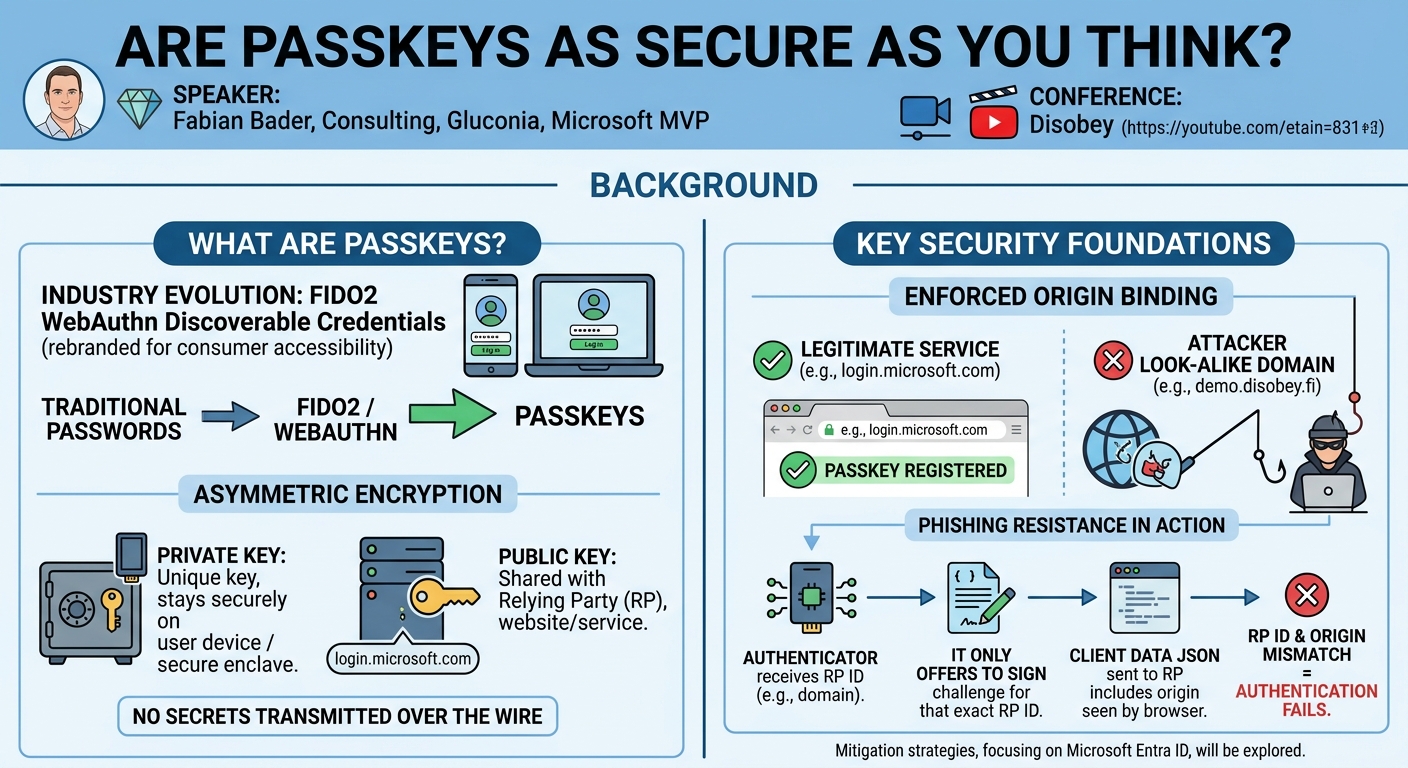
Passkeys represent the industry's evolution of FIDO2 WebAuthn discoverable credentials, rebranded for consumer accessibility (a term popularized by Apple). At their core, passkeys leverage asymmetric encryption, where a unique private key remains securely on the user's device or within a protected enclave, while a corresponding public key is shared with the relying party (RP), such as a website or service. This fundamental design eliminates the need to transmit secrets over the wire, a common vulnerability point for passwords.
A cornerstone of passkey security is enforced origin binding, which makes them inherently phishing-resistant. During the authentication process, the authenticator (the device holding the passkey) receives a relying party ID (typically the domain name, e.g., login.microsoft.com). It will only offer to sign a challenge if it possesses a passkey specifically registered for that exact RP ID. This prevents an attacker on a look-alike domain (e.g., demo.disobey.fi) from tricking the user's authenticator into signing a challenge for the legitimate service. Even if an attacker somehow manages to obtain a signature for an incorrect RP ID, the client data JSON sent to the RP includes the origin (what the browser sees), and if this doesn't match the RP ID known by the legitimate service, authentication will fail.
The typical passkey login sequence involves several critical steps:
- User Initiates Login: The user navigates to a service's login page (e.g.,
login.microsoft.com). - Redirection to RP: The user is redirected to the actual relying party (e.g., Microsoft Entra ID).
- Challenge Generation: The RP generates a unique, single-use number known as a nonce or challenge.
- Client Request: The challenge is sent to the client (browser), which triggers a JavaScript function,
navigator.credentials.get. - Authenticator Activation: This function activates the authenticator (FIDO key, platform SSO) on the user's device.
- User Verification (UV): The authenticator prompts the user for verification, typically a PIN or biometrics (e.g., Face ID, fingerprint). This step also confirms user presence.
- Private Key Unlock and Signing: Upon successful UV, the passkey's private key is unlocked and used to sign the challenge.
- Signature Transmission: The signed challenge, along with the signature, is sent back to the client.
- RP Verification: The client forwards the signature to the relying party. Entra ID then uses the public key it has on file for the user to validate the signature. If valid, authentication is successful.
This multi-step process, particularly the origin binding and user verification, forms the foundation of passkeys' enhanced security posture compared to traditional passwords and even many forms of multi-factor authentication (MFA) that remain susceptible to sophisticated phishing attacks.
Key Findings
▶ Watch: Understanding how passkeys achieve phishing resistance (4:40)
Fabian Bader's presentation uncovers several critical distinctions and potential vulnerabilities within the passkey ecosystem, challenging the perception of uniform security across all implementations.
A primary distinction lies between two fundamental types of passkeys:
- Sync Passkeys: These are designed for convenience, allowing the private key to be backed up and synchronized across multiple devices via a passkey provider (e.g., Apple iCloud Keychain, Google Password Manager, or third-party solutions like Bitwarden, Proton Pass). While highly convenient for users, this synchronization raises several security concerns. Passkeys are generally locked within their respective ecosystems (Apple vs. Google), though credential exchange protocols are in development to bridge this gap. Crucially, sync passkeys do not support attestation, meaning the relying party cannot verify the authenticity of the underlying device or software generating the passkey.
- Device-Bound Passkeys: In contrast, the private key for these passkeys is designed to never leave the physical device. This typically involves dedicated security keys (e.g., YubiKeys) that function as a Hardware Security Module (HSM) or Trusted Platform Module (TPM), or secure enclaves within smartphones (e.g., Apple's Secure Enclave). While offering a higher degree of private key protection, device-bound passkeys require users to re-register with services if they switch to a new security key. These passkeys support attestation, providing a mechanism for the RP to verify the authenticity of the hardware.
Attestation is a critical security feature for device-bound passkeys. Each security key identifies itself with an Authenticator Attestation GUID (AA GUID). This GUID is unique to a specific firmware level or major hardware revision from a vendor (e.g., YubiKey 5C firmware 5.1 has a different AA GUID than 5.7). While not unique per individual device, the AA GUID can offer some insights into the authenticator's origin. However, Bader demonstrates that AA GUIDs are easily faked, as shown by modifying KeePassXC's source code to present itself as a "YubiKey Bio Series." This highlights that relying solely on the AA GUID string without cryptographic attestation is insufficient for security.
True attestation involves a private attestation key factory-burned into the device. During the initial registration of a new passkey, this private attestation key signs the user's new public key. The relying party then receives this signed public key and verifies the signature using the Master Data Service (MDS), which contains trusted public keys for known authenticators. This process confirms that the passkey was generated by a genuine, untampered device. It is vital to note that attestation only occurs during the registration phase; existing passkeys are not re-attested. Furthermore, as previously mentioned, syncable passkeys inherently do not support attestation, a significant finding that differentiates their security posture from device-bound counterparts.
Bader's threat modeling identifies vulnerabilities across various layers:
- WebAuthn Protocol: While highly resistant to general phishing, sophisticated attackers with valid certificates for target domains could potentially bypass origin binding. Downgrade attacks are also a significant risk, where attackers trick users into reverting to less secure authentication methods (passwords, traditional MFA) if passkey enforcement is not strict.
- Browser: Malicious browser extensions or token info stealers on an infected endpoint can compromise post-authentication access tokens, bypassing passkey security entirely.
- CTAP Protocol: This protocol facilitates communication between the computer/browser and the FIDO key. Bader highlights a lack of strong authentication between the browser and the FIDO key. For instance, NFC-enabled keys can have their user presence component easily faked if an attacker is in close proximity. Research by Marco and Danielle (published in 2023) indicates potential denial-of-service or tampering attacks (e.g., deleting credentials) if physical proximity is achieved.
- Passkey Storage (Physical Device): This layer is susceptible to side-channel attacks, physical theft, and PIN/biometric bypasses (though no known universal bypasses exist currently). A critical vulnerability is weak PINs, as many passkey providers do not enforce strong PIN policies, allowing users to choose easily guessable codes like birthdays.
These findings collectively paint a more nuanced picture of passkey security, emphasizing that while the core WebAuthn protocol is robust against phishing, the broader ecosystem introduces various attack surfaces that require careful consideration and mitigation.
Technical Deep Dive
▶ Watch: Overview of synced passkeys and ecosystem differences (6:00)
The technical underpinnings of passkeys involve a sophisticated interplay of cryptographic protocols and hardware security features. At the heart of it is the WebAuthn protocol, which standardizes the communication between a web application (relying party) and an authenticator. This protocol mandates the use of asymmetric cryptography, where a unique key pair is generated for each passkey. The private key, crucial for signing authentication challenges, is never exposed outside the authenticator, while the public key is registered with the relying party.
The phishing resistance of WebAuthn is fundamentally built upon origin binding. When an authentication request is made, the authenticator receives a relying party ID (RP ID), which is typically the canonical domain of the service (e.g., login.microsoft.com). The authenticator is designed to only sign a challenge if it possesses a passkey specifically associated with that exact RP ID. This prevents an attacker from presenting a phishing site (e.g., malicious-site.com) and tricking the authenticator into signing a request that would be valid for the legitimate service. Furthermore, the client data JSON object, part of the authentication assertion sent to the relying party, contains the origin property, which reflects the URL from which the browser initiated the WebAuthn call. The relying party verifies that this origin matches the expected RP ID, adding another layer of defense against cross-origin attacks.
The CTAP (Client to Authenticator Protocol) defines how the client (e.g., a browser or operating system) communicates with the authenticator device (e.g., a USB security key or a phone's secure element). This protocol facilitates commands such as makeCredential (for registration) and getAssertion (for authentication). A key observation in Bader's talk is the relative lack of strong authentication within the CTAP interaction itself between the browser and the FIDO key. While the browser initiates the request, the FIDO key mostly trusts the client's context for user presence. For NFC-enabled keys, this trust model can be exploited: if an attacker achieves close physical proximity, they might be able to satisfy the "user presence" requirement without explicit user interaction, potentially leading to credential deletion or listing (though listing usually requires user verification).
Attestation provides a cryptographic assurance of the authenticator's authenticity and integrity. During the makeCredential (registration) phase, if attestation is enforced by the relying party, the authenticator uses a private attestation key – a unique, non-extractable key burned into the device during manufacturing – to sign the newly generated public key of the user. This signed public key, along with the AA GUID (Authenticator Attestation GUID) identifying the authenticator model and firmware, is sent to the relying party. The relying party then consults a Master Data Service (MDS), which contains trusted public keys and metadata for known authenticators. By verifying the signature against the MDS, the RP can confirm that the passkey was created by a genuine hardware authenticator, not a software emulator or a tampered device. It's crucial to remember that this process only happens once, at registration, and syncable passkeys, by design, cannot support attestation due to their mobile nature.
Cross-device authentication, a common feature for syncable passkeys, introduces a distinct communication architecture. When a user wishes to authenticate to a desktop browser using a passkey stored on their mobile phone, a QR code is displayed on the desktop. Scanning this QR code initiates a process that involves:
- Bluetooth Low Energy (BLE) Proximity Check: The phone uses BLE to confirm it's physically near the desktop device.
- Encrypted Communication Tunnel: The actual authentication communication between the phone and the desktop is routed through intermediary servers provided by Apple or Google.
- QR Code Contents: The QR code itself is a base10 encoded string containing a Concise Binary Object Representation (CBOR) payload. This payload includes a compressed public key of the relying party, a shared secret used to encrypt the BLE communication, the tunnel server domain (e.g., Apple or Google), a timestamp, and the intended action (e.g.,
getAssertionfor sign-in ormakeCredentialfor registration).
This architecture, while convenient, means that the CTAP protocol traffic, which is typically confined to the local device for device-bound keys, now traverses public internet infrastructure, albeit encrypted. This expanded attack surface is a key area of concern, as demonstrated by the BLE Attacker-in-the-Middle (AiTM) attack discussed in the demo section.
Demo / Proof of Concept
▶ Watch: Device-bound passkeys and their hardware security (8:40)
Fabian Bader's talk included several compelling demonstrations and references to existing proofs of concept that highlight the practical vulnerabilities and nuances of passkey security:
- AA GUID Faking: Bader visually demonstrated how an AA GUID can be easily spoofed. By modifying the source code of KeePassXC, a popular password manager, he was able to register a passkey that, when inspected on a test website, appeared as a "YubiKey Bio Series." This effectively bamboozles the relying party into believing the passkey originated from a specific, secure hardware token, when in reality it was generated by software. This underscores the critical need for cryptographic attestation for device-bound passkeys and the inherent risk of trusting AA GUIDs alone.
- Side-Channel Attack on Infineon Cryptographic Library (Ninja Lab 2024): Bader referenced groundbreaking research by Ninja Lab in 2024, which detailed a side-channel attack targeting a weakness in the Infineon cryptographic library used by certain YubiKeys (specifically those with firmware below 5.7). This sophisticated attack involved physical access to the YubiKey, knowledge of its PIN, and the use of probes to extract sensitive data directly from the chip. The most alarming finding was the ability to retrieve not only the user's private keys but also the attestation private key from vulnerable YubiKeys. This compromise allows an attacker to effectively fake attestation for any YubiKey below firmware 5.7, making it possible to create malicious software authenticators that appear genuine to relying parties. While highly intrusive (requiring drilling into the key and sophisticated equipment), this PoC fundamentally shatters the "non-extractable" promise of hardware keys for certain vulnerable versions.
- Token2 Physical Vulnerability: As an illustration of physical access risks, Bader showed a picture of a broken Token2 security key, revealing its internal chips with minimal protection. While no specific attack against this particular chip was detailed, it served to highlight that some hardware authenticators might be more susceptible to physical tampering or side-channel attacks due to less robust physical enclosures compared to, for example, a fully potted YubiKey.
- Bluetooth Low Energy (BLE) Attacker-in-the-Middle (AiTM) for Cross-Device Authentication: This was a significant PoC, referencing work by Dennis Kniep from 2024. The attack leverages the cross-device authentication mechanism that uses QR codes and BLE.
- Setup: An attacker deploys small BLE proxy devices (range up to 100m, more realistically 20-50m) near a victim.
- Phishing: The victim is lured to a phishing website.
- QR Code Generation: The phishing website contacts the legitimate relying party (e.g., Entra ID) to obtain a valid challenge with the correct RP ID (
login.microsoft.com). The attacker's server then generates a fake QR code, embedding its own shared secret, and presents it to the user within the phishing page (making it appear as an OS prompt). - Interception: When the victim scans this QR code with their phone, the phone broadcasts an encrypted message via BLE. The attacker's proxies intercept this.
- Tunnel Hijack: Since the attacker's server generated the QR code, it possesses the shared secret to decrypt the phone's BLE message. The attacker then uses the legitimate Apple/Google cross-device authentication servers to establish a connection to the victim's phone.
- Authentication: The attacker forwards the legitimate challenge (with the correct
login.microsoft.comRP ID) to the victim's phone. The phone, unaware it's communicating with an attacker, signs the challenge. The signed challenge is then routed back through the Apple/Google servers, intercepted by the attacker, and finally forwarded to Entra ID, successfully authenticating the attacker. - Feasibility: While requiring specialized hardware and targeted deployment, this attack demonstrates that even with strong origin binding, the cross-device flow can be vulnerable to sophisticated AiTM attacks, especially against high-value targets.
- Vulnerabilities in Third-Party Passkey Providers: Bader conducted testing on four free third-party passkey providers, revealing significant security shortcomings:
- No MFA Enforcement: None of the tested providers enforced MFA for creating or accessing passkeys within their vaults, meaning a weak master password could compromise all stored passkeys.
- Unlogged Export/Import: All supported export and import of passkeys, often without any user notification, making it easy for an attacker with vault access to exfiltrate keys silently.
- Weak New Device Verification: Some providers (e.g., Keeper) relied on source IP for new device verification, which is easily bypassed in corporate environments where an attacker might share the same external proxy IP.
- Plain-Text Private Key Storage: Bader showed a screenshot of KeePassXC storing private keys in plain text within its database (albeit encrypted by the master password), indicating a lack of hardware-backed protection (TPM) for the key material itself.
- Token Tactics Tool: Bader developed a tool called Token Tactics that leverages these vulnerabilities. By providing a JSON file containing an exported passkey, the tool can perform authentication without any user presence or user verification, effectively automating sign-ins and posing a significant risk if private key material is compromised. This highlights that for many third-party providers, the passkey is only as secure as the master password protecting its software vault.
These demonstrations collectively illustrate that while passkeys offer robust core security, the implementation details, the choice of passkey provider, and the specific authentication flows can introduce new, complex attack surfaces that require careful attention from both developers and users.
Defensive Implications
▶ Watch: Introduction to attestation in passkey security (10:00)
Understanding the nuances and vulnerabilities of passkeys is crucial for implementing effective defensive strategies. Fabian Bader provided specific mitigations, primarily for Microsoft Entra ID environments, but also offering general advice for consumers.
For Organizations (Microsoft Entra ID Focus):
- Enforce Authentication Strengths via Conditional Access: This is the most critical step. After users register their passkeys, organizations must mandate their use.
- Configure Conditional Access policies to require a FIDO2 Security Key (which includes passkeys) as an authentication strength for sign-in.
- For recovery scenarios (e.g., lost phone), allow only a Temporary Access Pass (TAP). This minimizes the risk of attackers reverting users to less secure methods.
- Consider adding trusted location requirements for TAP usage, further limiting the attack surface. Without this enforcement, the benefits of passkeys are undermined by downgrade attacks.
- Introduce Passkey Profiles (Currently in Beta): Entra ID is rolling out passkey profiles, allowing granular control over passkey requirements for different user segments.
- For admin accounts and other high-value accounts (e.g., CEO, finance users), enforce the use of device-bound passkeys (e.g., YubiKeys). This provides the highest level of assurance.
- For frontline workers or general users, syncable passkeys might be deemed acceptable, as they still eliminate phishing risk for the initial sign-in, even if the private key is stored in a cloud provider. This balances security with user convenience.
- Enforce Attestation for Device-Bound Passkeys: For any device-bound passkeys used within the organization, attestation must be enforced. This ensures that the physical device used for authentication is genuine and has not been tampered with or spoofed. Without attestation, an attacker could fake the AA GUID and potentially use a software authenticator that impersonates a hardware key.
- Limit or Block AA GUIDs: Organizations can take attestation a step further by:
- Allowlisting specific AA GUIDs: This is recommended for high-security environments. For instance, procurement could be instructed to purchase only a particular model of YubiKey, and only its corresponding AA GUID would be allowed for admin accounts. This provides tight control over the approved hardware authenticators.
- Blocking specific AA GUIDs: Conversely, organizations could block AA GUIDs associated with known vulnerable devices (e.g., YubiKeys with firmware below 5.7, if not updated).
For Consumers:
- Apple Advanced Data Protection: For Apple users, enabling Advanced Data Protection provides end-to-end encryption for virtually all iCloud data, including passkeys. This means even Apple itself cannot access the user's data, offering robust protection against government requests or internal breaches. Users must securely store a recovery key, as losing it along with device access means permanent data loss.
- Apple Stolen Device Protection: This feature adds an extra layer of security. Outside of trusted locations, sensitive actions (like changing Apple ID password or recovering passkeys) require Face ID or Touch ID in addition to the device passcode, and often a security delay. This makes it significantly harder for a thief who has both the physical device and the passcode to compromise accounts.
- Google Advanced Protection Program: Google offers a similar high-security program. Users must register at least two physical security keys (one for daily use, one for backup). Once enrolled, users can only sign in using these secure methods, making phishing extremely difficult. Google also implements "ominous extra steps" for account recovery and identity checks using biometrics in untrusted locations.
General Takeaways:
- Passkeys are still superior to traditional passwords: Despite the identified vulnerabilities, passkeys (especially device-bound ones with attestation) offer significantly better protection against common phishing attacks compared to passwords, particularly when users store passwords and TOTP tokens together in insecure ways.
- Phishing resistance: The core WebAuthn sign-in process remains phishing-resistant if cross-device authentication is avoided or securely implemented.
- Beware of third-party passkey providers: The "Wild West" nature of some third-party providers, with lax security controls (no MFA, easy export, plain-text storage), poses a substantial risk. Organizations should carefully vet or prohibit the use of such providers for critical accounts.
- Stay informed and update: The security landscape for passkeys is evolving. Staying updated on new research (like Ninja Lab's findings) and firmware updates for hardware authenticators is essential.
By implementing these layered defenses, both organizations and individual users can significantly enhance their security posture when adopting passkeys, moving towards a more secure, passwordless future.
Key Takeaways
- Passkeys enhance phishing resistance but are not universally impenetrable. While the core WebAuthn protocol with its origin binding and asymmetric cryptography significantly reduces susceptibility to common phishing, the broader ecosystem introduces new attack vectors that require careful consideration.
- Distinguish between Sync and Device-Bound Passkeys. Syncable passkeys, while convenient, lack attestation and introduce cloud-storage risks (Apple/Google accounts, third-party vaults). Device-bound passkeys, typically hardware keys, offer higher security through non-extractable private keys and support for cryptographic attestation.
- Attestation is crucial for device-bound passkeys but has limitations. It cryptographically verifies the authenticity of the hardware authenticator at registration, but only works for device-bound keys and is easily circumvented if AA GUIDs are trusted without cryptographic proof. Vulnerabilities like Ninja Lab's side-channel attack on Infineon chips highlight that even attestation keys can be compromised in older hardware.
- Third-party passkey providers often present significant security risks. Many lack fundamental security controls like mandatory MFA for vault access, allow easy export of private keys without notification, and may store key material in software vaults without hardware protection, making them vulnerable to compromise if the master password is weak or stolen.
- Sophisticated attacks like BLE AiTM and physical side-channel attacks exist. The cross-device authentication flow can be vulnerable to targeted Bluetooth Low Energy Attacker-in-the-Middle attacks, while physical access and advanced techniques can compromise hardware-backed keys, demonstrating that passkeys are not immune to highly motivated and resourceful adversaries.
- Effective mitigation requires robust policy enforcement and consumer awareness. Organizations should leverage Conditional Access and Passkey Profiles to enforce strong authentication strengths, mandate attestation for device-bound keys, and carefully manage allowed AA GUIDs. Consumers should utilize advanced protection programs offered by Apple and Google to secure their syncable passkeys.
About the Speaker(s)
Fabian Bader is a security professional based in Hamburg, Germany. He works for Gluconia, where he primarily focuses on consulting in the security area, with a significant emphasis on identity-related technologies. Recognized for his expertise, Fabian is also a Microsoft MVP (Most Valuable Professional) and has developed several tools within the security domain. His talk at Disobey reflects his deep technical understanding and practical experience in evaluating and securing modern authentication mechanisms like passkeys.
Reviews
Dr. Zero (Offensive Security Researcher) — STRONG ACCEPT
Bader does the work most passkey talks skip entirely: he threat-models the full stack — protocol, browser, CTAP, storage, third-party provider — and backs it up with actual PoCs instead of hand-waving at 'potential risks.' The BLE AiTM demo and the Infineon side-channel reference are exactly the kind of 'yes, but here's where it actually breaks' content this space desperately needs to counterbalance the FIDO Alliance marketing machine.
Heather Calloway (CISO) — SOLID
Technically rigorous and well-structured, this talk does the honest work of separating passkey marketing from passkey reality — distinguishing sync from device-bound, surfacing real attack vectors, and walking through concrete Entra ID mitigations. The defender value is real, but it stays in the weeds of identity engineering rather than surfacing the governance decisions that security leaders actually need to make.