How to not fumble your Table Top Exercise
klipper (Homelabs, MTB, and everything in between. · Infosec)
SAINTCON 2025 · Day 1 · Main Track 2
Overview
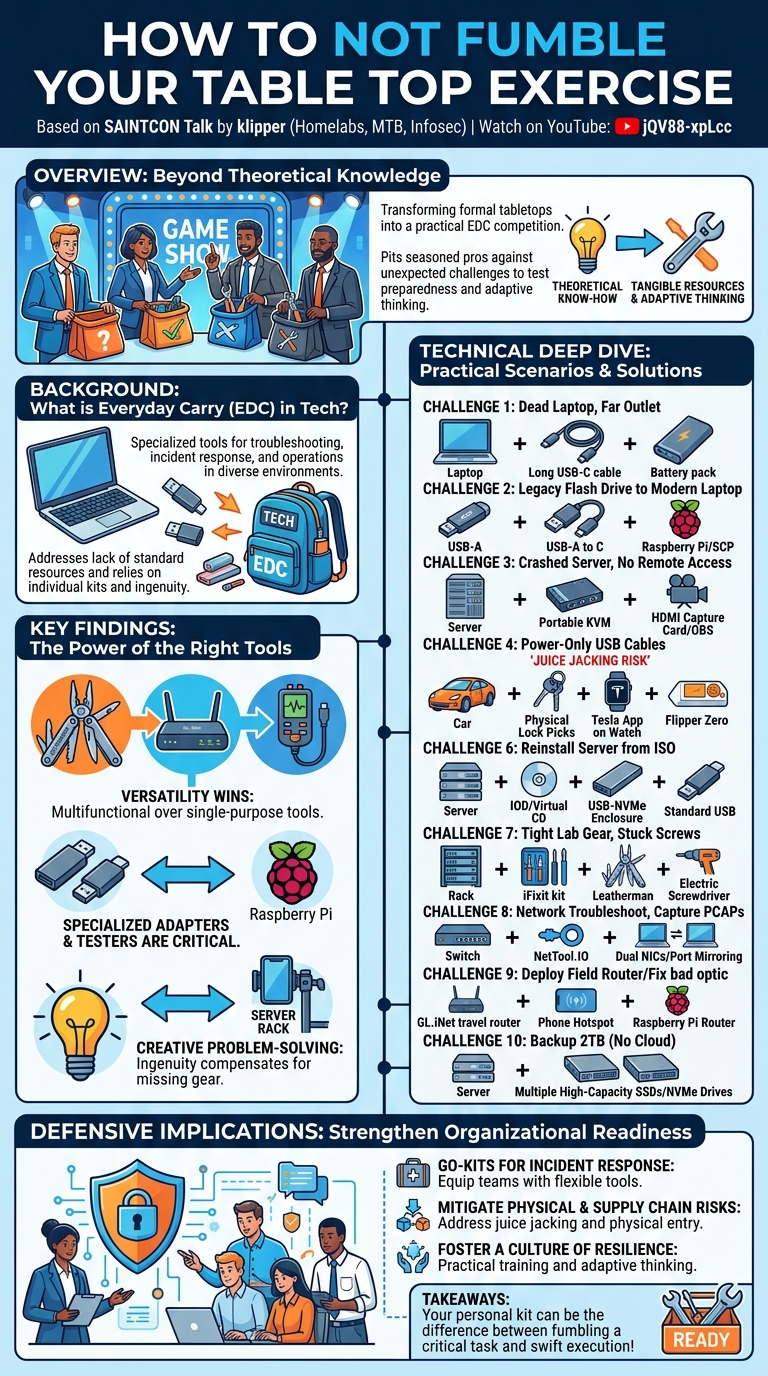
In a departure from typical conference presentations, "How to not fumble your Table Top Exercise" at SAINTCON transformed the concept of a tabletop exercise into a dynamic, live-action competition. Hosted by klipper, this talk pitted four seasoned security and IT professionals against a series of practical, on-the-spot challenges designed to test their everyday carry (EDC) preparedness and problem-solving skills. The format resembled a game show, with contestants retrieving items from their personal bags to address scenarios ranging from a dead laptop in a server room to needing to back up two terabytes of data without cloud access.
Key moments
- 2:00 Game rules and challenges introduced
- 2:30 Challenge 1: Dead laptop, 12ft away
- 4:40 Mac Mini capable portable AC power solution
- 6:10 Challenge 2: USB-A flash drive, USB-C laptop
- 7:40 Raspberry Pi & SCP for USB-A to C
- 8:00 Challenge 3: KVM for crashed server
How to not fumble your Table Top Exercise
Speakers: klipper (Homelabs, MTB, and everything in between., Infosec)
Conference: SAINTCON
YouTube: https://www.youtube.com/watch?v=jQV88-xpLcc
Overview
In a departure from typical conference presentations, "How to not fumble your Table Top Exercise" at SAINTCON transformed the concept of a tabletop exercise into a dynamic, live-action competition. Hosted by klipper, this talk pitted four seasoned security and IT professionals against a series of practical, on-the-spot challenges designed to test their everyday carry (EDC) preparedness and problem-solving skills. The format resembled a game show, with contestants retrieving items from their personal bags to address scenarios ranging from a dead laptop in a server room to needing to back up two terabytes of data without cloud access.
The core premise of the talk, despite its playful execution, underscored a critical aspect of cybersecurity and IT operations: the necessity of individual readiness and the ability to improvise under pressure. While the title suggests a focus on formal tabletop exercises, the talk effectively simulates the real-world, often unpredictable, scenarios that IT and security personnel encounter daily. It highlighted not just the tools one carries, but the ingenuity applied in leveraging those tools to overcome unexpected obstacles.
This unique presentation serves as a compelling case study for anyone in a technical role, emphasizing that true preparedness extends beyond theoretical knowledge to include tangible resources and adaptive thinking. It provides valuable insights into the types of practical equipment that can prove indispensable in a pinch, and how a well-curated EDC can be the difference between fumbling a critical task and executing a swift, effective solution. The talk, through its competitive lens, vividly demonstrated why proactive personal equipment planning is a vital, yet often overlooked, component of professional competence in the information security landscape.
Background
▶ Watch: Game rules and challenges introduced (2:00)
The concept of Everyday Carry (EDC) has long been popular in various communities, from survivalists to gadget enthusiasts, focusing on essential items one carries daily for utility and preparedness. In the realm of IT and cybersecurity, EDC takes on a specialized meaning, shifting from general utility to highly specific tools required for troubleshooting, incident response, and general operational tasks in diverse environments. The "problem" this talk implicitly addresses is the frequent occurrence of unforeseen technical challenges in environments where standard resources (e.g., licensed IPMI, readily available power, specific cables) are either absent, inaccessible, or malfunctioning.
IT professionals frequently find themselves in situations demanding immediate, hands-on solutions. This could be in a remote data center with limited connectivity, a client's office with non-standard equipment, or even at a conference where one's primary laptop battery dies. The reliance on cheap or unlicensed hardware, as humorously referenced with "no IPMI because we bought the cheap version," exacerbates these issues, forcing practitioners to rely on their personal kits and ingenuity. Prior work in this domain often involves informal discussions among peers about "go bags" or "survival kits" for tech emergencies, but rarely is it showcased in such a public, competitive, and detailed manner.
The talk effectively gamifies the practical application of these principles, moving beyond theoretical discussions of preparedness to a tangible demonstration. It taps into the inherent challenge of anticipating a wide array of technical glitches and equipping oneself to handle them. The competitive element not only entertains but also highlights the diverse approaches individuals take to similar problems, reflecting different specializations and personal preferences in tool selection. This background sets the stage for understanding why a seemingly lighthearted game show format can deliver profound lessons in practical technical readiness.
Key Findings
▶ Watch: Mac Mini capable portable AC power solution (4:40)
While "How to not fumble your Table Top Exercise" didn't present traditional research findings, it yielded significant practical insights into the nature of preparedness for IT and security professionals. The primary "findings" revolve around the demonstration of versatility, adaptability, and the sheer breadth of equipment that can be considered essential for an effective everyday carry kit.
One overarching finding was the undeniable advantage of a multi-functional toolset. Contestants who carried items capable of addressing multiple types of challenges (e.g., a Leatherman with a full bit set, a GL.iNet travel router that could act as a switch or firewall, a USB-C tester for power and data) consistently outperformed those with single-purpose gadgets. This highlights the efficiency of consolidating tools, especially when space and weight are considerations.
Another key finding was the importance of specialized adapters and testers. Simple yet critical items like USB-A to USB-C dongles, USB-C power/data testers, and even external USB CD/DVD drives proved invaluable. These tools, often overlooked in a standard office setup, become indispensable when dealing with legacy hardware or non-standard interfaces in a crisis. The scenario involving "power-only USB cables" specifically underscored a critical security finding: the need to identify and discard or mark such cables due to potential data exfiltration risks when plugged into unknown charging ports.
Finally, the talk showcased the power of creative problem-solving. Solutions like using a Raspberry Pi to network-bridge a USB-A flash drive to a USB-C laptop, employing an HDMI video capture card with OBS to get server video, or even clipping a phone to a server rack for hands-free illumination, demonstrated that the right mindset can often compensate for missing specialized tools. The overall "winner," BP, consistently demonstrated the most comprehensive and adaptable kit, underscoring that a well-thought-out and extensively equipped EDC can indeed prevent "fumbling" even the most unexpected technical challenges.
Technical Deep Dive
▶ Watch: Challenge 2: USB-A flash drive, USB-C laptop (6:10)
The talk, structured around a series of practical challenges, offered a rich display of technical tools and methodologies employed by IT and security professionals in real-world scenarios. Each challenge presented a common operational hurdle, and the contestants' responses provided a live demonstration of various technical solutions.
Challenge 1: Dead Laptop, 12ft Outlet
- Problem: Laptop dead, power outlet 12 feet away.
- Solutions:
- Anchor battery packs: Several contestants showcased high-capacity Anchor battery packs, some with pass-through charging capabilities and 140W USB-C output. This highlighted the utility of modern portable power solutions for laptops.
- Long USB-C cables: The ability to provide a 12-foot reach was crucial, demonstrating the need for appropriately long and robust cables in an EDC.
- AC Output Battery Pack: One contestant presented a large battery pack with an AC inverter built-in, capable of powering not just laptops but even a Mac Mini. This device, rated at 84 watt-hours (the maximum allowed on an airplane), showcased extreme versatility for diverse power needs.
Challenge 2: USB-A Flash Drive, USB-C Laptop
- Problem: Legacy USB-A flash drive, modern USB-C-only laptop.
- Solutions:
- USB-A to USB-C dongles/adapters: The most straightforward and commonly carried solution, emphasizing the need for simple interoperability adapters.
- Raspberry Pi as Network Gateway: A more creative, albeit slower, solution involved plugging the USB-A drive into a Raspberry Pi, standing up a temporary network, and using SCP (Secure Copy Protocol) to transfer data over a USB-C virtual interface to the laptop. This demonstrated an advanced understanding of network bridging and device capabilities.
Challenge 3: Crashed Server, No IPMI, Need KVM
- Problem: Server crashed, no IPMI license, requiring direct keyboard and video access.
- Solutions:
- Portable KVMs: Dedicated portable KVM (Keyboard, Video, Mouse) devices, such as the "GLET rocket" or "Comet," were presented. These compact units are designed for direct console access.
- HDMI Video Capture Card: A highly innovative solution involved an HDMI video capture card that plugs into a laptop. This allows the server's video output to be streamed to the laptop via software like OBS (Open Broadcaster Software), effectively creating a virtual monitor. For keyboard input, a USB dongle keyboard or Bluetooth keyboard was proposed, though the host humorously questioned the reliability of 2.4 GHz Bluetooth in a server room.
Challenge 4: Power-Only USB Cables
- Problem: Identify and discard potentially risky "power-only" USB cables.
- Solutions:
- USB-C Testers: Several contestants produced USB-C power and data testers. These devices can troubleshoot power delivery, data transfer capabilities, and identify if a cable is data-enabled or purely for charging. This highlights a critical security concern regarding juice jacking and supply chain trust for cables.
Challenge 5: Locked Keys in Vehicle, No Phone
- Problem: Locked out of a vehicle with no phone access.
- Solutions:
- Tesla App on Watch: One contestant with a Tesla suggested using their watch app, relying on built-in cellular service.
- Flipper Zero: A popular multi-tool for RF, RFID, and IR, the Flipper Zero was proposed for its potential to interact with vehicle locking systems, though its effectiveness on rolling codes was debated.
- Physical Lock Picks: The most direct and universally applicable solution was a set of actual lock picks, demonstrating a practical skillset beyond digital tools.
Challenge 6: Reinstall Server from ISO
- Problem: Need to reinstall a server from an ISO image.
- Solutions:
- IOD (Virtual CDROM): An IOD (ISO-On-Demand) device was shown, allowing the mounting of "unlimited ISOs" virtually, functioning as a virtual CD-ROM.
- USB to NVMe Enclosure: A highly efficient solution involved a USB to NVMe adapter/enclosure. The contestant proposed putting the ISO directly onto an NVMe drive within the enclosure, partitioning it, and booting the server directly from it, significantly reducing installation time. One contestant claimed to carry 60 terabytes of data across multiple NVMe drives.
- Standard USB with Burned ISO: The basic solution of burning an ISO onto a standard USB drive was also presented.
Challenge 7: Unrack Tight Lab Gear
- Problem: Unrack a tightly screwed-in piece of lab gear.
- Solutions:
- iFixit Kit: The ubiquitous iFixit kit (specifically the metal versions) was a popular choice, known for its comprehensive set of bits and tools for electronics repair.
- Leatherman with Bit Set: A Leatherman multi-tool equipped with a full bit set demonstrated the power of compact, multi-purpose tools.
- Extensive Screwdriver Collection: The winning contestant, BP, presented an impressive array including a ratchet screwdriver with interchangeable heads, extensions, an electric screwdriver, a socket set, and a Milwaukee Fastback utility knife, highlighting preparedness for a wide range of fasteners and situations.
Challenge 8: PCAP off Misbehaving Switch
- Problem: Get a packet capture (PCAP) off a misbehaving switch.
- Solutions:
- NetTool.IO: A specialized network diagnostic tool, the NetTool.IO, was presented. This device can perform various network tests, including capturing packets.
- Port Mirroring + Two NICs: The technically correct approach described was to configure port mirroring on the switch and then connect a laptop with two network interfaces (NICs) – one for normal network access and the other for capturing the mirrored traffic.
- TFTP for Existing PCAP: A clever interpretation of the question suggested that if a PCAP already existed as a file on the device, one could use TFTP (Trivial File Transfer Protocol) to retrieve it.
Challenge 9: Deploy Field Router
- Problem: Deploy a field router or fix a bad optic.
- Solutions:
- GL.iNet Travel Routers: The GL.iNet Slate 7 and Slate 6 travel routers were popular choices. These compact devices offer versatile functionality, including Wi-Fi bridging, VPN client/server, and even acting as a firewall, configurable via a web interface or mobile app.
- Phone Hotspot: A simple fallback solution was to use a mobile phone as a personal hotspot.
- Raspberry Pi as Firewall/Router: A contestant proposed using a Raspberry Pi to create a custom router with ad blocking and an OpenVPN connection back to a home server, showcasing advanced customization.
Challenge 10: Backup 2TB Data (No Cloud)
- Problem: Back up two terabytes of data from a server without cloud solutions.
- Solutions:
- Multiple NVMe/SSD Drives: The most robust solution involved multiple high-capacity Samsung 2TB EVO SSDs and M.2 NVMe drives (Gen 4, capable of 10 gigabits per second over USB-C). The idea of using multiple drives for RAID 1 or splitting the load across several high-speed drives was emphasized for speed and redundancy.
- Laptop as Backup Target: A less ideal but functional solution was to use the contestant's own laptop, raising security concerns about mixing customer data with personal devices.
The depth and variety of solutions for each challenge underscored the technical expertise and foresight required in IT and security roles. The consistent theme was the reliance on portable, versatile, and often specialized tools to address problems in resource-constrained or unexpected environments.
Demo / Proof of Concept
▶ Watch: Raspberry Pi & SCP for USB-A to C (7:40)
The entire "How to not fumble your Table Top Exercise" talk was a live, interactive demonstration, acting as a competitive proof-of-concept for the value of a well-equipped everyday carry (EDC) for IT and security professionals. The format itself was the demo: a series of practical, timed challenges presented to four contestants, each tasked with producing a tangible item from their personal bags to solve the problem.
The demonstration began with a physical weigh-in of the contestants' bags, humorously highlighting the commitment to preparedness. Each challenge was articulated by the host, klipper, who then gave the contestants a brief moment to rummage through their gear. The "proof of concept" for each solution was the physical presentation of the item, often followed by a brief explanation of its functionality or how it would be applied. The audience participated by voting for the most effective or creative solution.
Key moments that served as particularly strong proofs of concept included:
- BP's extensive toolkit: Repeatedly, contestant BP demonstrated a comprehensive array of tools, from multiple high-capacity SSDs for data backup to an entire collection of specialized screwdrivers, including electric and ratchet models. This proved that a meticulously curated and robust EDC can address an extremely wide spectrum of technical tasks.
- Dark Matter's NVMe drive strategy: For server reinstallation, Dark Matter's proposal to use an NVMe drive in a USB enclosure to directly boot and install an OS was a powerful demonstration of leveraging high-speed storage for efficiency, a modern take on bootable media.
- Lean's innovative phone mount: Faced with the challenge of hands-free illumination in a dark server room, Lean's solution of using a flexible phone mount (originally for an airplane seatback) to attach his phone to a server rack for light was a brilliant example of adaptability and repurposing common items for unexpected technical uses.
- The USB-C tester: The immediate production of USB-C power and data testers by multiple contestants in response to the "power-only cable" challenge vividly demonstrated the tangible tools available to mitigate a real-world security risk like juice jacking.
- The physical lock picks and hotel room bypass tools: These items, though perhaps less "technical" in a digital sense, served as a stark reminder that physical security challenges are also part of an IT professional's potential reality, and that preparedness extends beyond software and network issues.
The demo was highly effective in showcasing that practical problem-solving in IT often relies on a blend of specialized technical gadgets, versatile multi-tools, and a healthy dose of ingenuity. The live nature of the event, complete with audience interaction and the physical display of equipment, provided a compelling and entertaining proof that a well-considered EDC is an invaluable asset.
Defensive Implications
▶ Watch: Challenge 3: KVM for crashed server (8:00)
While the talk was primarily a demonstration of individual preparedness, its implications for organizational defense and cybersecurity strategy are significant. The scenarios presented, though gamified, reflect common operational challenges that can impact an organization's security posture and incident response capabilities.
Firstly, the emphasis on diverse and versatile tools highlights a critical need for organizations to equip their incident response (IR) and IT operations teams with comprehensive go-kits or fly-away kits. Relying solely on standard issue equipment may leave teams vulnerable when facing non-standard or legacy systems, or when operating in environments with limited infrastructure (e.g., no functional IPMI, unreliable network access). Organizations should perform their own "tabletop exercises" – perhaps less competitive but equally practical – to identify gaps in their collective toolkit and ensure personnel have access to items like:
- Portable KVMs and video capture cards for direct server access when remote management fails.
- USB-C testers and a policy for identifying and discarding power-only USB cables to mitigate juice jacking risks and ensure supply chain integrity for peripherals.
- A variety of network adapters, serial cables, and diagnostic tools (e.g., NetTool.IO) for on-the-spot network troubleshooting and packet capture without relying on potentially compromised or unavailable network infrastructure.
- High-speed, portable storage solutions (like NVMe enclosures) for rapid data acquisition during incident response, especially for large datasets where cloud solutions are not feasible or secure.
Secondly, the talk implicitly underscores the importance of physical security awareness. The challenges involving lock picks for vehicle access or hotel room bypass tools are a stark reminder that attackers may leverage physical access to gain entry or compromise systems. Organizations should educate their staff on these vectors and consider physical security training as part of their broader security awareness programs.
Finally, the talk champions adaptability and creative problem-solving. While providing tools is essential, fostering a culture where IT and security personnel are encouraged to think outside the box and improvise with available resources is equally vital. Regular, practical training that simulates unexpected scenarios can help develop these skills, ensuring that when an incident occurs, teams are not just technically proficient but also resilient and resourceful. By understanding and addressing the practical challenges demonstrated in this talk, organizations can significantly strengthen their operational resilience and incident response readiness.
Key Takeaways
- Everyday Carry (EDC) is Critical for IT/Security Professionals: A well-stocked and thoughtfully curated personal toolkit is invaluable for addressing unexpected technical challenges in diverse environments.
- Versatility and Multi-functionality Win: Tools that can serve multiple purposes (e.g., multi-bit screwdrivers, travel routers acting as switches/firewalls) are more efficient and effective than single-use gadgets.
- Don't Underestimate Adapters and Testers: Simple items like USB-A to USB-C dongles, USB-C power/data testers, and various network adapters are indispensable for bridging technology gaps and diagnosing issues.
- Creative Problem-Solving is Key: When standard solutions aren't available, the ability to improvise and repurpose tools (e.g., Raspberry Pi as a network bridge, phone as a hands-free light) is crucial for success.
- Security Beyond the Digital: Practical challenges like identifying power-only USB cables (to prevent juice jacking) and having physical lock picks highlight the importance of physical security awareness and preparedness.
- Organizational Implications for Preparedness: The talk serves as a blueprint for organizations to assess and equip their incident response and IT operations teams with comprehensive go-kits and to foster a culture of practical readiness.
About the Speaker(s)
The talk was hosted by klipper, identified with affiliations including "Homelabs, MTB, and everything in between., Infosec." As the energetic and humorous host of the competitive "Table Top Exercise," klipper expertly guided the audience and contestants through a series of practical challenges. His role involved presenting the scenarios, evaluating the proposed solutions, and engaging with the participants, demonstrating a deep understanding of the diverse technical problems faced by IT and security professionals. The transcript indicates klipper is passionate about practical preparedness and fostering a collaborative learning environment, as evidenced by the mention of a follow-up event designed for participants to showcase their kits and share knowledge.