ScreenConnect: Restriction Bypass for RCE
Paul Whiting (UltraViolet Cyber)
SAINTCON 2025 · Day 2 · Main Track 2
Overview
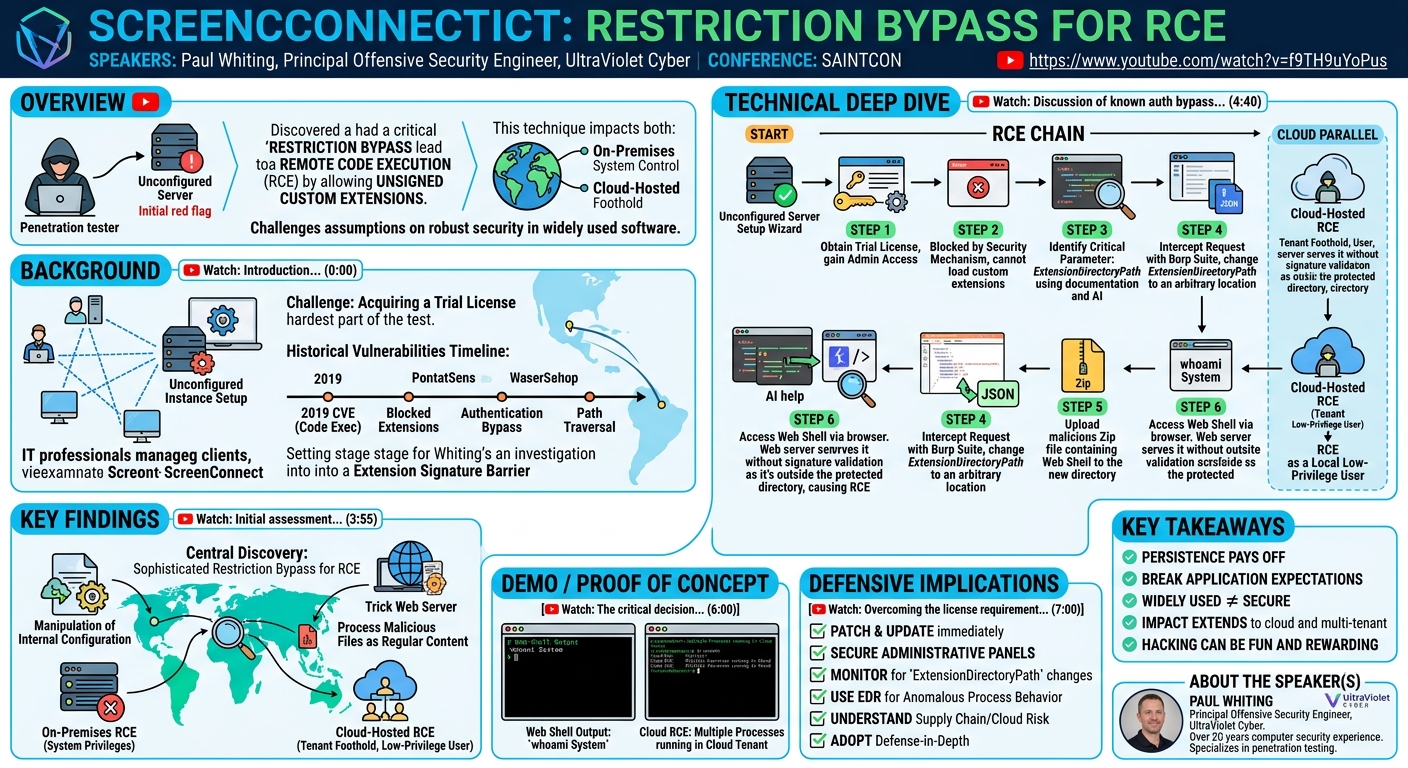
In his SAINTCON talk, "ScreenConnect: Restriction Bypass for RCE," Paul Whiting of UltraViolet Cyber detailed a novel method to achieve remote code execution (RCE) on ConnectWise ScreenConnect instances. The talk outlines a penetration testing engagement where an unconfigured ScreenConnect server was discovered, leading to a deep dive into its vulnerabilities. Whiting's research uncovered a critical restriction bypass that allowed for the execution of unsigned custom extensions, circumventing built-in security mechanisms designed to prevent such actions.
Key moments
- 0:00 Introduction to talk and speaker's background
- 2:15 Discovering an unconfigured ScreenConnect instance during pentest
- 3:55 Initial assessment of ScreenConnect features and challenges
- 4:40 Discussion of known authentication bypass and path traversal CVEs
- 6:00 The critical decision: proving impact versus quick reporting
- 7:00 Overcoming the license requirement for ScreenConnect setup
ScreenConnect: Restriction Bypass for RCE
Speakers: Paul Whiting, Principal Offensive Security Engineer, UltraViolet Cyber
Conference: SAINTCON
YouTube: https://www.youtube.com/watch?v=f9TH9uYoPus
Overview
In his SAINTCON talk, "ScreenConnect: Restriction Bypass for RCE," Paul Whiting of UltraViolet Cyber detailed a novel method to achieve remote code execution (RCE) on ConnectWise ScreenConnect instances. The talk outlines a penetration testing engagement where an unconfigured ScreenConnect server was discovered, leading to a deep dive into its vulnerabilities. Whiting's research uncovered a critical restriction bypass that allowed for the execution of unsigned custom extensions, circumventing built-in security mechanisms designed to prevent such actions.
This presentation is significant because it demonstrates how an attacker can leverage seemingly innocuous configuration settings to escalate privileges and gain full system control, even on modern, patched versions of widely used software. The impact extends beyond on-premises deployments, as Whiting successfully applied the technique to cloud-hosted ScreenConnect instances, highlighting a broader attack surface. The talk serves as a compelling case study on persistent vulnerability research, emphasizing the importance of scrutinizing application logic beyond surface-level security controls.
Whiting's findings underscore that even popular remote administration tools, frequently targeted by threat actors, can harbor subtle yet powerful vulnerabilities. By detailing the step-by-step process—from initial discovery and license acquisition to configuration manipulation and RCE—the talk provides invaluable insights for both offensive and defensive security practitioners. It challenges the assumption that widely adopted software automatically implies robust security, urging a deeper, more analytical approach to penetration testing and vulnerability assessment.
Background
▶ Watch: Introduction to talk and speaker's background (0:00)
ScreenConnect, a product by ConnectWise, is a widely used remote administration and support tool. It allows IT professionals to access and manage client machines remotely, performing tasks like troubleshooting, software installation, and system maintenance. Its prevalence in enterprise environments makes it a high-value target for adversaries seeking initial access or privilege escalation.
Whiting’s journey began during a penetration test for a client where an unconfigured ScreenConnect instance was discovered. This instance presented a "welcome to ScreenConnect" setup screen, indicating unauthenticated access, which is always a red flag for security researchers. The initial challenge was to configure the application, which required a license key. Whiting humorously recounted that acquiring a trial license through customer support was "probably the hardest part of this whole test," highlighting a common, albeit unexpected, hurdle in real-world engagements.
Prior to Whiting's research, ScreenConnect had a history of vulnerabilities. A notable CVE in 2019 allowed administrators to upload arbitrary code for execution, a feature later "closed down" by requiring extensions to be signed by ConnectWise. More recently, other vulnerabilities included an authentication bypass (by appending a slash to the URL) and a path traversal vulnerability that allowed malicious zip files to be uploaded and positioned in unexpected directories, leading to code execution. These historical vulnerabilities set a precedent for potential issues within ScreenConnect's extension handling and file management. Whiting's initial approach was to investigate if any of these known CVEs, or similar logic flaws, could still be exploited, especially given the unknown version of the unconfigured server. The key hurdle was the requirement for signed extensions, which was a direct countermeasure to previous RCE issues.
Key Findings
▶ Watch: Initial assessment of ScreenConnect features and challenges (3:55)
The central discovery of Paul Whiting's research was a sophisticated restriction bypass that enabled remote code execution (RCE) on ScreenConnect instances, even when custom extensions were explicitly blocked or required official signing. This bypass hinges on manipulating the application's internal configuration to trick the web server into processing malicious files as regular web content rather than restricted extensions.
The core finding is that while ScreenConnect enforces signature checks for extensions loaded from its default directory, this control can be circumvented. Whiting found that by changing the ExtensionDirectoryPath configuration setting to an arbitrary location, an attacker could upload a specially crafted zip file containing a web shell. Once the directory path was altered and the files uploaded, the web server would then serve these files without performing the usual signature checks because it no longer considered them "extensions" in the restricted directory. Instead, it treated them as standard static content, thereby granting unauthenticated RCE.
This vulnerability was not limited to on-premises deployments. Whiting demonstrated that the same technique could be applied to cloud-hosted ScreenConnect instances. By provisioning his own tenant in the ConnectWise cloud, he gained administrative access to that specific tenant. He then used the configuration manipulation technique to achieve RCE within his tenant's isolated environment. While the cloud instances ran processes as low-privilege users rather than System, this still provided a significant foothold into ConnectWise's infrastructure, demonstrating a broader impact than initially thought. The ability to achieve RCE on both on-premise and cloud deployments, bypassing signature requirements, constitutes a critical security finding.
Technical Deep Dive
▶ Watch: Discussion of known authentication bypass and path traversal CVEs (4:40)
The technical execution of this RCE chain involved several intricate steps, starting from an unconfigured ScreenConnect instance and culminating in system-level access.
The initial foothold was an unconfigured ScreenConnect server on a client's internal network, offering unauthenticated access to the setup wizard. The immediate challenge was to obtain a license key to gain administrative access to the application. After some back-and-forth with customer support, a trial license was successfully acquired, granting full administrative privileges within the ScreenConnect web interface.
With administrator access, Whiting's first attempt at RCE involved trying to upload a custom extension using the Extension Developer marketplace extension. This approach, however, was blocked, displaying a "license restricted" error. This indicated that ScreenConnect's security mechanisms, specifically the requirement for signed extensions (a fix for the 2019 CVE), were active and preventing direct custom code execution. This forced a pivot in the research strategy: instead of trying to upload an extension, the focus shifted to manipulating how existing extensions or files were handled.
The breakthrough came from examining the Advanced Configuration Editor extension, which allows administrators to modify various ScreenConnect settings. While the web interface for this editor didn't explicitly expose a setting to change the extension directory, Whiting theorized that such a setting might exist in the underlying configuration schema, accessible via direct API calls or by injecting parameters. Leveraging ScreenConnect's (now potentially removed) documentation and AI-assisted searches, he identified a critical configuration parameter: ExtensionDirectoryPath.
To exploit this, Whiting used a web proxy tool like Burp Suite. He would initiate a legitimate configuration change via the Advanced Configuration Editor's web interface, capture the outgoing HTTP request, and then modify it to inject the ExtensionDirectoryPath parameter with an arbitrary, attacker-controlled path. This allowed him to redefine where ScreenConnect expected to find extensions.
Once the ExtensionDirectoryPath was set to a new, arbitrary location (e.g., a path within the web server's accessible directories), the next step was to upload the malicious code. ScreenConnect's extension upload mechanism expects zip files containing a folder named as a GUID (Globally Unique Identifier), within which the actual extension files reside. Whiting uploaded a zip file containing a simple web shell (e.g., an ASP.NET or similar file depending on the underlying web server) into this newly defined, arbitrary directory.
The crucial bypass occurred at this stage: when the web server was subsequently instructed to serve files from this new ExtensionDirectoryPath, it no longer applied the stringent signature validation checks. The server believed it was serving regular web content from a specified directory, not a security-sensitive "extension" from the default, secured location. This "break expectation" scenario allowed the unsigned web shell to be accessed and executed, leading to RCE. Whiting's demonstration showed a screenshot of a web shell outputting whoami as System, confirming successful privilege escalation on an on-premises server.
The technique's applicability to cloud instances further broadened its impact. By signing up for a trial tenant on the ConnectWise cloud, Whiting obtained administrative access to his isolated ScreenConnect instance. He then applied the exact same ExtensionDirectoryPath manipulation to achieve RCE within his cloud tenant. Although the cloud environment ran the ScreenConnect processes under local low-privilege users (not System), it still provided a foothold onto the cloud provider's infrastructure, highlighting the potential for lateral movement or further exploitation within a multi-tenant environment.
Demo / Proof of Concept
▶ Watch: The critical decision: proving impact versus quick reporting (6:00)
During the talk, Paul Whiting presented compelling evidence of the vulnerability's impact. While a live, interactive demo was not performed, he showcased screenshots that clearly demonstrated the successful exploitation.
A key screenshot displayed a web shell running on the compromised ScreenConnect server. The output of the whoami command within this web shell explicitly showed System, confirming that the RCE achieved system-level privileges on the on-premises instance. This visually validated the critical impact of the restriction bypass.
Furthermore, Whiting presented a screenshot from a cloud-hosted ScreenConnect instance where he had successfully executed his malicious code. This image illustrated multiple ScreenConnect processes running, and while he did not fully enumerate them, it served as concrete evidence that the exploit chain functioned effectively in a cloud environment. He explicitly stated that while he would have liked to "continued hacking their cloud," he limited his actions due to the terms of service, but confirmed that RCE was achieved within his provisioned cloud tenant. These visual proofs of concept effectively conveyed the severity and broad applicability of his findings.
Defensive Implications
▶ Watch: Overcoming the license requirement for ScreenConnect setup (7:00)
The findings from this ScreenConnect RCE bypass present several critical implications for defenders, emphasizing the need for robust security practices and vigilant monitoring.
First and foremost, organizations using ScreenConnect should ensure their instances are fully patched and up-to-date. While this specific vulnerability relied on manipulating configuration, underlying patches might introduce additional safeguards or improve logging that could detect such activities. Administrators must also rigorously control access to the ScreenConnect web interface, especially preventing unauthenticated access to setup wizards or administrative panels. Network segmentation and strong authentication mechanisms (e.g., MFA) are crucial to limit initial access.
Defenders should implement strict monitoring for unusual configuration changes within ScreenConnect. Any modification to critical settings like ExtensionDirectoryPath should trigger high-priority alerts. This requires understanding the normal operational baseline of their ScreenConnect deployment. Logs from the web server and the ScreenConnect application itself should be regularly reviewed for suspicious file uploads, attempts to access newly created directories, or unusual process executions originating from the ScreenConnect service account.
The fact that the exploit worked on cloud instances, albeit with lower privileges, underscores the importance of understanding supply chain risk and the security posture of third-party cloud services. While ConnectWise runs cloud tenants with reduced privileges, any foothold into a cloud environment can potentially be leveraged for lateral movement or data exfiltration. Organizations should inquire about their cloud providers' security controls, monitoring capabilities, and incident response plans for multi-tenant environments.
Finally, the talk highlights the need for defense-in-depth. Even if direct extension uploads are blocked, attackers will seek other avenues to achieve their goals. Defenders should not rely on a single security control (like signature verification) but rather implement multiple layers of protection, including application whitelisting, integrity monitoring for critical application directories, and robust endpoint detection and response (EDR) solutions that can identify and block anomalous process behavior originating from legitimate applications. Regular penetration testing and vulnerability assessments, particularly for widely used remote access tools, are essential to uncover and address such subtle logic flaws before adversaries exploit them.
Key Takeaways
- Persistence Pays Off: Even when initial attempts at exploitation are blocked or known vulnerabilities are patched, persistent and creative research can uncover new, impactful flaws by scrutinizing application logic and assumptions.
- Break Application Expectations: Vulnerabilities often arise when an attacker identifies and exploits a mismatch between how an application expects to operate and how it can be made to operate. In this case, changing the
ExtensionDirectoryPathbroke the web server's expectation for extension validation. - Widely Used Does Not Mean Secure: The broad adoption of software like ScreenConnect does not guarantee it has been thoroughly audited for all types of vulnerabilities. Attackers often target popular software due to its widespread deployment and potential for high impact.
- Impact Extends Beyond Initial Findings: What might initially seem like a limited vulnerability (e.g., requiring administrator access on an on-premises server) can have far-reaching implications, such as affecting cloud-hosted instances and providing a foothold in multi-tenant environments.
- Hacking Can Be Fun and Rewarding: Embracing curiosity and finding joy in the process of discovery and breaking things can lead to significant security contributions and personal satisfaction.
About the Speaker(s)
Paul Whiting is a Principal Offensive Security Engineer at UltraViolet Cyber. With over 20 years of experience in the computer security field, he has a deep background in both offensive and defensive security practices. Whiting has been with UltraViolet Cyber for five years, where he specializes in penetration testing and actively contributes to the company's offensive security capabilities. His extensive experience allows him to tackle complex security challenges and present insightful findings, as demonstrated by his talk on ScreenConnect.