15 Ways to Break Your Copilot
Unknown
Black Hat USA 2024 · Day 1 · Briefing
Overview
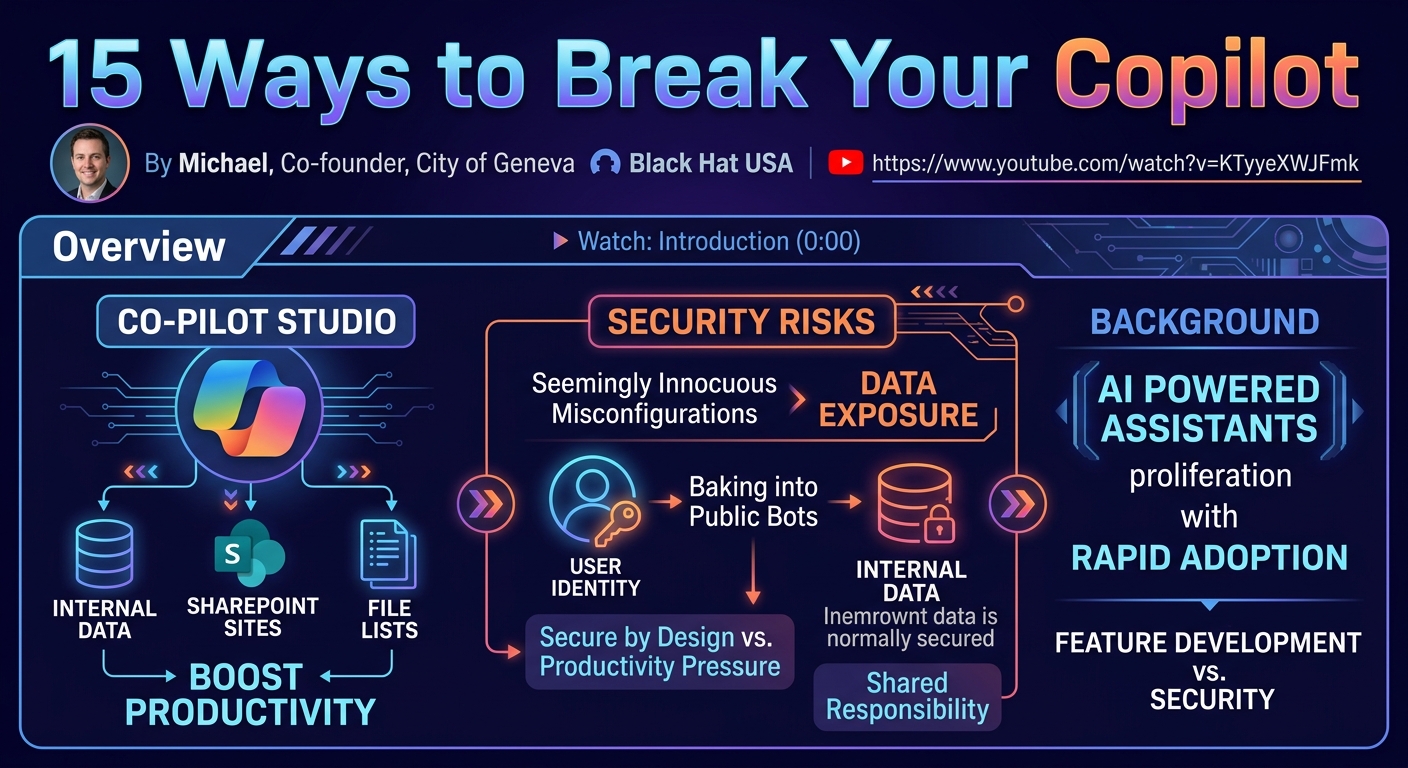
In an era where every product seemingly needs a "Copilot," Microsoft's ambitious push to integrate AI assistants across its ecosystem has brought forth powerful new tools like Copilot Studio. This platform empowers organizations to build custom AI assistants or extend existing Microsoft Copilots, leveraging internal data sources to enhance productivity. However, as Michael, co-founder of City of Geneva and lead of the OWASP Lokoko Top 10, revealed at Black Hat USA, this rapid adoption often outpaces security considerations, leading to significant vulnerabilities. His talk, "15 Ways to Break Your Copilot," served as a stark reminder that while Microsoft champions "secure by design" and "secure by default" principles, the real-world implementation by end-users can introduce critical security flaws.
Key moments
- 0:00 Introduction to Copilots and Copilot Studio
- 1:00 Challenging Microsoft's 'Secure Future Initiative' claims
- 2:15 Speaker introduction, mission, and user responsibility
- 3:20 Introducing Jack (CISO) and Jill (HR) personas
- 4:20 Connecting copilot to sensitive internal knowledge
- 5:55 Hacker accesses bot due to no authentication default
- 6:25 Critical issue: Copilot 'identity baking' vulnerability
15 Ways to Break Your Copilot
Speakers: Michael, Co-founder, City of Geneva
Conference: Black Hat USA
YouTube: https://www.youtube.com/watch?v=KTyyeXWJFmk
Overview
In an era where every product seemingly needs a "Copilot," Microsoft's ambitious push to integrate AI assistants across its ecosystem has brought forth powerful new tools like Copilot Studio. This platform empowers organizations to build custom AI assistants or extend existing Microsoft Copilots, leveraging internal data sources to enhance productivity. However, as Michael, co-founder of City of Geneva and lead of the OWASP Lokoko Top 10, revealed at Black Hat USA, this rapid adoption often outpaces security considerations, leading to significant vulnerabilities. His talk, "15 Ways to Break Your Copilot," served as a stark reminder that while Microsoft champions "secure by design" and "secure by default" principles, the real-world implementation by end-users can introduce critical security flaws.
Michael's presentation meticulously unraveled how seemingly innocuous misconfigurations within Copilot Studio can expose sensitive corporate data to unauthorized access. By demonstrating how a user's identity and permissions can be inadvertently "baked" into a public-facing bot, he highlighted a fundamental disconnect between productivity-driven development and robust security practices. The research aims to push Microsoft and the wider community towards a more secure future for enterprise AI, emphasizing the shared responsibility in safeguarding these emerging technologies.
This talk is crucial for security professionals, enterprise architects, and anyone involved in the deployment or management of AI-powered assistants. It dissects practical attack vectors, offering concrete examples of how internal data, typically secured behind corporate firewalls and authentication mechanisms, can become publicly accessible through misconfigured Copilots. Understanding these vulnerabilities is paramount for organizations striving to harness the power of AI without compromising their security posture.
Background
▶ Watch: Introduction to Copilots and Copilot Studio (0:00)
The proliferation of AI-powered assistants, or Copilots, has become a defining characteristic of modern enterprise software. Microsoft, in particular, has positioned Copilots as integral components across its suite of products, aiming to boost user productivity. Central to this strategy is Copilot Studio, a platform designed to enable both the creation of custom AI assistants and the extension of existing Microsoft Copilots. This technology allows organizations to integrate their proprietary data, such as internal documents, SharePoint sites, and file lists, directly into the Copilot's knowledge base, making the AI more relevant and powerful for specific business contexts.
Microsoft publicly emphasizes a commitment to security, advocating for a "secure future initiative" built on principles of "secure by design" and "secure by default." However, as Michael points out, the inherent tension between rapid feature development for productivity and stringent security implementation is a perennial challenge in the software industry. Product teams are often incentivized to prioritize speed and functionality, sometimes leading to security being an afterthought or a secondary concern. This dynamic creates a fertile ground for vulnerabilities, especially in nascent technologies like enterprise AI.
Historically, the security community has played a vital role in identifying and remediating such issues. Examples like the community's response to Microsoft Recall underscore the collective effort required to guide product development towards a more secure trajectory. Michael himself has been actively contributing to this effort for several years, presenting at conferences like Black Hat to raise awareness and advocate for better security practices. His work includes leading the OWASP Lokoko Top 10, an initiative specifically focused on identifying and addressing the most critical security risks in enterprise Copilots and no-code applications, which often share similar architectural and deployment paradigms. The talk thus frames the presented research as part of this broader community drive to ensure that the rapid adoption of AI doesn't inadvertently introduce systemic security risks into the enterprise.
Key Findings
▶ Watch: Speaker introduction, mission, and user responsibility (2:15)
The research presented by Michael at Black Hat USA uncovered several critical vulnerabilities and misconfigurations prevalent in the deployment of custom Copilots via Copilot Studio, challenging Microsoft's "secure by default" claims. The primary findings revolve around improper authentication, identity delegation, and the inherent risks associated with integrating sensitive knowledge sources.
- Default "No Authentication" Exposing Internal Data:
For several months at the beginning of the year, Copilot Studio bots were configured by default to use "no authentication" upon publication. This seemingly minor default had catastrophic implications: any custom Copilot deployed with this setting became publicly accessible on the internet, allowing anyone to interact with it. The talk demonstrated that even after Microsoft changed this default, many previously deployed bots remained exposed, creating a persistent attack surface. This oversight meant that internal company information, intended for employees, could be queried by unauthenticated external users, simply by navigating to the bot's public website or accessing it via integrated channels like Microsoft Teams.
- Inadvertent Identity Baking and Credential Sharing:
Perhaps the most alarming finding was the mechanism of identity baking, or implicit credential sharing. When a user (e.g., an HR employee) creates a Copilot and connects it to internal data sources like SharePoint or internal file lists, their own identity and associated permissions are embedded within the bot. Consequently, every subsequent user interacting with that bot, regardless of their own authentication status or privileges, effectively operates under the creator's identity. This means a public bot configured with "no authentication" but connected to a SharePoint site via an HR administrator's identity, grants any attacker the ability to query that SharePoint site with the HR administrator's full permissions. This creates a severe privilege escalation scenario where low-privileged or unauthenticated users can access highly sensitive corporate data. Michael emphasized that this issue makes audit logs misleading, as all interactions with the backend data source appear to originate from the legitimate bot creator (e.g., "Jill"), making it extremely difficult to detect unauthorized access or exfiltration. This is a common problem observed in no-code applications, where the ease of development often obscures complex security implications.
- Large Attack Surface from Knowledge Base Integration:
Copilot Studio allows integration with a wide array of knowledge sources, including internal files, SharePoint sites, external websites, and other structured data. The research highlighted that many of these sources, particularly internal ones, can contain highly sensitive information. When such sources are connected to a Copilot, they collectively form a large attack surface. While the talk focused primarily on the authentication and identity issues, Michael briefly noted that the integration of diverse knowledge sources also opens doors for indirect prompt injection and other forms of data exfiltration, a topic he planned to cover in a separate presentation. The key takeaway here is that the sheer volume and sensitivity of data connected to these AI assistants represent a significant risk if not secured meticulously.
These findings collectively paint a picture of a new class of security challenges arising from the rapid adoption of AI and no-code platforms. The ease of deployment, combined with potentially insecure defaults and a lack of user awareness regarding identity management, can inadvertently turn productivity tools into critical data leakage vectors.
Technical Deep Dive
▶ Watch: Introducing Jack (CISO) and Jill (HR) personas (3:20)
The technical underpinnings of the vulnerabilities demonstrated in "15 Ways to Break Your Copilot" lie within the architecture and deployment mechanisms of Microsoft Copilot Studio. This platform acts as the foundational layer for building and extending AI assistants, allowing users to define their bot's capabilities and integrate various data sources.
At its core, Copilot Studio facilitates the creation of custom Copilots by providing a wizard-driven interface. Users can define topics, which are essentially conversational flows or areas of expertise for the bot (e.g., "answering questions about HR"). To make these topics intelligent, the bot needs access to a knowledge base. This knowledge base can be populated in several ways:
- Direct File Uploads: Users can upload internal documents (e.g., PDFs, Word files) directly to the Copilot.
- SharePoint Integration: Bots can connect to SharePoint sites and specific file lists within them. This is a critical vector as SharePoint often houses highly sensitive corporate data.
- External Data Sources: The platform also supports connecting to various external data sources, though the talk's focus was on internal data exposure.
The primary technical vulnerability demonstrated revolves around authentication configuration during the publication process. When a user publishes a custom Copilot, they must select an authentication method. The critical flaw was that, for a period, the default option was "no authentication." This setting essentially made the bot a public endpoint, accessible to anyone with the bot's URL.
Compounding this authentication issue is the mechanism of identity delegation or credential baking. When a Copilot needs to access an authenticated resource, such as a SharePoint site, it requires credentials. In Copilot Studio, the identity of the user who created and configured the connection to the data source (e.g., Jill from HR) is implicitly used by the bot. This means:
- Implicit Credential Storage: The bot effectively stores and uses Jill's credentials or a token derived from her identity to access SharePoint.
- Universal Delegation: Every interaction with the bot, regardless of who initiates it, leverages Jill's baked-in identity to access the backend data source. If an unauthenticated "hacker" queries the bot about HR policies, the bot makes the request to SharePoint as Jill.
- Audit Trail Obfuscation: From the perspective of SharePoint or other connected data sources, all access requests originating from the bot appear to come from the legitimate user (Jill). This makes it nearly impossible for security teams to differentiate between legitimate access by Jill and unauthorized access facilitated by the misconfigured bot. The logs show Jill's activity, even when the interaction was initiated by an attacker.
This "identity baking" is a pervasive issue in many no-code and low-code platforms where ease of integration can abstract away the complexities of identity and access management. Users, often non-technical, are guided through wizards that make connecting to internal resources straightforward, without fully understanding the security implications of delegating their own permissions to a publicly accessible service.
The attack surface is further expanded by the sheer volume and sensitivity of data that can be ingested into a Copilot's knowledge base. While the AI's internal mechanisms are designed to prevent the direct revelation of sensitive data (e.g., "it will say no, it doesn't really want to do it"), the research implies that these safeguards are not foolproof. The speaker's brief mention of the AI only needing to "do the mistake one time" strongly hints at the potential for prompt injection or other adversarial AI techniques to bypass intended content filters and extract sensitive information. However, the talk explicitly states that a deeper dive into "indirect projection" (a form of prompt injection leading to data exfiltration) would be covered in a separate talk, so the technical details of how to achieve such an AI mistake were not elaborated upon here.
In summary, the technical vulnerability chain involves:
- A user configuring a Copilot with sensitive internal data sources.
- Publishing the Copilot with a "no authentication" default (or choice).
- The bot implicitly using the creator's elevated identity to access the connected data.
- This combination allowing any external, unauthenticated user to query the bot and receive sensitive internal data, with all backend requests logged as the legitimate creator.
Demo / Proof of Concept
▶ Watch: Hacker accesses bot due to no authentication default (5:55)
The core of Michael's presentation was a compelling demonstration that illustrated the practical implications of these security flaws through a simulated scenario. The demo involved two personas: Jill, an HR department employee, and a hacker.
Scenario Setup:
- Jill's Journey: Jill, enthusiastic about using AI to boost productivity, uses Copilot Studio to create a custom HR Copilot.
- She goes through a wizard to generate the bot, which includes boilerplate content and 60 default topics.
- She creates a new topic specifically for "answering questions about HR."
- Crucially, she hooks up the Copilot to the company's internal HR SharePoint site and HR file list. This involves uploading internal HR files, making them part of the bot's knowledge base.
- After setting up the knowledge base, Jill proceeds to publish her Copilot.
- During the publishing process, she inadvertently selects (or is defaulted to) "no authentication" as the method for accessing the bot.
- She then makes the bot available on various channels, including a public website and Microsoft Teams.
- Jill tests the bot by asking, "How can I apply for an internal job posting?" and receives a proper, internal-policy-based response, confirming the bot's functionality and access to the HR SharePoint data.
The Attack:
- Hacker Access: A "hacker" (visually represented by a person in a hoodie) accesses the public website of Jill's newly published HR Copilot.
- Unauthorized Query: The hacker, without any authentication, asks the bot a question about internal HR policies: "How is employee performance measured?"
- Data Exfiltration: The bot, leveraging Jill's baked-in identity and its connection to the HR SharePoint site, retrieves the internal policy document and provides a detailed response to the unauthenticated hacker. This demonstrates direct access to sensitive corporate data that should have been protected.
The Consequences:
The demonstration vividly showed that the combination of a "no authentication" default and the implicit identity baking meant that the HR Copilot, intended to assist internal employees, became a public gateway to confidential HR documents. The speaker highlighted that this issue was not theoretical; it was a real-world problem observed in deployed Copilots, as the "no authentication" default had been active for several months earlier in the year. He confirmed that Microsoft had been informed and subsequently changed this default, but the legacy of previously deployed, vulnerable bots persisted.
The demo effectively illustrated how a seemingly innocent act by a non-security professional, driven by a desire for productivity, could lead to a severe data breach, bypassing traditional perimeter defenses and internal access controls. The "badness counter" shown during Jill's configuration process served as a visual cue, accumulating "badness" points as insecure choices were made, culminating in the hacker's successful data retrieval.
Defensive Implications
▶ Watch: Critical issue: Copilot 'identity baking' vulnerability (6:25)
The findings from "15 Ways to Break Your Copilot" present critical defensive implications for organizations deploying or considering Microsoft Copilot Studio and custom AI assistants. Mitigating these risks requires a multi-faceted approach, encompassing technical controls, policy enforcement, and user education.
- Enforce Strong Authentication from the Outset:
The most immediate and crucial defense is to never deploy Copilots with "no authentication." Organizations must enforce strong authentication mechanisms, such as Azure Active Directory (AAD), to ensure that only authorized users can interact with internal-facing bots. This requires careful review of Copilot Studio's authentication settings during creation and publication. Security teams should scan for and identify any existing Copilots that might have been published with "no authentication" and remediate them immediately.
- Implement Principle of Least Privilege for Bot Identities:
The issue of "identity baking" demands that the identity used by the bot to access backend data sources adheres strictly to the principle of least privilege. Instead of using the creator's highly privileged identity, dedicated service accounts or managed identities with the absolute minimum necessary permissions should be configured for the bot's data access. These identities should only have read access to the specific documents or SharePoint sites required for the bot's function, and no more. Regular audits of these delegated identities and their permissions are essential.
- Rigorously Evaluate Connected Knowledge Sources:
Before connecting any internal or external data source to a Copilot, security teams must conduct a thorough risk assessment.
- Data Classification: Understand the sensitivity level of the data within each source (e.g., PII, financial data, intellectual property).
- Need-to-Know Basis: Ensure that the data connected is strictly necessary for the Copilot's intended purpose. Avoid connecting entire SharePoint sites if only a specific document library is needed.
- External Sources: Be cautious with external sources, as they can introduce risks like indirect prompt injection or supply chain attacks if compromised.
- Enhance Monitoring and Audit Capabilities:
Given that identity baking can obfuscate audit trails (all backend activity appearing as the bot creator), organizations need to enhance their monitoring.
- Bot-Specific Logging: If possible, enable detailed logging within Copilot Studio itself to track user interactions with the bot.
- Correlation: Attempt to correlate bot interaction logs with backend data source access logs (e.g., SharePoint audit logs) to identify suspicious patterns that might indicate unauthorized access via the bot. Look for unusual access times, volumes, or queries attributed to the bot's delegated identity.
- Develop Security Policies and Governance for AI/No-Code:
Establish clear organizational policies regarding the creation, deployment, and management of custom Copilots and other no-code applications. These policies should:
- Mandate Security Reviews: Require security team review and approval before any enterprise Copilot is published.
- Define Permissible Data Sources: Specify which types of data can be connected to Copilots and under what conditions.
- Standardize Authentication: Enforce corporate standards for authentication and authorization.
- OWASP Lokoko Top 10: Incorporate best practices from the OWASP Lokoko Top 10, which Michael leads, into internal security guidelines for AI and no-code apps.
- Comprehensive User Training and Awareness:
Since non-technical users are often the ones creating these Copilots, security awareness training is paramount. Users like "Jill" need to understand:
- The security implications of publishing bots without authentication.
- The concept of identity delegation and why using their own privileged identity for bot connections is dangerous.
- The importance of data classification and connecting only necessary, non-sensitive data.
- How to correctly configure authentication and permissions.
By proactively addressing these defensive implications, organizations can harness the productivity benefits of Copilots while significantly reducing their exposure to data breaches and unauthorized access.
Key Takeaways
- Default Settings Matter: The "no authentication" default in Microsoft Copilot Studio for a period was a critical security flaw, making internal data publicly accessible. Always verify and configure authentication explicitly.
- Identity Baking is a Major Risk: When a Copilot connects to internal data sources, it often bakes in the creator's identity and permissions. This means any user of the bot (even unauthenticated ones) can implicitly use the creator's privileges, leading to severe data exposure and privilege escalation.
- Audit Logs Can Be Misleading: Due to identity baking, all backend data access through a misconfigured bot appears to originate from the legitimate creator, making it difficult to detect and attribute unauthorized access in audit logs.
- No-Code/Low-Code Security Challenges: The ease of development in platforms like Copilot Studio can abstract away complex security considerations, leading non-technical users to inadvertently create significant vulnerabilities.
- Prioritize Least Privilege: Always configure Copilots to access backend data with the absolute minimum necessary permissions, ideally using dedicated service accounts rather than individual user identities.
- Comprehensive Data Source Review: Rigorously assess the sensitivity of all data sources connected to a Copilot and connect only what is strictly necessary for its function.
About the Speaker(s)
The talk was delivered by Michael, who introduced himself as the co-founder of City of Geneva. His company is dedicated to securing enterprise Copilots and no-code applications, indicating a specialized focus on the emerging security challenges presented by these technologies. Michael also highlighted his leadership role in the OWASP Lokoko Top 10, an initiative aimed at identifying and mitigating the most critical security risks in these application types. This presentation marked his third appearance at Black Hat, underscoring his consistent contributions to the security community in this rapidly evolving field. His work is clearly driven by a desire to help organizations and Microsoft navigate the security landscape of AI responsibly.